SoulGen’s NSFW image generation tools isn’t just another pixel-filler—it’s like sketching your fantasy onto a living canvas.
You don’t just type in a mood; you see it morph and breathe right before your eyes. Here’s the scoop, flavored with some real-talk charm and a few rough edges that make it feel alive, not polished.
You’re standing in front of an image—a character, an anime girl, or maybe something more personal. The Inpaint tool hands you a brush and asks: “Want to remove clothes? Swap the background? Shift her expression?”
You highlight, tweak, prompt, and let the AI gradually reveal your vision. Sometimes it’s spot-on. Other times, hilariously off—a lop-sided shadow, a mismatched stocking—but that’s where the dance happens. You adjust, laugh, and nudge again.
Soulgen Image Generator — 4-Step User Guide
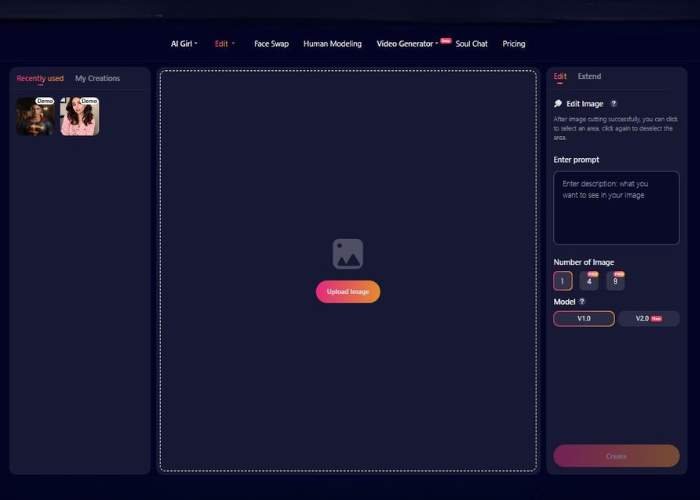
I decided to test the Soulgen image generator for a while. Below is a complete, start-to-finish walkthrough of the interface of Soulgen, with every control explained and practical tips for great results.
1) Upload Image

- Where: Big gradient button labeled “Upload Image.”
- What it does: Loads a base photo for AI editing or extension.
- How to use: Click Upload Image and choose a file (common formats like JPG/PNG typically work).
- Tips
- Pick the clearest, highest-resolution version you have (avoids blurry outputs).
- Crop away irrelevant parts before uploading if you only care about a subject.
2) Choose Mode: Edit or Extend

You’ll see two tabs at the top-left: Edit (active by default) and Extend.
- A) Edit
- Label: “Edit Image” with a small ? help icon.
- Hint shown: “After image cutting successfully, you can click to select an area, click again to deselect the area.”
- What it means:
The app first “preps/cuts” your image so it understands regions.- Click any region to select it for modification.
- Click again on the same region to deselect it.
- You can toggle multiple regions to build a complex selection.
- Use cases: Remove/replace backgrounds, change clothing, swap objects, adjust skies, etc.
- Pro tip: Select only what should change; leave everything else unselected for better fidelity.
- B) Extend
- What it does (outpainting): Expands your canvas beyond the current borders and lets the AI invent new content that blends with the original (e.g., widen a landscape, add headroom, create a wider scene).
- Use cases: Social crops, cinematic wide shots, adding missing limbs/edges, room “reveal” shots.
- Pro tip: Extend in smaller steps (e.g., 10–20% per side) for cleaner, more coherent fills.
3) Enter Prompt (Describe the result)

- Where: The large box labeled “Enter prompt — what you want to see in your image.”
- What to write: A clear, visual description of the change or the extended scene.
- Prompt formula that works well:
- Subject + specific details + style + lighting/mood + quality cues
- Edit examples:
- “Replace the selected shirt with a black leather jacket, realistic texture, soft studio lighting, natural shadows.”
- “Fill selected sky with dramatic sunset clouds, warm golden hour light, realistic color grading.”
- Extend examples:
- “Extend canvas to the right into a cozy café interior with wooden tables and bokeh lights, realistic, evening mood.”
- “Continue the beach shoreline with gentle waves, footprints in wet sand, pastel sunrise.”
- Tips
- Be concrete (“red ceramic mug”) rather than vague (“nice cup”).
- Mention what to keep consistent when relevant: colors, perspective, era, weather, etc.
4) Output Settings: Number of Images & Model

You’ll see two groups of options:
- A) Number of Image
- 1 — Generate a single result.
- 4 (PRO) — Generate four variations.
- 9 (PRO) — Generate nine variations.
If you don’t have PRO, choose 1. More variations = better odds of a perfect match.
- B) Model
- V1.0 — Legacy/baseline model (often faster/more predictable for simple edits).
- V2.0 (New) — Newer model (typically better detail and coherence for complex tasks).
If unsure, start with V2.0; fall back to V1.0 if you prefer its look or speed.
Generate
- After choosing the Number of Image and Model, click the app’s Generate/Create button (wording may vary) to produce results.
Reviewing & Iterating
- Compare variants: If you generated multiple, pick the closest match.
- Iterate quickly:
- Refine the prompt (add 3–6 precise words).
- Adjust selection (tighten/loosen the region in Edit).
- Switch model or re-roll once for new randomness.
- Export: Use the app’s Download/Save control to export your final image (usually in PNG/JPG).
Pro Tips for Best Results
- One change at a time: Complex, multi-step edits are cleaner than one mega-prompt.
- Edges matter: When editing, avoid razor-thin selections that slice through hair/fur; select a slightly larger, natural boundary.
- Lighting consistency: Mention the light direction/mood so additions match the base photo.
- Perspective & scale: If adding objects, state size and placement (“on the table, small ceramic bowl, front-left”).
- Version A/B: Keep a copy of your original upload so you can compare and revert fast.
How It Plays Out
| Feature | What It Means in Practice |
| Inpaint Editing | Select areas to modify—remove clothing, tweak pose, or change background. |
| NSFW Mode (Opt-In) | You get a warning and must agree to proceed before explicit edits happen. |
| Text Prompt Flexibility | Describe what you want—pose, lighting, style—and the AI tries to match. |
| Anime & Realistic Styles | Work with both stylized anime girls and lifelike portraits. |
| Edit, Extend & Swap | Outpatient to stretch scenes, face-swap, fine-tune details. |
| Limited Free Gen | One free creation a day, watermark included; Pro plan opens the doors. |
The Feels Behind the Interface
Tried a quiet scene: she’s lounging in daylight. I tapped her outfit, asked for a more daring pose. AI wobbled a bit—thigh-highs turned thigh-mid, shadow skewed—but that stumble felt human, like the tool is just discovering your fantasy with you. It nudges the vibe forward, occasionally belly-flops, but when she finally looks right—it thrills.
Some users note it’s pricey if you get serious—graphics professionals or folks refining every detail might wince at subscription costs.
And others say certain features (like NSFW) sometimes vanish or glitch. Yet for those of us who love the tactile thrill of edition-meets-surprise, that rawness is gold.
Who Should Give This a Shot?
| You’re… | Why You’ll Probably Click With It |
| Tinkering Artists | Controls are flexible—prompt, paint, resubmit. Keeps feedback loops alive. |
| Fantasy Weavers | Anime or photoreal, you shape the fantasy; the AI fills in the gaps. |
| Privacy-Minded Creators | NSFW requires consent. You control when and how the switch flips. |
| Budget-Conscious Explorers | One-day trial is enough to taste it. Go Pro when you’re hooked. |
My Take (Extra Honest Edition)
Found myself leaning into it more than expected—prompting “dim room, soft focus, lingerie,” then mocking its quirks. That wobble, that slight misfire, was fun.
It’s not sterile; it’s interactive, even a bit vulnerable. Prices and glitches aside, I’d nudge someone to give that free try. If your whim synchronicity clicks, you’ll find yourself back two cups of coffee later, shaping shadows and fantasies.