What happens when still images aren’t enough, and you want motion, realism, and a touch of the forbidden? That’s where the promise of FreeGF AI’s Unfiltered Video Generation comes in.
Unlike mainstream AI platforms that choke the second you type anything remotely risqué, this one tries to hand you the creative keys with fewer “sorry, can’t do that” pop-ups.
It’s pitched less as a sterile tech demo and more as a playground for adults who want their fantasies brought to life in moving form.
Think short clips, looping animations, or entire NSFW scenarios, generated from prompts that would be flat-out blocked elsewhere.
FreeGF AI Video Generator — Detailed User Guide
This guide walks you through the whole process of video generation with FreeGF and gives you practical tips for getting clean, natural motion from still images.
Before you start
- Supported uploads: JPEG, PNG, WebP, HEIC up to 15 MB.
- Best inputs: high-resolution images with the subject centered, face unobstructed, and a pose that matches how you want the animation to move.
- Credits: The Generate Video button shows it costs 15 credits per render. Make sure you’re signed in and have enough balance.
- Ethics & rights: Only animate images you own or have permission to use.
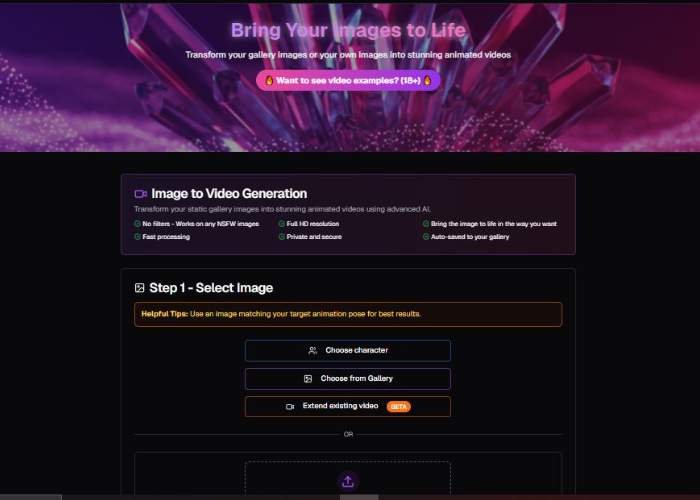
Step 1 — Select Image

What you see
- Helpful Tips (banner): “Use an image matching your target animation pose for best results.”
Why it matters: If you want a walking loop, pick an image where the subject already looks mid-stride; if you want a head-turn, choose a front or ¾ view. - Choose character: Opens a library of pre-made characters/avatars you can animate without uploading. Great for quick tests or when you don’t have an image.
- Choose from Gallery: Picks from a built-in gallery (stock/reference images). Use this when you need inspiration or want to see ideal input composition.
- Extend existing video (BETA): Continues or adds to a previous clip instead of starting from scratch. Use this to append motion to an earlier render.
- Drop image or click (upload zone): Drag a file in, or click to browse. You’ll see supported formats and the 15 MB limit under the box.
Pro tips for Step 1
- Match pose to motion: The closer your still image pose is to your intended animation, the fewer artifacts you’ll see in limbs, hair, and clothing.
- Keep edges clean: Avoid images where the head, hands, or feet are cropped off the frame.
- Reduce busy backgrounds: Plain or softly blurred backgrounds help the model focus on your subject.
- Avoid heavy filters/watermarks: Over-processed images can introduce jitter or flicker.
Step 2 — Customize Video (Optional, but powerful)

Controls & what they do
- Prompt text box (0/500 chars):
Describe how you want the subjects in the image to move. The placeholder suggests covering action, expression, lighting, environment, and camera work. If you leave it blank, the tool uses a default animation. - Add Special Elements (NEW):
Adds optional embellishments/effects/props to your scene. Use sparingly so they don’t overpower the subject’s motion. - Sample Prompts:
Opens ready-made prompts. Insert one as a starting point, then tweak verbs, mood, and camera moves to fit your image. - Prompt Writing Guide:
A help link for structure and examples. Useful if you’re new to motion prompting. - Enable prompt optimization (checkbox):
When enabled, the system refines your text to improve visual quality and motion consistency.
When to turn ON: You want reliable results and minimal artifacts.
When to try OFF: You need the model to follow quirky, highly specific instructions verbatim. - Video Duration — Short / Long:
Choose how long the output should be. Short is ideal for previews, loops, or social stories; Long gives you more room for cinematic camera moves and extended gestures (rendering usually takes longer).
How to write strong motion prompts
Use who + action + expression + camera + environment + lighting + pacing. Keep verbs clear and physical.
Prompt templates you can copy:
- “Upper-body idle loop; subtle breathing; gentle smile; eyes blink; soft studio lighting; shallow depth of field; slow push-in camera.”
- “Smooth walking cycle toward camera; relaxed arms; hair sway; sunny street background; handheld camera feel; natural daylight.”
- “Head turn left→right; slight eyebrow raise; confident grin; rim-light from behind; slow pan left; cinematic look.”
- “Waving hand greeting; cheerful expression; warm indoor ambience; tripod-steady shot; soft key light; medium pace.”
- “Pose shift from neutral to power stance; determined look; dramatic side light; light wind effect; slow orbit camera.”
Do / Don’t
- Do: Be specific with actions (“head nod twice”, “slow step forward”, “hand wave”).
- Do: Specify camera (“slow push-in”, “pan left”, “orbit 30°”).
- Do: Guide lighting (“soft daylight”, “warm key, cool rim”).
- Don’t: Overload with conflicting moves (“run and sit and jump”).
- Don’t: Over-specify tiny timings in one sentence—split ideas with commas.
Step 3 — Generate Video

What you see
- Generate Video (15 credits) — a single large button.
What happens
- Click Generate Video to start rendering. Your credits are deducted and the job is queued.
- When the render finishes, preview the result. If your platform supports it, you can typically save/download from the result screen (naming and export options vary by plan).
Iteration workflow (recommended)
- If the motion is too subtle, add verbs that imply stronger body movement (“exaggerated arm swing”, “brisk pace”) or switch Short → Long.
- If the motion looks unnatural, return to Step 1 and pick an image with a pose closer to the action you described.
- If the face warps or flickers, simplify your prompt, enable prompt optimization, and use a clearer, higher-res portrait.
Troubleshooting & FAQs
Upload fails or stalls
- Check format (JPEG/PNG/WebP/HEIC) and <15 MB size.
- Re-export at 2000–3000 px on the long side to balance clarity and size.
The animation doesn’t follow my instructions
- Turn prompt optimization OFF for very specific or stylized instructions, or break your request into shorter, clearer phrases.
- Reduce competing commands (e.g., don’t ask for “static tripod” and “handheld wobble” together).
Jittery background or edges
- Use images with simpler backgrounds and good contrast between subject and background.
- Avoid heavy grain/noise. Clean photos track better.
When should I use “Extend existing video (BETA)”?
- When you already like a clip and want a little more tail or a follow-up movement without starting from zero.
Do I have to write a prompt?
- No. Leaving the box empty applies a default, general animation. Prompts simply let you steer action, mood, and camera.
Quick Checklist for Great Results
- Pick the right image: High-res, clear face/hands, and a pose that fits your motion goal.
- Write a focused prompt: One main action + expression + camera + lighting.
- Enable optimization first: It often improves realism; disable only if you need strict, unusual behavior.
- Choose duration wisely: Short for loops/previews, Long for cinematic moves.
- Generate, review, iterate: Small prompt tweaks beat giant rewrites.
Features That Stand Out
| Feature | What It Means | My Take |
| Explicit prompts allowed | You can describe sexual, taboo, or fetish-based scenarios in detail | The main draw—it feels freeing compared to censored platforms |
| Video over image | Brings fantasies to life with movement, expressions, body language | The realism jump here is huge, though it’s not flawless |
| Custom styles | Realistic, anime, artistic, experimental | Great for niche tastes—you don’t just get “generic porn” visuals |
| Fast rendering | Short clips generated quickly | Makes experimentation addictive—you’ll want to tweak prompts non-stop |
The Experience
The first thing you notice isn’t perfection—it’s possibility. Sometimes the output nails it: fluid movement, expressive faces, a scene that feels uncanny in the best way.
Other times, you get the AI equivalent of a blooper reel: characters phasing through walls, physics that don’t obey gravity, or, yes, the occasional cursed limb.
But here’s the kicker—those imperfections don’t ruin it. They make the process oddly entertaining.
You tweak, retry, laugh at the fails, and celebrate when it hits gold. There’s a strange intimacy in shaping raw ideas into a clip that feels like it was made just for you.
Step into FreeGF AI Uncensored Video Generation
Why It’s Worth Trying
For someone who’s ever hit the filter wall on other AI tools, this feels like finally being let into the VIP section. It’s not about mass-produced content; it’s about your prompt, your fantasy, rendered in a way no mainstream site would dare host.
It won’t be Hollywood-level cinema—let’s be real. But it doesn’t need to be. It’s about freedom and fun. And honestly? That’s refreshing.
My Tips Before You Dive In
- Keep prompts short at first. Too much detail can confuse the AI.
- Save clips right away; don’t trust history logs to always be there.
- Test different styles—realistic might impress, but anime or fantasy can be way smoother.
- Treat it like play, not production. The joy’s in experimenting.