• About Us
  • Disclaimer
  • Contact Us
  • Privacy Policy
Saturday, April 11, 2026
mGrowTech
No Result
View All Result
  • Technology And Software
    • Account Based Marketing
    • Channel Marketing
    • Marketing Automation
      • Al, Analytics and Automation
      • Ad Management
  • Digital Marketing
    • Social Media Management
    • Google Marketing
  • Direct Marketing
    • Brand Management
    • Marketing Attribution and Consulting
  • Mobile Marketing
  • Event Management
  • PR Solutions
  • Technology And Software
    • Account Based Marketing
    • Channel Marketing
    • Marketing Automation
      • Al, Analytics and Automation
      • Ad Management
  • Digital Marketing
    • Social Media Management
    • Google Marketing
  • Direct Marketing
    • Brand Management
    • Marketing Attribution and Consulting
  • Mobile Marketing
  • Event Management
  • PR Solutions
No Result
View All Result
mGrowTech
No Result
View All Result
Home Google Marketing

Tips for using Google DeepMind’s Lyria 3

Josh by Josh
February 23, 2026
in Google Marketing
0
Tips for using Google DeepMind’s Lyria 3


1. Begin with text

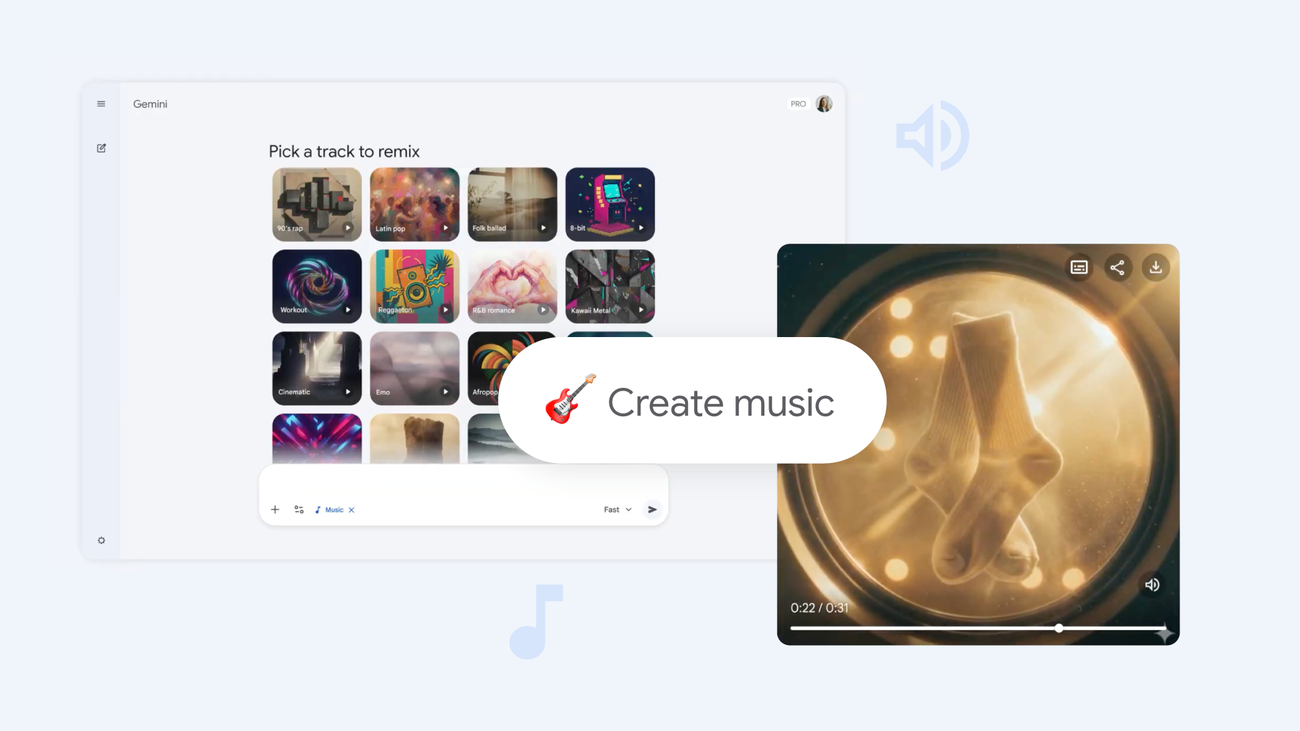
You can write a prompt to create unique tracks with lyrics or instrumentals, like: “Create a track about my favorite meal my mom used to make. It was made of rice, plantains and beans. Use an Afrobeats vibe and the singer should sound West African.” Or turn any moment, topic or inside joke into tracks. For example: “Create a 90’s skate punk rock track to tell my roommate Ryan to wash the dishes; high energy, fast drums.”

2. Upload an image or video

With Lyria, you can also upload a visual as inspiration. Try holiday snaps, photos of your dog or even your own artwork. Depending on who or what’s in the image or video, what they’re wearing, what’s in the background and so on, Lyria will generate a musical match.

3. Define the genre and era

If you don’t know where to begin, start with something basic. Lyria can cover plenty of genres and eras, like ‘90s hip-hop or 2000s pop. You can even blend different genres within one song. Do you want a catchy K-pop tune with a Motown edge? Or should you merge classical violins into a funk track? It’s up to you.

4. Add details like instruments, song dynamics and vocals

If you start with a genre and era like “1950s jazz,” your track will likely feature saxophones and trumpets. But you can add other instruments, like an ‘80s synth, to round out your sound. If you don’t specify instruments, Lyria will automatically choose instruments to suit the genre. You can also determine how music flows between sections. Maybe a quiet piano builds into an explosive chorus; perhaps there’s a purely instrumental section. Lyria can generate vocals, too: You can specify whether the vocalist is male or female, whether they’re a baritone or soprano — or maybe you have a full choir. Try adding vocal descriptions, like rich, gravelly, soulful or breathy. Or see how you can layer different vocal styles together. Maybe the vocals get calmer and quieter as the track progresses, or split into harmonies.

5. Write your own lyrics — or ask Lyria to handle it

Share your own lyrics by using the code “Lyrics:” before the lines you’d like to hear (since tracks are 30 seconds, try keeping your lyrics short and sweet!). If you want background singers to echo the main vocals, add that in parentheses, like this: “Lyrics: Let’s go (go).” Or if you want Lyria 3 to generate lyrics for you, choose a clear theme with your prompt. You might want “a love song” or “a song about success.” Or perhaps you want to write a “new happy birthday song” for your best friend.

6. Share your tracks

You can easily share whatever you create with Lyria 3: Just download your track as an MP3 or MP4, then share it to social media sites or send via text. It’s sure to bring a new element to the group chat — try it today.


Source_link

READ ALSO

6 study tips for college students using Gemini

YouTube Premium is getting pricier

Related Posts

6 study tips for college students using Gemini
Google Marketing

6 study tips for college students using Gemini

April 10, 2026
YouTube Premium is getting pricier
Google Marketing

YouTube Premium is getting pricier

April 10, 2026
Generate 3D models and interactive charts with the Gemini app
Google Marketing

Generate 3D models and interactive charts with the Gemini app

April 10, 2026
Use Google Search AI Mode to book restaurants in the UK
Google Marketing

Use Google Search AI Mode to book restaurants in the UK

April 10, 2026
Google’s Gemini AI can answer your questions with 3D models and simulations
Google Marketing

Google’s Gemini AI can answer your questions with 3D models and simulations

April 10, 2026
Fitbit personal health coach Public Preview expands to more countries
Google Marketing

Fitbit personal health coach Public Preview expands to more countries

April 9, 2026
Next Post
I Evaluated G2 Reviews for 11 Free Floor Plan Software

I Evaluated G2 Reviews for 11 Free Floor Plan Software

POPULAR NEWS

Trump ends trade talks with Canada over a digital services tax

Trump ends trade talks with Canada over a digital services tax

June 28, 2025
Communication Effectiveness Skills For Business Leaders

Communication Effectiveness Skills For Business Leaders

June 10, 2025
15 Trending Songs on TikTok in 2025 (+ How to Use Them)

15 Trending Songs on TikTok in 2025 (+ How to Use Them)

June 18, 2025
App Development Cost in Singapore: Pricing Breakdown & Insights

App Development Cost in Singapore: Pricing Breakdown & Insights

June 22, 2025
Comparing the Top 7 Large Language Models LLMs/Systems for Coding in 2025

Comparing the Top 7 Large Language Models LLMs/Systems for Coding in 2025

November 4, 2025

EDITOR'S PICK

Reducing Event Check-In Time by 80% Using Eventdex’s Pre-Printed Event Badge Printing

Reducing Event Check-In Time by 80% Using Eventdex’s Pre-Printed Event Badge Printing

September 16, 2025
Gemini Embedding now generally available in the Gemini API

Gemini Embedding now generally available in the Gemini API

July 14, 2025
Black Friday: A Ritual In Brand Damage

Black Friday: A Ritual In Brand Damage

November 19, 2025
How to Combine Facebook Ads With Google Ads

How to Combine Facebook Ads With Google Ads

June 11, 2025

About

We bring you the best Premium WordPress Themes that perfect for news, magazine, personal blog, etc. Check our landing page for details.

Follow us

Categories

  • Account Based Marketing
  • Ad Management
  • Al, Analytics and Automation
  • Brand Management
  • Channel Marketing
  • Digital Marketing
  • Direct Marketing
  • Event Management
  • Google Marketing
  • Marketing Attribution and Consulting
  • Marketing Automation
  • Mobile Marketing
  • PR Solutions
  • Social Media Management
  • Technology And Software
  • Uncategorized

Recent Posts

  • How to Create an Effective SEO Report in 2025 (+ Free Template)
  • Why Customers Stop Buying (Even When the Economy Looks Fine)
  • Superhuman Uses SXSW to Launch its Rebrand and AI Philosophy
  • 6 study tips for college students using Gemini
  • About Us
  • Disclaimer
  • Contact Us
  • Privacy Policy
No Result
View All Result
  • Technology And Software
    • Account Based Marketing
    • Channel Marketing
    • Marketing Automation
      • Al, Analytics and Automation
      • Ad Management
  • Digital Marketing
    • Social Media Management
    • Google Marketing
  • Direct Marketing
    • Brand Management
    • Marketing Attribution and Consulting
  • Mobile Marketing
  • Event Management
  • PR Solutions