🔥 New: You can now automatically email shoppers when products they have viewed drop in price, so you can recover more revenue earlier in the funnel without complex automation setup.
Most ecommerce automations kick in late, after someone adds an item to cart or completes a purchase. But in reality, the biggest revenue leak often happens before that.
Think about the shoppers who:
- view the same product a few times
- compare prices across stores
- wait for the right moment
- then disappear without ever adding anything to cart
They are not cold traffic. They are high-intent browsers who need one final nudge. And for many of them, that nudge is simple: the price drops.
That is why we built Price Drop Campaigns, a new ecommerce campaign type in GetResponse that automatically sends price drop alerts to shoppers who have already shown clear interest in a product. No extra apps. No custom events. No complicated workflows.
Just set your rules (for example, “price drops by 10%” and “viewed at least 2 times”), publish the campaign, and we will handle the rest, including safeguards that bundle product alerts into a single email so customers are not flooded with messages.
This feature is available on the Marketer plan and above for customers using our native ecommerce integrations, including Shopify, WooCommerce, Magento, PrestaShop, and IdoSell.
1. What are Price Drop Campaigns?
Price Drop Campaigns are automated ecommerce campaign that automatically email shoppers when a product they showed strong interest in drops in price.
In practice, it works like this:
- A shopper visits your store and views a product a certain number of times (and optionally spends a minimum amount of time on the product page).
- Later, you reduce the product’s price in your store.
- GetResponse detects the price drop and automatically sends a price drop email to the shoppers who meet your criteria.
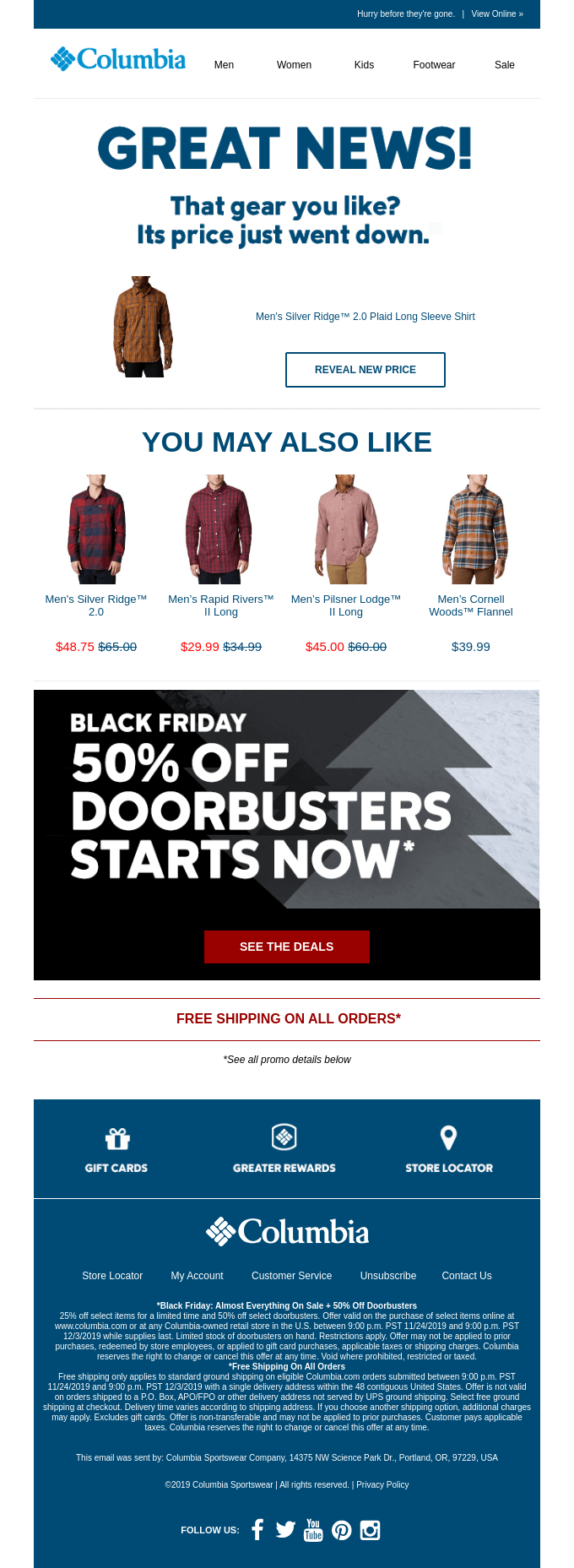
The goal is simple: convince the unconvinced. These are shoppers who were already close to buying, but did not take the final step. Many of them are waiting for a better deal, especially for products with longer consideration cycles like furniture or electronics.
Price Drop Campaigns are designed to be fast to launch and easy to manage. You set the rules once, publish the campaign, and it runs automatically across your store, with performance tracked through conversion and attributed revenue reporting.

2. Why Price Drop Campaigns matter
If you run an online store, you already know the painful part is not getting traffic. It is watching interested shoppers browse and leave without buying.
For a long time, many ecommerce automation setups focused on the final stages of the funnel. What happens after someone buys, or what happens when someone adds an item to cart but abandons it.
But there is another, often bigger drop off point earlier in the journey.
In most stores, the drop-off is brutal:
- around 43% of shoppers view products
- only around 14% add to cart
- and only about 1.5 to 2.5% convert
Price Drop is built to target the biggest missed revenue pool: shoppers who showed clear interest but never added to cart.
These are the shoppers who:
- return to the same product page multiple times
- compare options and prices across stores
- hesitate because the purchase feels expensive or requires more thought
- leave without adding anything to cart
This group is a major pool of lost revenue, and until now it has been hard to target them without extra apps, custom event tracking, or complex automation work.
Price Drop Campaigns close that gap by triggering the message at the most meaningful moment: when interest is already there and the price finally becomes attractive.
That is why price drop alerts can have such a strong impact:
- Boost engagement and conversions by reaching high-intent browsers when they are most likely to act
- Reduce abandonment for longer consideration purchases where people wait days or weeks before deciding
- Strengthen loyalty by sending only relevant messages tied to what a shopper actually viewed, not generic promotions
- Recover revenue with minimal effort because the campaign is automated, native, and quick to launch
Stop Losing Revenue from High-Intent Browsers
Price Drop Campaigns help you convert window shoppers into paying customers by automatically alerting them when the products they love become more affordable.
3. How Price Drop Campaigns work
Price Drop Campaigns are built around one idea: notify shoppers only when there is clear intent and a clear reason to come back.
1. A shopper shows interest
A shopper qualifies based on their behavior on your store, for example:
- They previously provided consent to receive marketing messages
- they viewed a product at least a set number of times
- optionally, they spent at least a set amount of time on the product page
- optionally, they have not purchased within a defined number of days
This lets you focus on high-intent browsers, not accidental visits.
Important detail: if you use the “viewed for at least X seconds” condition, it applies to each qualifying visit. In other words, it is not enough that the shopper stayed longer once. Each view needs to meet the time threshold.
2. The price drops
When the product price drops by your chosen threshold (for example 10%), the campaign is triggered.
At launch, the campaign reacts to standard price changes made in the store. Promo price support is planned for a later stage.
3. The right shoppers get the alert
GetResponse then checks which contacts match the conditions and sends them the notification.
A few safeguards are built in:
- Emails are buffered to avoid sending multiple messages during rapid price updates
- Notifications are consolidated so shoppers do not get a separate email for every product change
- Each email includes up to 5 products, ordered by most recently visited
Also, shoppers will not be alerted about a product they already purchased. This helps avoid negative experiences where someone feels they paid too much.
4. You measure results
You can track conversion rate and attributed revenue for the campaign, both in dedicated reports and from your dashboard, so you can see how much revenue the campaign is recovering.
4. Use cases: Where Price Drop Campaigns make the biggest impact
Price Drop Campaigns are especially useful in scenarios where interest is strong, but the decision takes time or depends on price.
1. Convert price-sensitive browsers
Some shoppers do not add products to cart because they are waiting for a discount. They might view the same product multiple times, check alternatives, and leave.
A price drop alert reaches them at the exact moment their hesitation disappears. The message is tied to a specific product they already cared about, so it feels relevant instead of promotional noise.
2. Re-engage long consideration purchases
For higher-ticket items like electronics or furniture, the buying cycle can take days or weeks. Shoppers often pause to compare offers across different stores and wait for the right deal.
Price Drop Campaigns work well here because they support those longer journeys. When the price finally drops, the shopper gets a timely reminder and a reason to revisit.
3. Clear seasonal or aging inventory without broad promotions
Sometimes you want to move specific products without running a store-wide sale or blasting your entire list.
Price Drop Campaigns let you target only the shoppers who already viewed those items. This is ideal for seasonal stock, slow-moving SKUs, or end-of-line products where a controlled discount can unlock revenue.
4. Build a full recovery engine when combined with Abandoned Cart
Price Drop Campaigns and Abandoned Cart campaigns solve different problems.
- Price Drop focuses on shoppers who browse with intent but never reach the cart
- Abandoned Cart focuses on shoppers who added items but did not complete checkout
Together, Price Drop and Abandoned Cart create a full-funnel recovery engine:
- Price Drop recovers high-intent browsers before they ever reach the cart
- Abandoned Cart recovers shoppers who leave during checkout
This means you cover both major drop-off points, with minimal setup.
5. Who Price Drop is best for, and why it works so well
Price Drop is a strong fit if you:
- discount products or update prices regularly
- sell products with longer consideration cycles (electronics, furniture, fashion)
- run seasonal promos or frequent price changes
- want ROI without complex automation or dev work
It may not be ideal if your store never discounts or rarely changes prices, or if you do not run an ecommerce business.
There are plenty of ways to send price alerts, but most of them come with tradeoffs. Extra apps. Complex configuration. Custom event tracking. Or workflows that take hours to build and maintain.
Price Drop Campaigns are designed to remove that overhead.
1. Native setup with minimal complexity
Price Drop Campaigns work as a built-in GetResponse ecommerce campaign type. That means:
- no third-party apps required
- no custom events to configure
- no middleware or additional tools needed
You connect your store and launch the campaign with a few settings. The campaign then runs globally across your store.
2. Fast time to value
Instead of building a complicated automation flow, you set a small number of clear rules, publish, and start collecting results.
This is important for teams who want a reliable revenue recovery tactic without needing technical resources or advanced marketing automation skills.
Launch Your First Price Drop Campaign in Minutes
No complex setup, no third-party apps. Connect your store and start recovering revenue from high-intent browsers today with GetResponse’s native ecommerce automation.
3. Personal by behavior, not generic personalization
A price drop email is personal because it is triggered by what the shopper actually did. It is based on real browsing behavior and real product interest.
This is different from generic broadcasts that rely on basic fields like name or location. The relevance comes from intent.
4. Built for control, trust, and compliance
Price Drop Campaigns also include mechanisms that help the message feel useful instead of spammy:
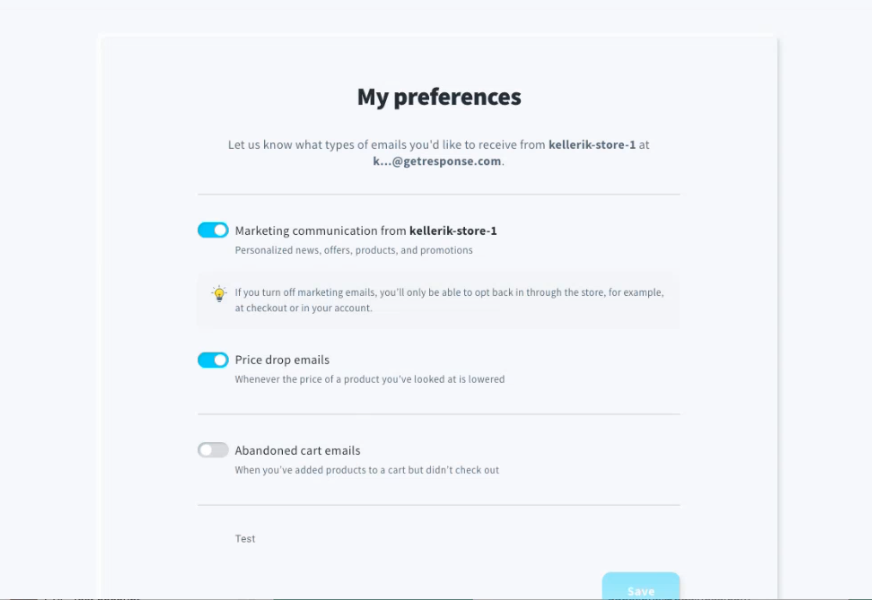
- recipients can manage price alert preferences in the preference center without fully unsubscribing
- shoppers are only targeted if they have marketing consent
- the campaign is designed to send consolidated messages rather than a flood of separate alerts
5. Measurable results tied to revenue
You can track conversion rate and attributed revenue from Price Drop Campaigns, so the value is not just engagement. You can see the business impact.
6. How to set up a Price Drop Campaign
Getting started is intentionally simple. If your store is connected through a native ecommerce integration, you can launch your first Price Drop Campaign in just a few steps.
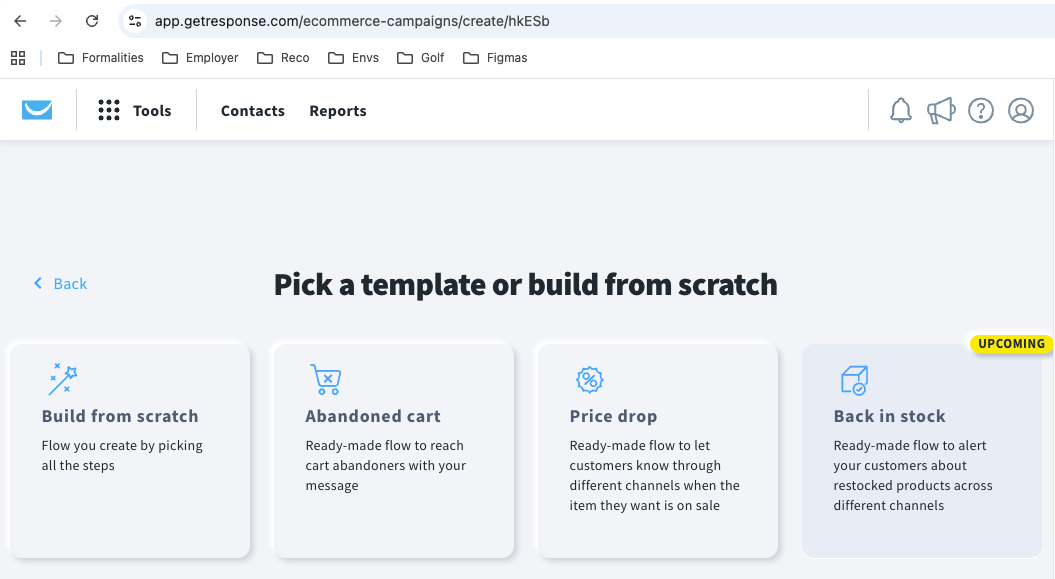
1. Create the campaign
Go to Campaigns, then open ecommerce campaigns, and select Price Drop to start.
2. Set your price drop threshold
Define the minimum percentage price drop that will trigger the alert, for example 10%.
This gives you control over how aggressive the campaign is. A lower threshold triggers more often, while a higher threshold keeps alerts reserved for bigger price changes.
3. Define the audience rules
Target shoppers based on their browsing behavior, such as:
- how many times they viewed the product
- optional conditions like time spent viewing the product page
- optional rules like not purchasing within a specified time window
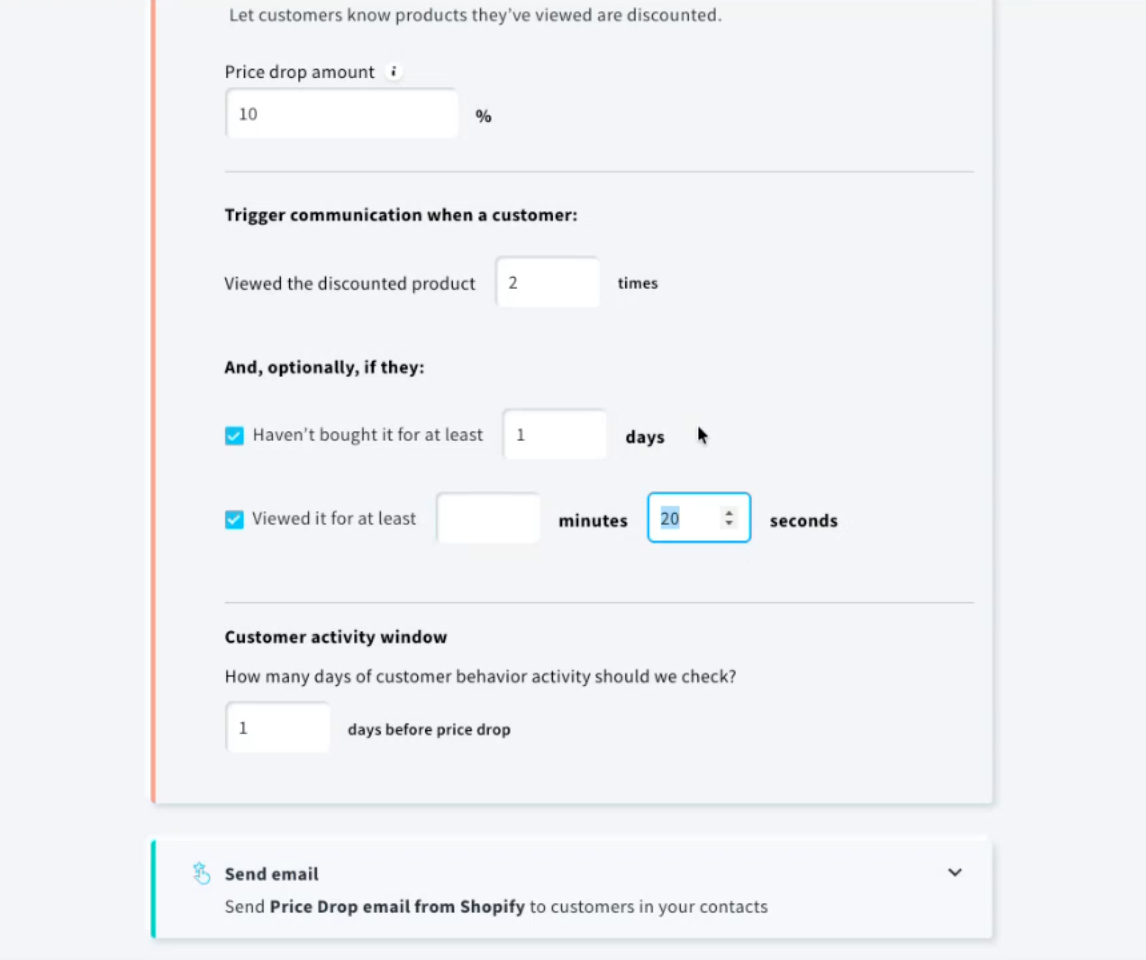
These settings help you focus on clear intent rather than casual browsing.
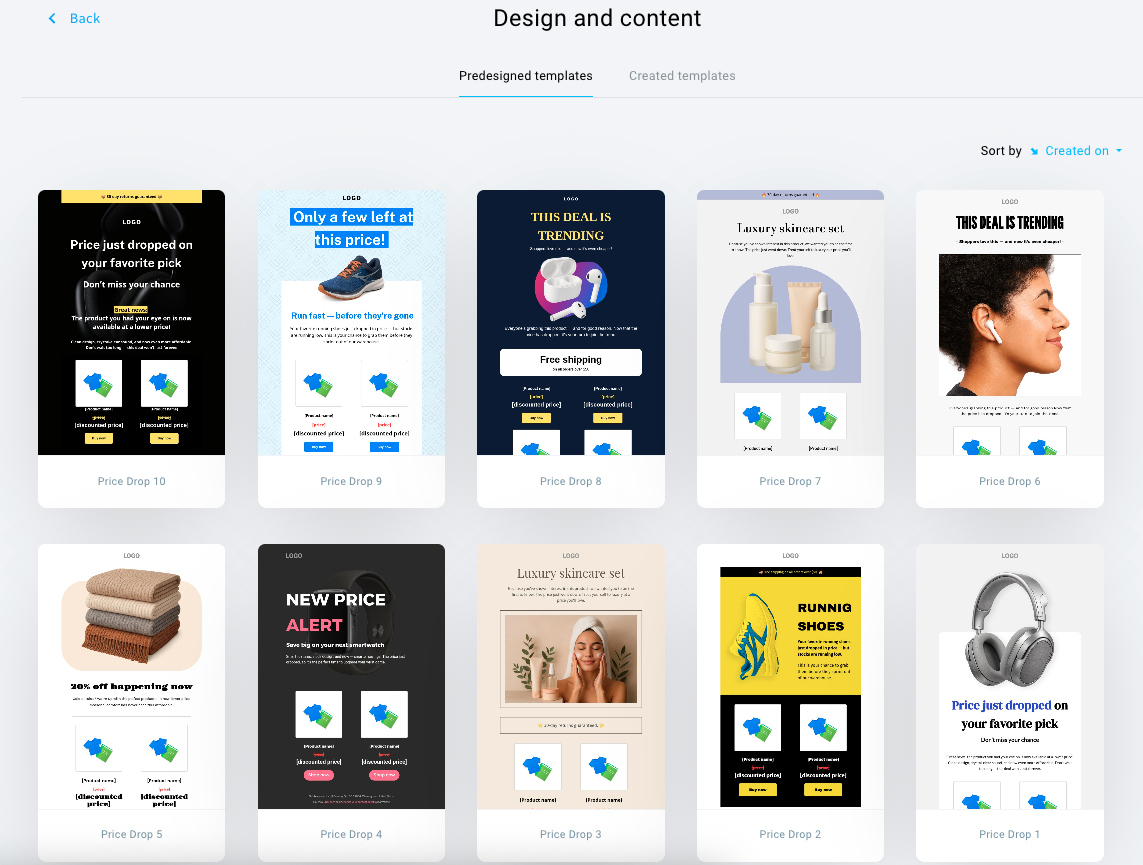
4. Choose a template and customize your message
Pick a ready-made template and edit the content to match your brand voice and design.
The key is to keep the message focused on the value: the shopper is receiving an alert because a product they viewed is now cheaper.
5. Publish and let it run
Once published, the campaign works globally across your store. You configure it once and it automatically checks for qualifying price drops and shopper activity.
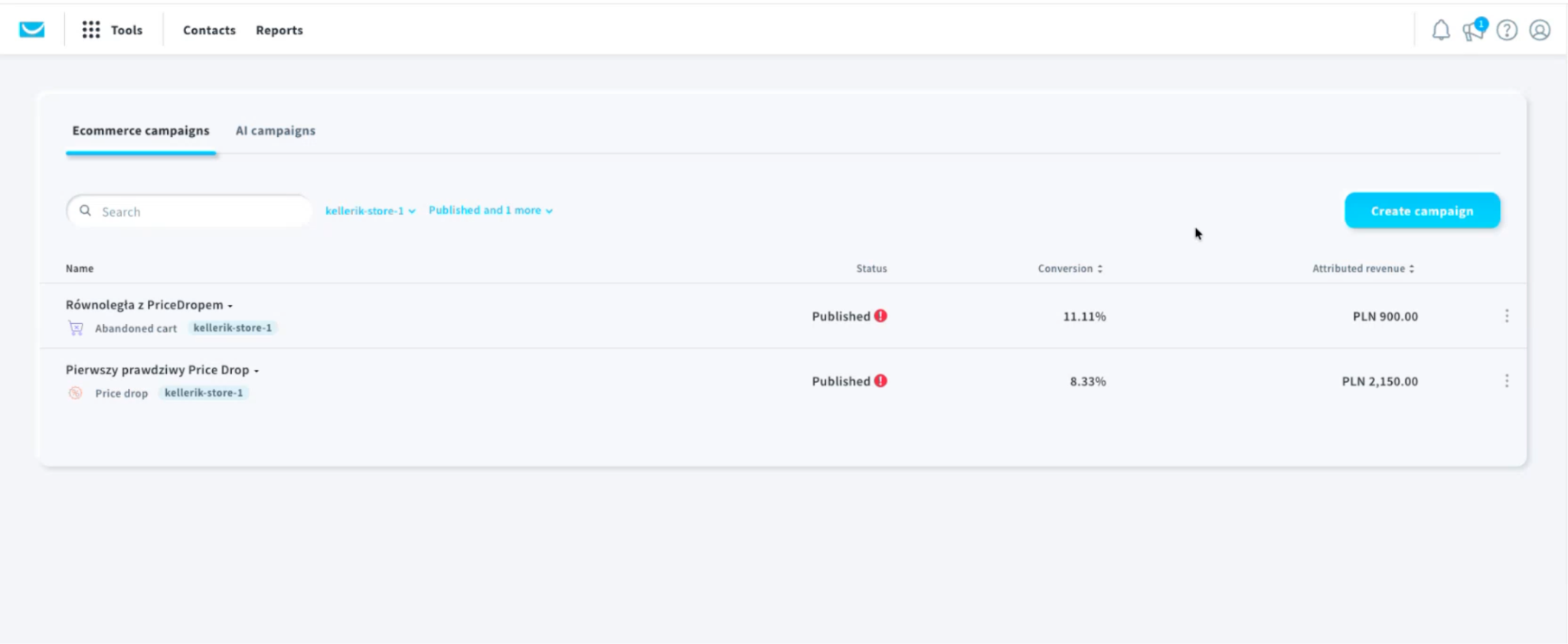
6. Monitor results
Track conversion rate and attributed revenue in the campaign reporting and on your dashboard, so you can see the impact and optimize your settings over time.
7. Availability and supported integrations
Price Drop Campaigns are available to all paid GetResponse customers who use our native ecommerce integrations.
This feature works with the major store platforms we support, including:
- Shopify
- WooCommerce
- Magento
- PrestaShop
- IdoSell
If your store is already connected, you can create a Price Drop Campaign right away. If not, start by setting up your integration first, and then you will see Price Drop as an option inside ecommerce campaigns.
Complete your ecommerce recovery engine
Price Drop Campaigns help you recover revenue at a stage most stores cannot reach with traditional automation. They let you re-engage shoppers who are clearly interested, but not yet ready to buy, and bring them back at the exact moment the offer becomes compelling.
Used on its own, Price Drop is a powerful way to convert high-intent browsing into sales. Combined with Abandoned Cart campaigns and post-purchase automation, it becomes part of a broader recovery engine that supports the full customer journey, from first product interest to completed checkout and beyond.
If you are already using GetResponse for ecommerce, this is one of the simplest upgrades you can make to drive more conversions with the traffic you already have.
Ready to Recover Lost Revenue Automatically?
Connect your store, go to Campaigns, open ecommerce campaigns, and launch your first Price Drop Campaign. Start turning window shoppers into paying customers today.