In recent times, many developments in the agent ecosystem have focused on enabling AI agents to interact with external tools and access domain-specific knowledge more effectively. Two common approaches that have emerged are skills and MCPs. While they may appear similar at first, they differ in how they are set up, how they execute tasks, and the audience they are designed for. In this article, we’ll explore what each approach offers and examine their key differences.
Model Context Protocol (MCP)
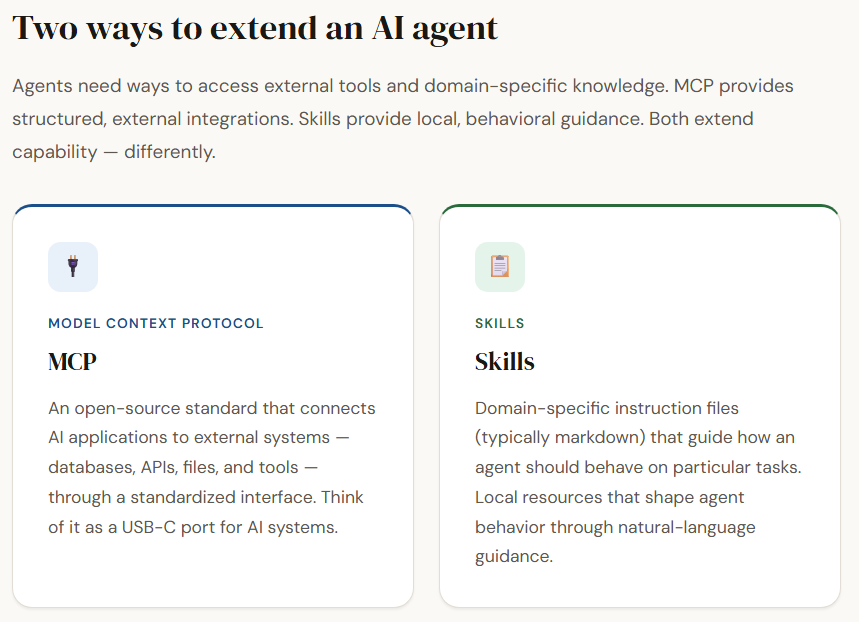
Model Context Protocol (MCP) is an open-source standard that allows AI applications to connect with external systems such as databases, local files, APIs, or specialized tools. It extends the capabilities of large language models by exposing tools, resources (structured context like documents or files), and prompts that the model can use during reasoning. In simple terms, MCP acts like a standardized interface—similar to how a USB-C port connects devices—making it easier for AI systems like ChatGPT or Claude to interact with external data and services.
Although MCP servers are not extremely difficult to set up, they are primarily designed for developers who are comfortable with concepts such as authentication, transports, and command-line interfaces. Once configured, MCP enables highly predictable and structured interactions. Each tool typically performs a specific task and returns a deterministic result given the same input, making MCP reliable for precise operations such as web scraping, database queries, or API calls.
Typical MCP Flow
User Query → AI Agent → Calls MCP Tool → MCP Server Executes Logic → Returns Structured Response → Agent Uses Result to Answer the User
Limitations of MCP
While MCP provides a powerful way for agents to interact with external systems, it also introduces several limitations in the context of AI agent workflows. One key challenge is tool scalability and discovery. As the number of MCP tools increases, the agent must rely on tool names and descriptions to identify the correct one, while also adhering to each tool’s specific input schema.
This can make tool selection harder and has led to the development of solutions like MCP gateways or discovery layers to help agents navigate large tool ecosystems. Additionally, if tools are poorly designed, they may return excessively large responses, which can clutter the agent’s context window and reduce reasoning efficiency.
Another important limitation is latency and operational overhead. Since MCP tools typically involve network calls to external services, every invocation introduces additional delay compared to local operations. This can slow down multi-step agent workflows where several tools need to be called sequentially.
Furthermore, MCP interactions require structured server setups and session-based communication, which adds complexity to deployment and maintenance. While these trade-offs are often acceptable when accessing external data or services, they can become inefficient for tasks that could otherwise be handled locally within the agent.
Skills
Skills are domain-specific instructions that guide how an AI agent should behave when handling particular tasks. Unlike MCP tools, which rely on external services, skills are typically local resources—often written in markdown files—that contain structured instructions, references, and sometimes code snippets.
When a user request matches the description of a skill, the agent loads the relevant instructions into its context and follows them while solving the task. In this way, skills act as a behavioral layer, shaping how the agent approaches specific problems using natural-language guidance rather than external tool calls.
A key advantage of skills is their simplicity and flexibility. They require minimal setup, can be customized easily with natural language, and are stored locally in directories rather than external servers. Agents usually load only the name and description of each skill at startup, and when a request matches a skill, the full instructions are brought into the context and executed. This approach keeps the agent efficient while still allowing access to detailed task-specific guidance when needed.
Typical Skills Workflow
User Query → AI Agent → Matches Relevant Skill → Loads Skill Instructions into Context → Executes Task Following Instructions → Returns Response to the User
Skills Directory Structure
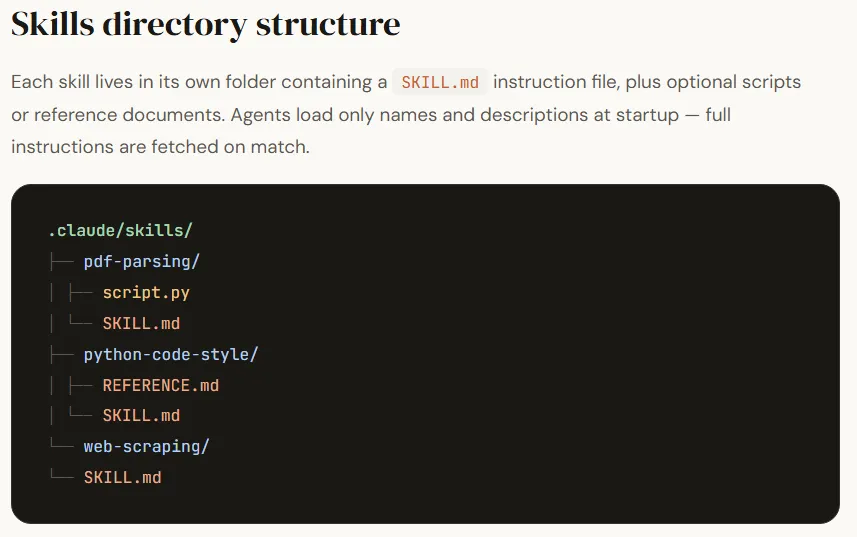
A typical skills directory structure organizes each skill into its own folder, making it easy for the agent to discover and activate them when needed. Each folder usually contains a main instruction file along with optional scripts or reference documents that support the task.
| .claude/skills ├── pdf-parsing │ ├── script.py │ └── SKILL.md ├── python-code-style │ ├── REFERENCE.md │ └── SKILL.md └── web-scraping └── SKILL.md |
In this structure, every skill contains a SKILL.md file, which is the main instruction document that tells the agent how to perform a specific task. The file usually includes metadata such as the skill name and description, followed by step-by-step instructions the agent should follow when the skill is activated. Additional files like scripts (script.py) or reference documents (REFERENCE.md) can also be included to provide code utilities or extended guidance.
Limitations of Skills
While skills offer flexibility and easy customization, they also introduce certain limitations when used in AI agent workflows. The main challenge comes from the fact that skills are written in natural language instructions rather than deterministic code.
This means the agent must interpret how to execute the instructions, which can sometimes lead to misinterpretations, inconsistent execution, or hallucinations. Even if the same skill is triggered multiple times, the outcome may vary depending on how the LLM reasons through the instructions.
Another limitation is that skills place a greater reasoning burden on the agent. The agent must not only decide which skill to use and when, but also determine how to execute the instructions inside the skill. This increases the chances of failure if the instructions are ambiguous or the task requires precise execution.
Additionally, since skills rely on context injection, loading multiple or complex skills can consume valuable context space and affect performance in longer conversations. As a result, while skills are highly flexible for guiding behavior, they may be less reliable than structured tools when tasks require consistent, deterministic execution.
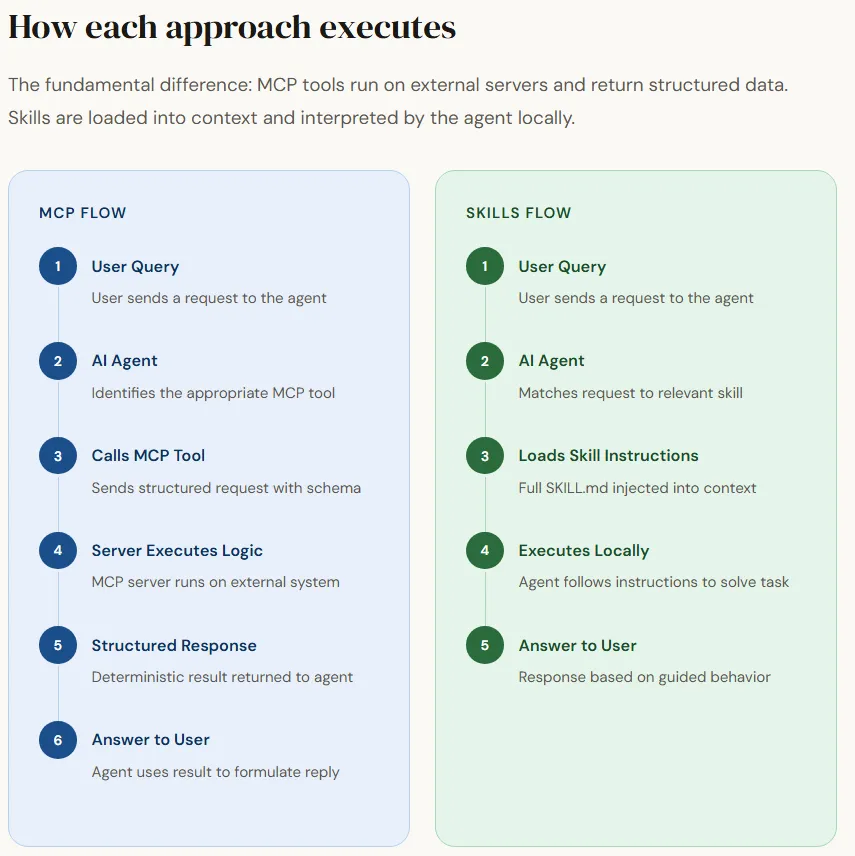
Both approaches offer ways to extend an AI agent’s capabilities, but they differ in how they provide information and execute tasks. One approach relies on structured tool interfaces, where the agent accesses external systems through well-defined inputs and outputs. This makes execution more predictable and ensures that information is retrieved from a central, continuously updated source, which is particularly useful when the underlying knowledge or APIs change frequently. However, this approach often requires more technical setup and introduces network latency since the agent needs to communicate with external services.
The other approach focuses on locally defined behavioral instructions that guide how the agent should handle certain tasks. These instructions are lightweight, easy to create, and can be customized quickly without complex infrastructure. Because they run locally, they avoid network overhead and are simple to maintain in small setups. However, since they rely on natural-language guidance rather than structured execution, they can sometimes be interpreted differently by the agent, leading to less consistent results.
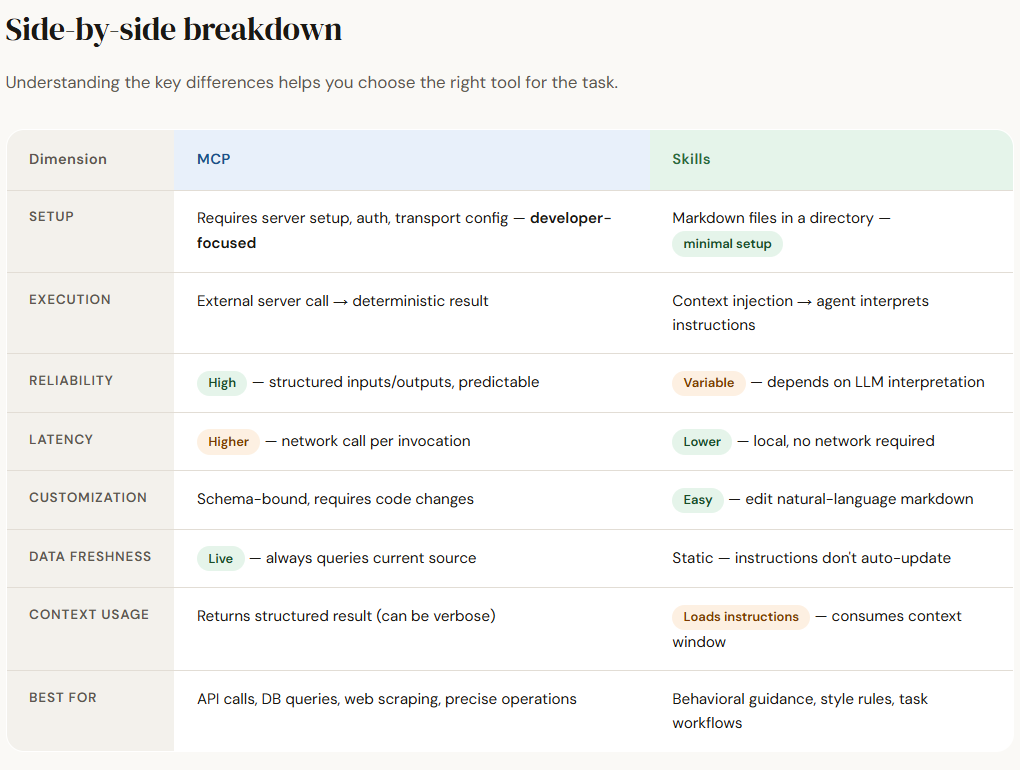
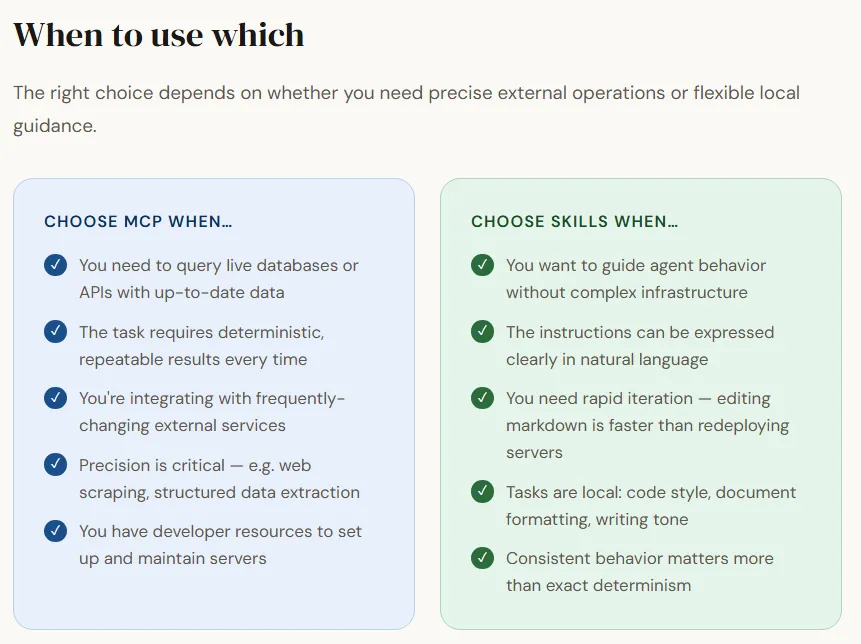
Ultimately, the choice between the two depends largely on the use case—whether the agent needs precise, externally sourced operations or flexible behavioral guidance defined locally.

I am a Civil Engineering Graduate (2022) from Jamia Millia Islamia, New Delhi, and I have a keen interest in Data Science, especially Neural Networks and their application in various areas.