Meta Advertiser Field Notes
Weekly observations from inside Meta ads
A handful of smaller updates this week focused on cost, control, and the ways Meta continues to guide advertiser behavior. None require a full deep dive, but they’re all worth paying attention to.
- Meta announces location fees
- Advertisers pushed to schedule budget increases
- Describe your audience with AI
- New audience restriction flow
- Breakdown by attribution limitations
Let’s get to it…
1. Meta Announces Location Fees
Advertisers running ads in certain European countries were greeted with an unpleasant surprise on Tuesday. Meta announced location fees, “due to the evolving regulatory landscape, including but not limited to digital services tax legislation.”
Here’s Meta’s explanation:
When your ad is delivered to an audience in a jurisdiction with location-specific fees, such as a digital service tax (DST), a location fee will be added to your bill. This fee is separate from your campaign budget and will appear as a distinct line item on your invoice or transaction statement.
So, these are fees that Meta had previously absorbed, but now they’re passing them on to advertisers. And that fee will be itemized, rather than baked into your overall costs.
Fees are based on the location of the user receiving the ad impression, not the location of the business or advertiser. And fees will only apply to impressions hitting users in specific countries.
Location fees will apply in the following locations:
- Austria: 5%
- France: 3%
- Italy: 3%
- Spain: 3%
- Türkiye: 5%
- United Kingdom: 2%
If you spend $100 on ads to Austria, your total bill will be $105 ($100 + 5% location fee). Not a huge difference, but no one wants to give away money, especially as advertising in Europe gets increasingly difficult.
Users in Europe can already opt into less-personalized ads, which likely makes advertising less effective in the region. And now advertisers will need to spend more to get those results.
While there may be multiple reasons for this move, it could put consumer pressure on the regulatory commissions that are ultimately the source of those fees. Or at least, Meta likely hopes that advertisers see it that way.
2. Meta Wants Me to Schedule a Budget Increase
When I create a campaign with a $100 daily budget, I get this message…

It reads:
Schedule a budget increase and take advantage of higher opportunity for similar costs
Our model has identified 5 days with higher opportunity. Increasing your budget to $130.00 may help you achieve additional results at a better cost per result.
That’s interesting enough. So apparently Meta has determined that I can get better results by taking advantage of opportunities that are higher than normal on five days of the week.
When I hover over the tooltip, I get additional details…

In short, this is a high opportunity period, and Meta’s models think I can get a lower cost per result if I take advantage of it.
If I click the button to increase budget, Meta completes the schedule for me.

Meta fills out the schedule to increase my daily budget by $30 from March 14 through March 18. These are apparently my “high opportunity” days. I’m not sure why the increases are scheduled from 12:30 am to 11:30 pm, but I guess that’s what the models want.
For the record, it doesn’t matter what I set my original budget at. Meta is going to detect high opportunities to increase my budget. For fun, I tried a $1,000 daily budget. I bet you can guess what happened next…

I’m not sure what to make of this. It would be helpful if Meta provided more details about what the models are seeing. Otherwise, this feels like a transparent money grab.
3. Detailed Targeting AI Recommendations

While I don’t seem to have this in any accounts, I’ve seen a few advertisers share it now. It’s not clear if it’s a test or the start of a rollout.
If you have it, you’ll see a “Describe your audience” option under detailed targeting. Here’s how it works…
1. Using natural language, describe the audience you’re hoping to reach in under 2,000 characters.
2. Meta will automatically interpret that text and suggest interests and behaviors that match your suggested audience.
3. Keep the suggested audiences or remove them manually.
This is one of those options that would be a whole lot more interesting several years ago, back when our detailed targeting inputs meant more. But they are only suggestions when using 11 of the most popular performance goals (there’s no indication that this would change that).
But this does simplify and automate what can otherwise be a bumbling exercise of trial and error. Again, assuming you actually provide detailed targeting inputs these days, it’s helpful. Especially when using a performance goal where you can restrict by detailed targeting.
Personally, I find it odd that we’re seeing this at all given the direction we’re heading with algorithmic targeting. Does it mean that such suggestions could have more impact than Meta’s been letting on? Otherwise, Meta’s been doing all it can to de-emphasize audience suggestions.
But again, we don’t know whether this is simply a test or an actual rollout at this point. Stay tuned.
4. New Audience Restriction Flow
Some ad accounts are seeing this message after clicking the link to “further limit the reach of my ads.”

This is messaging that Meta has played with a lot over the years. They’ll display various warnings and even highlight stats to suggest that restricting your audience will hurt results. But this is different.
In addition to the seemingly ridiculous options of sticking with the current setting or restricting your audience and increasing costs, Meta provides one more option: Apply value rules with Advantage+ on.
I’ve been pushing value rules pretty hard the past several months, but I’ve been disappointed that Meta hasn’t done more to explain why they’re useful. This is actually a really good start.
While some advertisers surely restrict their audience when it’s unnecessary, there is another segment where there’s a clear problem to be solved. This is often due to low-priced, low-quality optimized actions.
For example, I’ve often talked about how Meta will spend a high percentage of my budget on people aged 65 and up when optimizing for a lead or registration. The reason for this is simple: Meta can get very cheap leads that way, and my goal is to get as many leads as possible.
But quality matters, too, and that demographic does not get me high-quality leads. In the past, I’d restrict my audience by age group. But value rules are a better solution.
With the help of value rules, you can increase or decrease your bid for a specific demographic. In my case, I lowered the bid on people aged 65 and up.
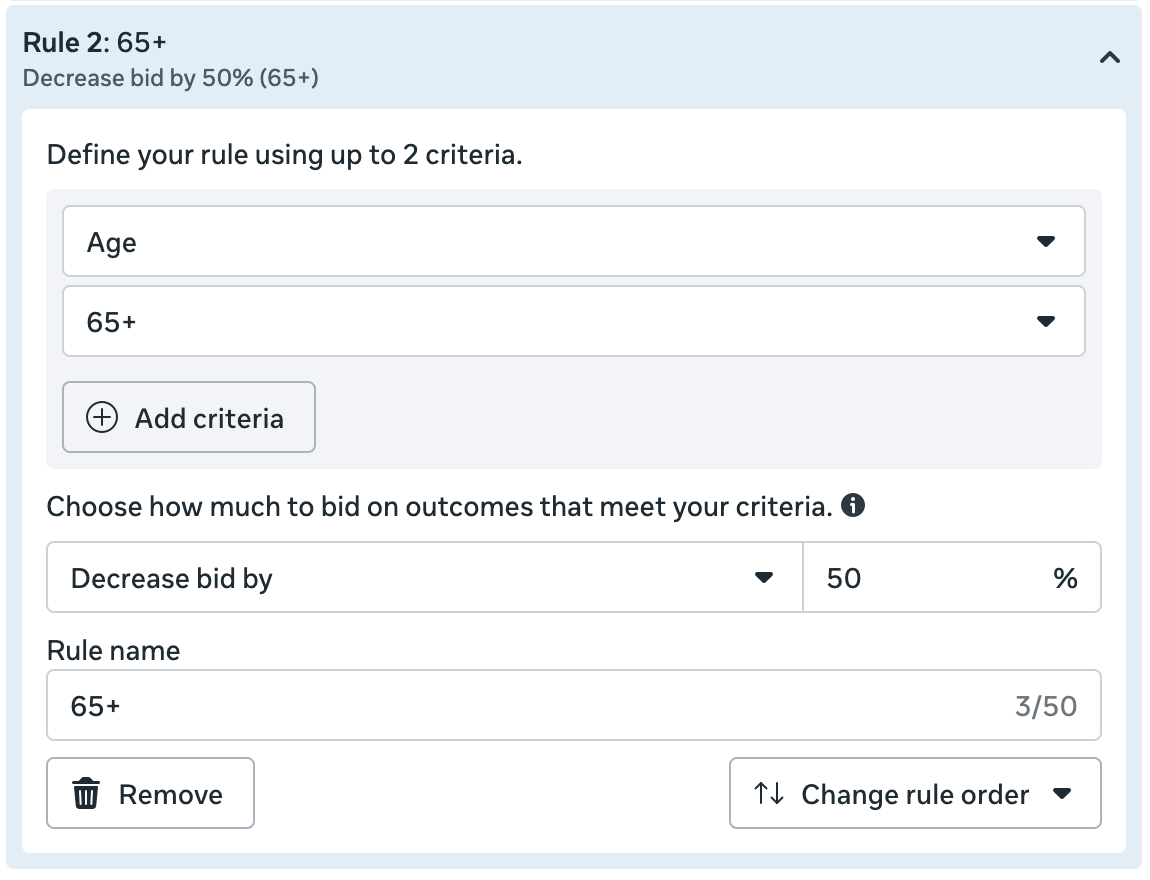
I’m glad that Meta is making this a clearer option here. You should rarely need to restrict by age or gender. If there’s a problem to be solved, Meta wants you to know that you can keep Advantage+ on and use a value rule to fix it instead.
5. Breakdown by Attribution Limitations
I’m a big fan of Meta’s new breakdown by attribution (setting and count) because it lets advertisers get a clear view of how their results are distributed.

It’s great for your optimized conversion event that is the focus of the Results column.

But it’s not so great for any other conversion event.

Why isn’t this data available when using breakdown by attribution? We know it exists because it appears when using the Compare Attribution Settings feature.

Maybe it was an oversight. Maybe it’s a bug. Or maybe we’re seeing the early version of this breakdown while they work out the details.
Whatever the reason, I hope that these breakdowns will be built out further to be even more helpful.
More to Come
I’ll keep sharing observations like this every week, as long as Meta keeps rolling out things that are interesting, confusing, or both.
The post Meta Announces Location Fees (Plus 4 Updates) appeared first on Jon Loomer Digital.