Meta Advertiser Field Notes
Weekly observations from inside Meta ads
A handful of attribution updates, a short Ads Manager outage, rumors about monthly invoicing, and a few observations about how Meta is leaning further into creative diversification. None of these require a full deep dive, but each one says something about where things are heading.
- Will Remarketing Take the Biggest Hit?
- How to Approach Engage-Through
- Breakdown by Attribution is Back
- Tuesday Outage
- Related Media Observations
- What is Monthly Invoicing?
Let’s get to it…
1. Will Remarketing Take the Biggest Hit?
Ever since Meta announced changes to attribution, I’ve been thinking about how this could impact results. There’s one strategy I keep coming back to as the most likely to see a substantive drop in results: Remarketing.
First, let’s summarize the changes…
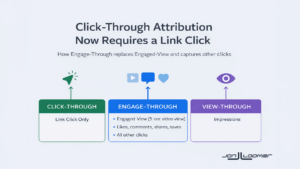
Click-through attribution now requires a click on a link.
The previous definition of click-through attribution required any click on your ad prior to converting. The change eliminated situations where the only clicks were social (like/reaction, comment, share, save) or other non-link clicks.
Engage-through attribution replaces engaged-view.
The clicks that moved out of click-through attribution moved into the new engage-through attribution, which also includes engaged-view actions (someone watched at least 5 seconds of a video prior to converting).
But this means that some previously reported conversions will disappear. While all types of clicks that were previously included under click-through attribution are now covered in engage-through, there’s a major caveat: The window has changed from 7 days to 1 day. This means that conversions that happened within 2-7 days following an engage-through action will no longer be counted.
What percentage of total conversions will be lost? It’s impossible to say. I assume the impact will be minimal, if not inconsequential, for most advertisers. But there’s a reason I think advertisers stuck on remarketing strategies will see the biggest change.
Let’s consider the most likely scenario where these kinds of conversions would happen…
- Person sees your ad and likes, comments, shares, or saves it
- They do not click the link, CTA, or thumbnail image to go to your website
- They get a marketing message from you on another channel
- 2-7 days after the initial ad was clicked, they convert
The scenario above is very similar to what we would normally consider a view-through conversion. In both cases, they didn’t click through to your website, but they ended up going back to your website later — usually driven by another channel. But the biggest difference here is that the social clicks were previously given 7 days to convert, not 1.
I often talk about the misleading results of remarketing, particularly related to Cost Per Result and ROAS. Those results tend to look far different when you remove the view-through conversions.
But we may not have considered the potentially bigger source of fluff results. These are essentially view-through conversions that were given a 7-day limit.
Of course, some level of remarketing happens naturally, so it’s entirely possible that all advertisers will see some impact from this. But if your entire strategy is built around remarketing because of the results, they’re likely to look less impressive soon. And the view-through conversions might not save you.
2. How to Approach Engage-Through
Because of this change, you’re likely to see far more results from engage-through attribution than you ever did from engaged-view. That assumes, of course, that you turn it on in the ad set.
This change will officially go into effect in March, and I don’t have it yet. But the default attribution setting will be 7-day click, 1-day engage-through (currently engaged-view), and 1-day view.
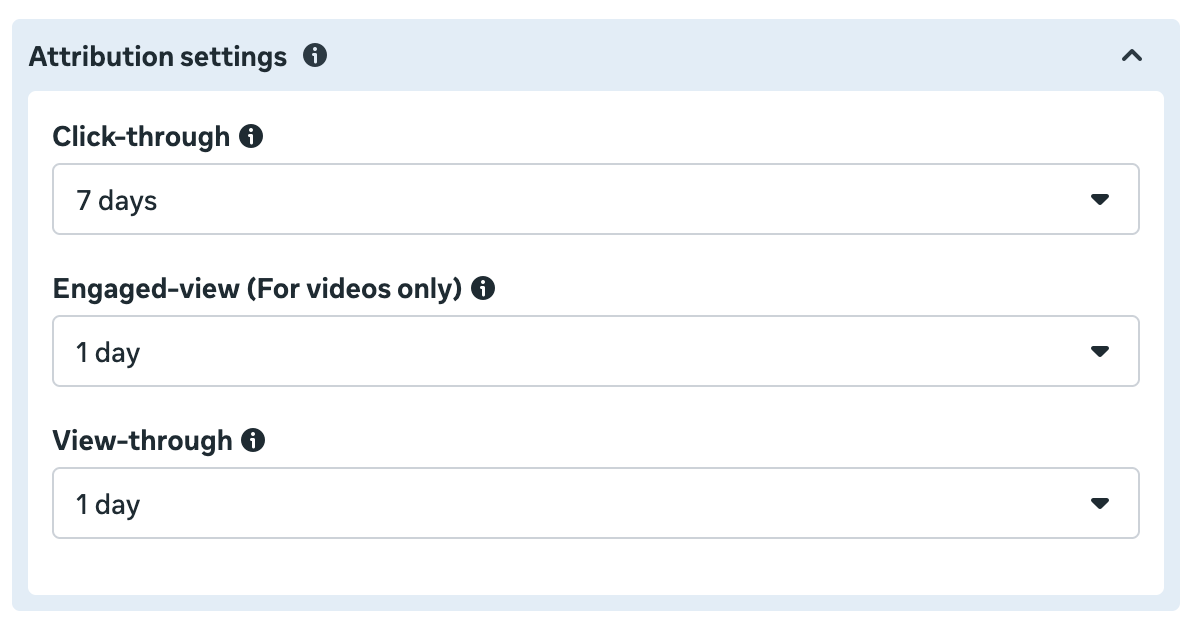
But there are reasons to consider changing from the default, and those changes certainly involve the new engage-through attribution setting.
If your goal event is a purchase, stick with the default 7-day click, 1-day engage-through, and 1-day view in most cases. View-through and engage-through conversions make sense when it requires a financial commitment. Someone may need to think about it longer or discuss with a partner. Then they’ll either Google the product or go directly to the website to convert.
But if you’re giving something away for free, this behavior makes much less sense. If it’s a lead magnet of any kind where you offer something of value in exchange for an email address, the behavior should be straightforward. If the ad inspires them to act, they’ll click the ad, go to the website, and complete the form. There are fewer reasons for deliberation.
So in those cases, I recommend using 1-day click only. You could conceivably use 7-day click, especially for a lead that may be to discuss a financial commitment. But I’d want Meta to focus on the clicks — and for my results to reflect that type of conversion.
Remarketing, of course, is where both engage-through and view-through could make up a very large percentage of your results. If you are showing ads to someone who also gets emails from you, a high number of view-through conversions would be natural. They may not have even seen the ad when it was displayed, and then they acted on an email that day.
A similar behavior can be true of the new engage-through conversion. You reach someone who receives emails from you, but they definitely see the ad. They may not even put much thought into what you’re promoting, but they like it to show support. But it didn’t inspire an action. Then they act on an email later.
As mentioned earlier, you should see fewer of these than before because of the 1-day window, but they’ll now stand out since they’re separated from clicks. And because of that, this type of fluff conversion will be easier to spot.
You want to eliminate those fluff conversions when Meta can lean heavily into them to get you results. If you at least limit conversions to click-through where they require a click on a link, the results should be more realistic.
Of course, I still think you should stop remarketing entirely, but you do you.
3. Breakdown by Attribution is Back
In a relevant development, the Breakdown by Attribution feature is back (at least for me). I had it long enough to write about it more than a month ago, but then it disappeared. It strangely reappeared while I was writing about Meta’s changes to attribution.

The most useful element of this breakdown given the latest changes will be to see how many of our reported conversions come from engage-through (when the change officially rolls out). This breakdown allows you to generate rows to see how conversions break out by each attribution type.
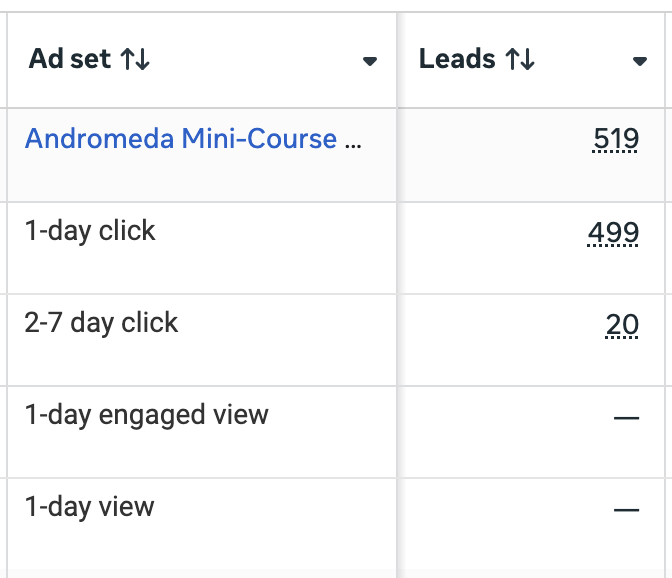
That assumes, of course, that you use the default attribution setting. Unlike the Compare Attribution Settings feature, which can uncover conversions that weren’t reported by default, this breakdown will only segment results based on your attribution settings.
Come back to this feature once the attribution changes are complete. I’ll be especially interested in breaking down remarketing results.
4. Tuesday Outage
I hope you weren’t wanting to create any new ads on Tuesday because it was an absolute blood bath. I obsessively check Ads Manager throughout the day, and I noticed everything was down around mid-afternoon. When that happens, I know my next step: Check metastatus.com.
Yep, there was a known outage. “High disruptions” impacting Ads Manager.
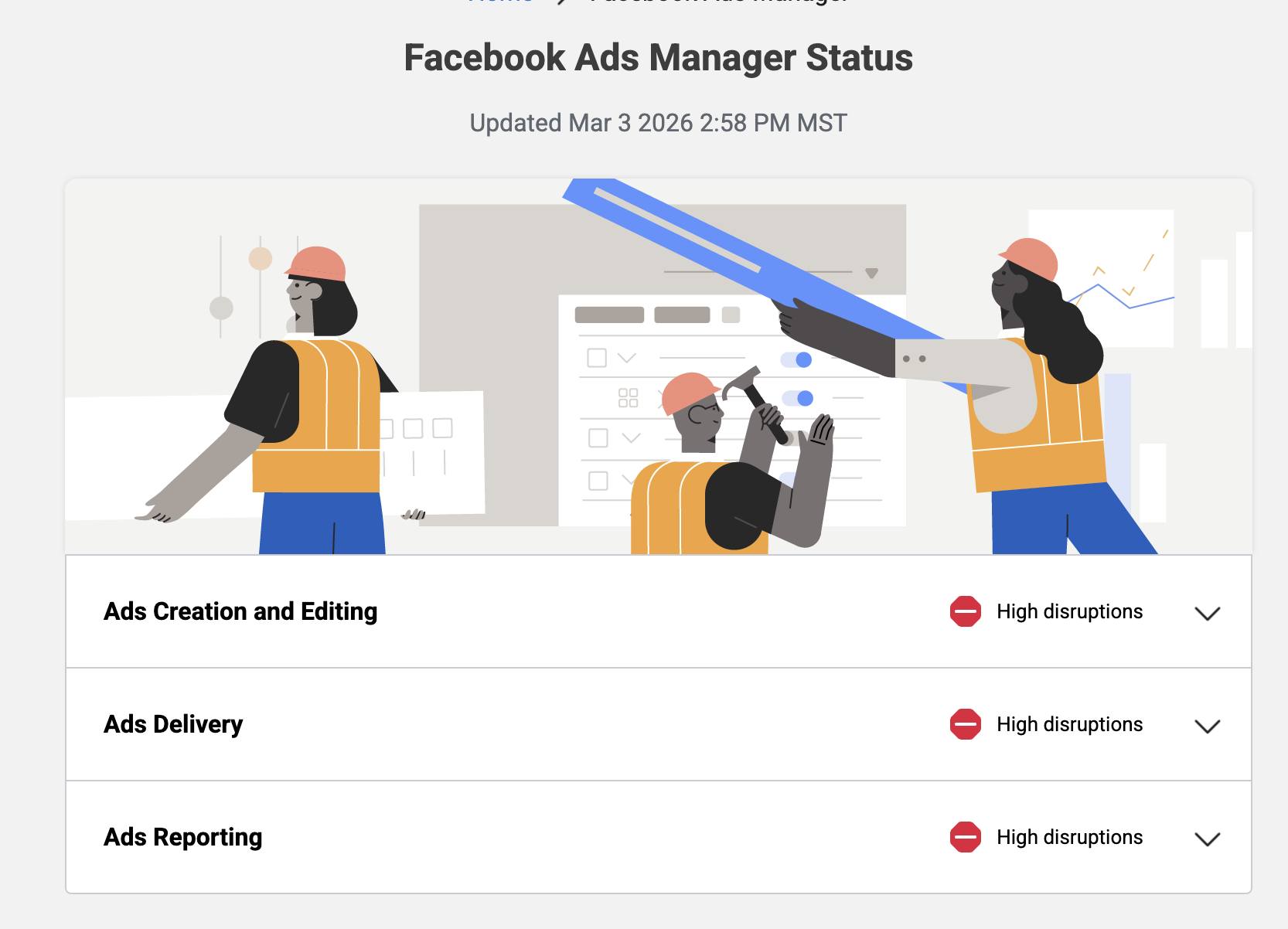
These high disruptions lasted a couple of hours, and then there were a couple of moderate blips after. But it wasn’t pretty.
It’s a good time to remind you that if something like this happens to you, use Metastatus to see if there’s a widespread problem. You can save a lot of headaches if you’re at least able to verify that it’s nothing on your end.
5. Related Media Observations
When you create an ad, Meta will recommend adding Related Media. This is creative that Meta detects you’ve used in other ads to promote the same thing.
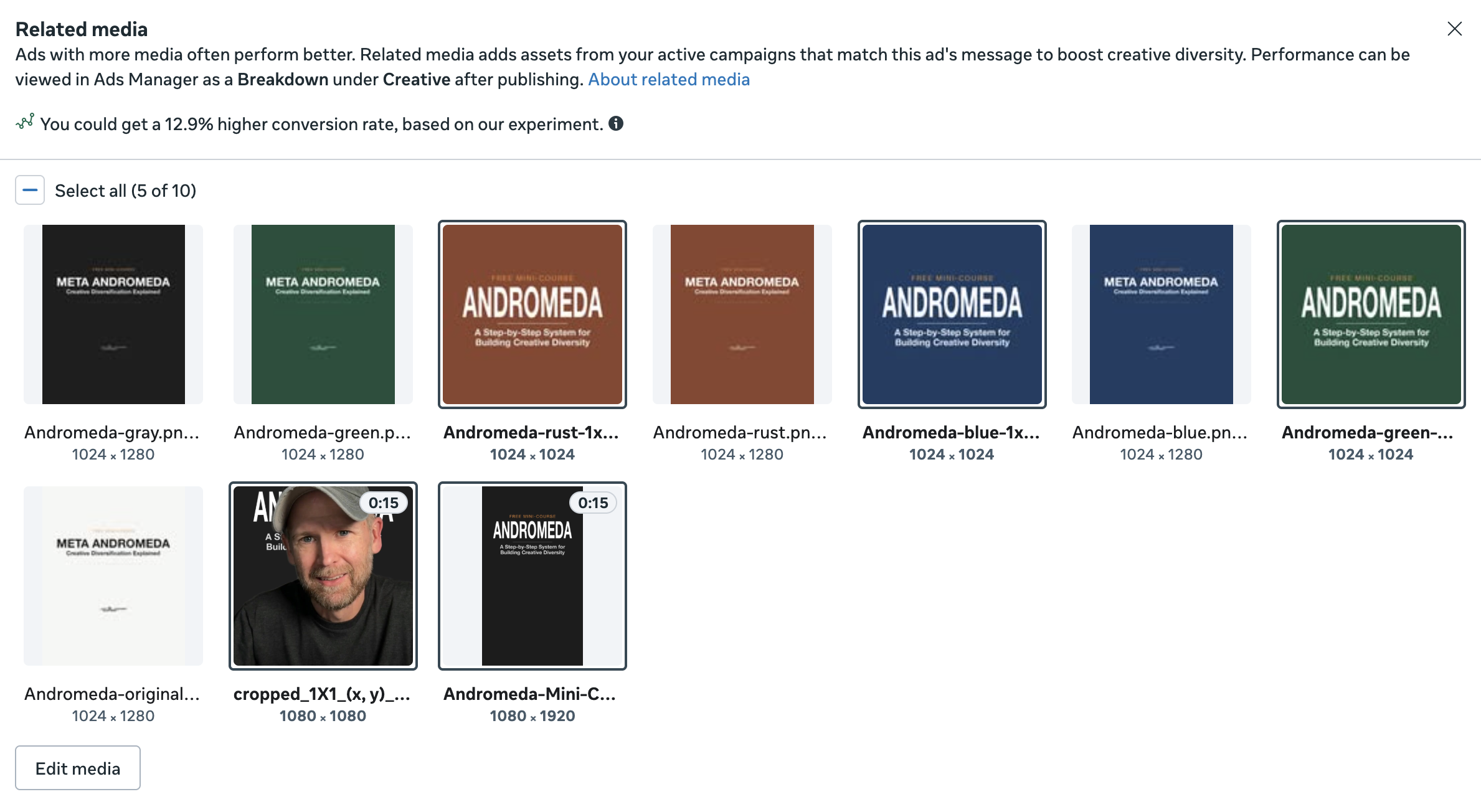
When selected, Meta will include that media as options for your ad. In other words, Meta may replace the primary media you provided with Related Media.
Something I’ve noticed is how well this works with my approach to “stack” creative diversity in phases. I won’t create a bunch of ads at once. I’ll create a couple at a time, based on a unique theme. I’ll learn from those ads and then create new ads later based on a uniquely different visual and theme.
The thing is, you won’t get Related Media recommended if you create all of your ads at once. But more and more will be recommended the longer you go. In the example above, these are creative I used during the past few months.
My point is that eventually I can create one monster ad that makes use of all creative I’ve used to promote the same product. Meta can then mix and match to find the creative that works best for the right people and in the right placement. I might even be able to turn the old ads off (or I wouldn’t be surprised if Meta stopped showing the old ones that become overlap).
As I’ve thought about this more, I have a couple of primary observations…
It’s well past time that we stop trying to find “winning” creative.
I had already been saying this for a while now. The point of creative diversification is to generate lots of options — creative and text — for Meta to help find the right combination for the right person. Once you include Related Media, this becomes all the more obvious.
When discussing the Breakdown Effect, Meta stresses how important it is not to micromanage results. Instead of focusing on the performance of individual ads, we should evaluate results in aggregate. We can drill down even lower. If you use multiple media for one ad, worry less about the performance of each creative and more about the ad itself — if we even care about that.
Meta really leans into Related Media.
I hadn’t used the Breakdown by Related Media in a while, but I guess I also hadn’t used Related Media all that much until recently. And, wow, what it reveals is pretty interesting.
When you use this breakdown, Meta will generate separate rows (for a single campaign, ad set or ad) for your original media and Related Media. Take a look at this breakdown for an ad where I experimented with Related Media recently…
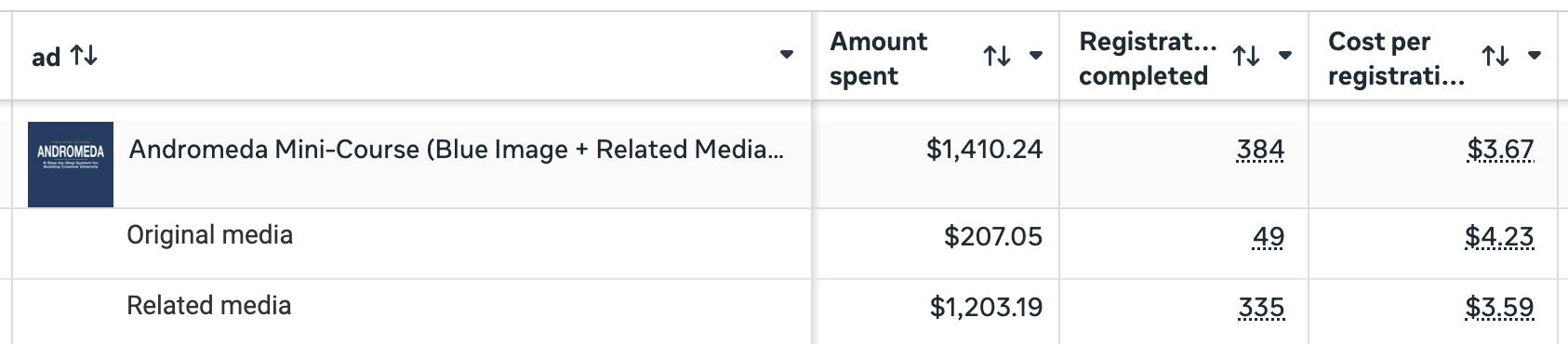
Meta spent six times more on Related Media than on the original media. If your instant reaction is “Oh, no!” you’re looking at this all wrong.
Do you know why Meta spent six times more on Related Media? Because the results were better. And that’s good validation for providing creative variation.
6. What is Monthly Invoicing?
I’ve seen some rumors recently that all Meta advertisers will be forced to use monthly invoicing instead of paying for ads with credit cards. I’ve been digging into the source and accuracy of the rumor, and here’s what I’ve been able to figure out so far…
Monthly invoicing is a billing option for eligible businesses that replaces Meta’s standard threshold-based charging with a single monthly invoice. You’re given a credit limit, spend accumulates throughout the month, and you have 30 days to pay once the invoice is issued. If you hit your limit before the month ends, ads pause until payment is made.
Unlike the standard payment system, you connect your bank account to pay these invoices, rather than use a credit card. And that, I believe, is where the panic begins.
First, it doesn’t appear that all advertisers are being forced into monthly invoices. It’s an option that Meta lists as a benefit. Though Meta’s documentation does indicate that “some” advertisers are being forced into monthly invoicing.

What’s not clear is what the circumstances are for an ad account to be forced into this. Is it due to high ad spend? Or is it the opposite, because of an account that lacks history?
One concern I’ve heard from advertisers is that forcing them into monthly invoicing would be problematic for situations where credit cards are used for points and other benefits. That element would be lost.
I’ve also seen the rumor that this is Meta’s way of taking more money on financing and interest, but that doesn’t seem to be true either. Meta says that “Your credit limit is not a form of credit or financing.”
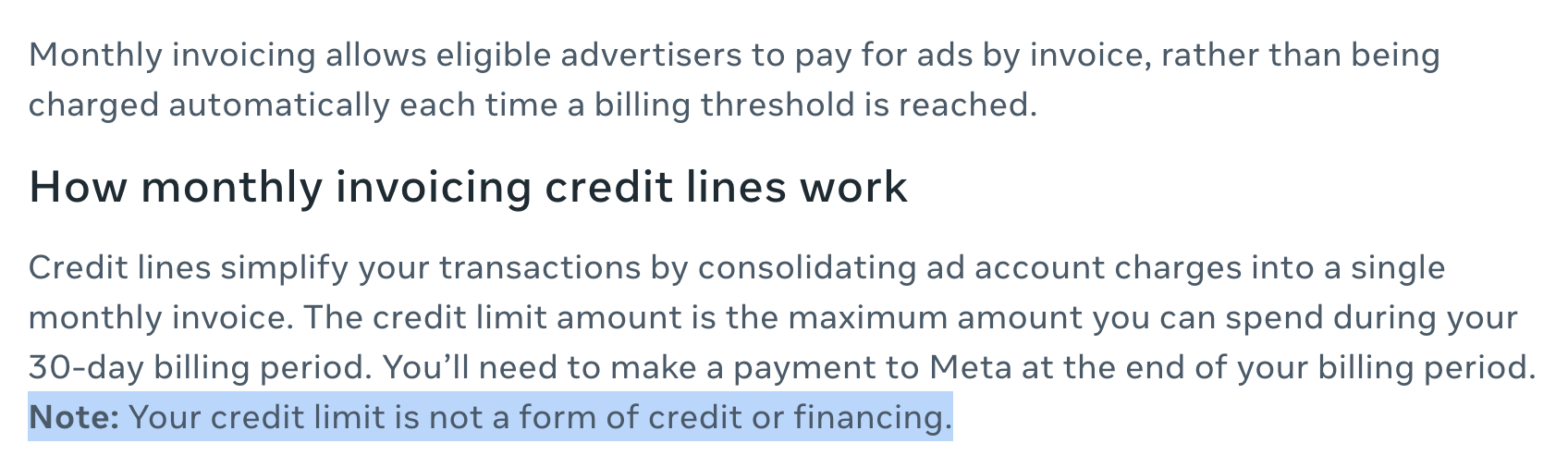
I haven’t heard anything directly from Meta on this, but what appears in their official documentation conflicts with many of the rumors I’ve seen. Are some advertisers being forced into monthly invoicing? Yes. The details behind that are murky.
More to Come
I’ll be sharing observations like this every week, as long as there’s something interesting or confusing to write about.
The post Attribution Changes Could Hit Remarketing Hardest (Plus 5 Updates) appeared first on Jon Loomer Digital.