Trying out the Ourdream NSFW image tool is like whispering your fantasy into a magic lens—and having it draw back something surprisingly vivid.
If you’ve ever danced with AI art platforms that choke on adult prompts or spit out generic results, this filter-free corner of the internet feels like a breath of fresh, spicy air.
What impresses isn’t just the lack of censorship—but how intuitive it is. No third-grade prompt training, no endless tutorials; you type what’s on your mind—pose, outfit, background—and a few seconds later, you get an image that’s not sanitized. It’s raw, sometimes a little quirky, but absolutely yours.
Ourdream AI Image Generator — Step-by-Step User Guide
I tried Ourdream AI Image generator and created this detailed guide:
Step 1 — Start a New Image & Select Character (required)

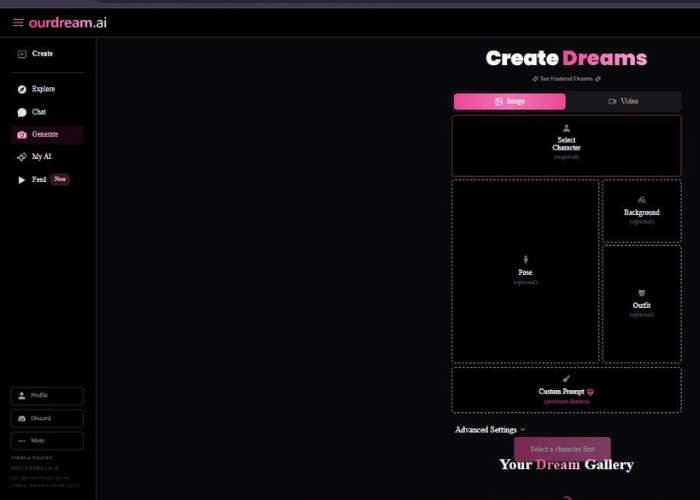
- At the top, choose Image (not Video) under Create Dreams.
- Click the big Select Character panel.
- In the Select Character modal:
- Search bar: type descriptors (e.g., “red hair”, “bust”, “cyberpunk”, “smile”) to narrow the list.
- Gender filter: the Female button is shown; use the dropdown to pick Female, Male, or All.
- Style filter: the Realistic button is shown; switch if other styles exist (e.g., stylized/anime).
- Pick your character. This locks in the base look the generator will follow.
Tip: Use 2–3 strong keywords in the search (hair color + vibe + era) rather than long sentences.
Step 2 — Add Pose, Background, and Outfit (all optional)

You’ll see three modular panels:
- Pose
- Click to choose a body position or camera framing (e.g., standing, close-up, looking left).
- Leave blank to let the model pose naturally.
- Background
- Choose a setting (studio, street, beach, sci-fi room, etc.).
- Blank = neutral/background determined by the model.
- Outfit
- Select wardrobe presets (casual, formal, uniform, fantasy…).
- Blank = outfit will be inferred from the character/style.
Tip: Fewer constraints = more stylistic freedom. Add pose/background/outfit only where you care most.
Step 3 — Custom Prompt ✧ (Premium feature)

Use this to precisely steer the image beyond the menus.
- Write a short, punchy sentence with subject + style + details.
- Example: “Soft window light, 50mm portrait, freckles, natural makeup, shallow depth of field, candid smile.”
- You can include photographic terms (key light, rim light, bokeh), era/aesthetic (Y2K, noir), and materials/textures.
Tip: Order matters—lead with what’s most important. Avoid contradictions (e.g., “night” and “bright sunlight”).
Step 4 — Negative Prompt ✧ (Premium feature)

Tell the model what to avoid. This is your quality guardrail.
- Examples: “no extra fingers, no text, no watermark, no blurry eyes, no glasses, no low-res, no duplicate face.”
- Keep it concise and stable; reuse your best negative prompt across sessions for consistent quality.
Step 5 — Choose Orientation & Number of Images

Fine-tune output shape and batch size.
Orientation (Aspect Ratio)
- Portrait (4:5) — great for portraits, Instagram feed.
- Landscape (5:4) — good for banners, blog images.
- 9:16 — tall/Story, Reels, Shorts.
- 1:1 — square/profile images and grids.
- 16:9 — YouTube thumbnails, widescreen headers.
Tip: Pick the final destination first (site, social) and match its native ratio to avoid later cropping.
Number of Images
- 2 is enabled by default for quick A/B picks.
- Higher counts (4, 8, 16, 32, 64, 128, 256) show a ✧ (diamond), meaning premium tiers.
- Larger batches help you explore variations (pose, lighting, micro-expressions) in one go.
Generate & Review
- After completing Steps 1–5, click the Create/Generate button (label may vary) to start rendering.
- Review the results:
- If composition is off → tweak Pose or Orientation.
- If styling misses the mark → refine Custom Prompt.
- If unwanted artifacts appear → tighten the Negative Prompt.
- Want more options → increase Number of Images (premium for bigger batches).
Proven Prompting Tips
- Stack from most to least important: subject → mood → lighting → lens/camera → finishing touches.
- Stay consistent: reuse a winning Negative Prompt and core style line for series work.
- Iterate in small steps: change one variable at a time (pose or outfit or lighting) to see clear cause/effect.
- Match ratio to platform: 9:16 for Stories, 16:9 for YouTube, 4:5 for portrait posts, 1:1 for avatars.
Feature Breakdown
| Feature | What It Delivers | Why That Stands Out |
| Full NSFW Support | No filters to blunt your vision | Let’s you explore adult themes freely |
| Custom Prompts | “Portrait, wet skin, candlelight” → precise results | You steer the creative direction |
| Optional Depth | Background, pose, outfit switches up your visuals | Great for fine-tuning your visuals |
| Speedy Output | Few seconds from prompt to image | Keeps creative flow; no long waits |
| High Resolution | Sharp, detailed visuals suitable for personal use | Makes the fantasy feel more… real |
Use Cases That Draw You In
- Visualizing personal fantasies that don’t exist in mainstream galleries.
- Moodboard for artists and writers, a base sketch for edits or story inspiration.
- Roleplay visual support, bringing scenes in chat to life visually.
- Collecting custom, anonymous erotic art, private and personal.
Who Sticks Around
This generator isn’t for those wary of adult AI image tools. It’s for people who’ve felt held back by censorship or frustrated by generic filters. If you want your NSFW vision rendered exactly as you intend, and fast, this tool gives that freedom—no judgment, just art.
Personal Take (With All the Feels)
First run: prompt was absurd—“mermaid with neon scales under moonlight.” Result? An image that was rough around the edges but electric—tail glowed, water shimmered, ambiance captured.
Not perfect, but real. That’s the vibe Ourdream brings: alive with raw creativity, not sterilized. Yes, some facial angles are off, and sometimes a knee looks doubled, but those flaws humanize it.
If you’re chasing polished—and those polish filters then smother the soul—you’ll be disappointed. But if you want tools that respect your fringe fantasies, this generator is inviting you in, no questions asked.
Final Thoughts
Ourdream’s NSFW image tool isn’t pretentious—it doesn’t try to be all things. It doesn’t filter, it remembers your details, and it delivers quickly. The imperfections are part of the charm.
If what you crave is a place where your erotic imagination gets drawn in full clarity, this is where you land. Creative freedom shouldn’t come with a delay or a filter.