You’ve probably explored a few AI app builders already. The common pattern? It’s easy to generate a demo, but much harder to build an app your team can confidently deploy, maintain, and scale. Integrations can be limiting, AI-generated outputs often need refinement, and even small changes can turn into time-consuming projects.
As someone who spends a lot of time researching and comparing B2B software, I wanted to make this decision easier. I evaluated 25+ best AI app builders on G2 and compared their features, user reviews, and ratings to understand how these platforms perform in real-world business environments. I looked at the features users valued most — assessing how quickly each one moves from idea to working app, how cleanly it connects to existing data, and whether teams can maintain and scale it without constant firefighting.
Based on the analysis, my top five picks are Lovable, Replit, Microsoft Power Apps, ServiceNow App Engine, and Airtable.
If you’re looking for an AI app builder that helps your team launch applications faster while supporting long-term growth, this guide will help you compare the top choices. I’ll break down where each platform excels, where reviewers found tradeoffs, and which use cases each one is best suited for.
5 best AI app builder platforms for 2026: My top picks
- Lovable: Best for quickly generating customizable AI-built web & mobile apps
Turns plain-English requirements into working app scaffolds you can edit, extend, and ship. ($25 per month) - Replit: Best for real-time collaborative coding and rapid prototyping
Enables pairing with an in-browser IDE that provides AI code assistance, so teams can prototype, iterate, and share live projects quickly. ($20 per month) - Microsoft Power Apps: Best for low-code business apps inside Microsoft 365
Offers drag-and-drop app building with built-in connectors to Microsoft 365 and Dynamics. ($12 per user, per month) - ServiceNow App Engine: Best for automating complex enterprise workflows
Creates scalable apps that tie into ServiceNow’s platform for approvals, records, and AI-powered process automation. (Custom pricing) - Airtable: Best for no-code operational app building with relational data
Turns relational databases, automations, and interfaces into functional business apps; connect processes, manage workflows, and scale without writing code. ($24 per user, per month)
*These best AI app builder platforms are top-rated in their category, according to the latest G2 Summer 2026 Grid Report. I’ve added their standout features and pricing information for an easy comparison.
5 best AI app builders I recommend in 2026
AI app builders aren’t just for flashy demos anymore — they’re how teams move ideas into production without months of custom plumbing. Adoption has jumped fast: the global application development market is projected to reach $290 billion by 2033, growing at a CAGR of 8.5%.
That momentum is reflected in how quickly platform choice has become a strategic decision: the right builder shortens time-to-first-app, fits your stack, and makes everyday changes safe. With that in mind, I focused on tools that make launch-to-iterate cycles predictable: quick setup, clean data connections, sensible costs, and clear governance.
Based on my evaluation of G2 user reviews, these are the five I’d recommend if you’re serious about shipping this quarter.
How did I find and evaluate the best AI app builder platforms?
I began by reviewing the G2 Summer 2026 Grid® Report for AI App Builders and to help me identify category leaders and high-performing products based on verified customer satisfaction and market presence.
Next, I analyzed hundreds of verified G2 reviews to understand how each platform performs in real-world use. I looked for recurring feedback on AI-assisted app generation, ease of setup, customization, integrations, scalability, usability, and the overall speed of application development and deployment. I also evaluated feature ratings and satisfaction metrics from G2 Data to identify each product’s strengths, limitations, and ideal use cases.
Rather than relying on individual opinions, I focused on consistent patterns across reviews to understand what customers value most and where products fall short. This approach allowed me to compare platforms based on actual user experiences while highlighting the tradeoffs buyers should consider before making a decision.
All product screenshots featured in this article come from official vendor G2 pages and publicly available materials.
What makes the best AI app builders worth it: My opinion
I considered the following factors when evaluating the best AI app builder options.
- Fast app creation without a steep learning curve: An AI app builder should help you move from an idea to a functional application quickly. I prioritized platforms that simplify app creation with AI prompts, templates, guided workflows, and intuitive interfaces, making them accessible to both technical and non-technical users.
- Flexible customization and AI-assisted development: AI can accelerate development, but it shouldn’t limit what you can build. I looked for platforms that combine AI-generated apps with the flexibility to customize layouts, business logic, workflows, and user experiences as requirements evolve.
- Reliable integrations and data connectivity: The best AI app builders work with your existing tech stack instead of creating additional silos. I prioritized products with strong native integrations, API support, and seamless connections to databases, business applications, and third-party services.
- Ease of deployment and scalability: Launching an app is only the beginning. I favored platforms that make it easy to deploy applications, manage updates, and support growing teams or increasing workloads without requiring a complete rebuild.
- Security and governance: Whether you’re building internal tools or customer-facing applications, security can’t be an afterthought. I considered features such as role-based access controls, authentication options, governance capabilities, and enterprise-ready security to help organizations deploy AI applications responsibly.
- Strong user satisfaction and long-term value: Finally, I reviewed verified G2 reviews and product ratings to assess how well each platform delivers over time. Beyond feature lists, I considered recurring feedback on ease of use, implementation, customer support, and overall satisfaction to identify products that provide lasting value rather than just impressive demos.
The list below contains genuine user reviews from the AI App Builder category. To be included in this category, a solution must:
- Generate fully functioning applications and websites from natural language prompts
- Connect to databases, web services, or APIs for robust data integration
- Produce both frontend user interfaces and backend logic
- Maintain application context, allowing for progressive enhancements and changes via subsequent prompts
*This data was pulled from G2 in 2026 Some reviews may have been edited for clarity.
1. Lovable: Best for quickly generating customizable AI-built web & mobile apps
Lovable comes up in reviews as a tool that closes the gap between having an idea and shipping a working app. Users describe typing a plain-English request, for example, “build me an appointment booking app,” “create a landing page for my shop”, and watching Lovable generate a working version in minutes. For non-technical founders and small business owners, that removes the dependency on contractors or development cycles just to test an idea.
One of the strongest points I found in reviews is the speed of launch. Lovable makes it possible to build apps in hours rather than weeks, and users noted that even with minimal technical background, they could produce responsive, mobile-ready apps that looked polished and professional. This speed encourages experimentation; reviewers said they felt freer to test multiple variations because the effort was so low.
A second standout is ease of use and no-code accessibility. Reviewers highlighted that they had no developer skills yet could turn ideas into functional products. The platform’s design-first approach lowers the barrier to entry, which is especially valuable for early-stage teams that want to focus on customers and growth rather than code.
Users also praised Lovable for its AI-powered personalization and customization. Instead of cookie-cutter templates, the platform tailors apps based on the description and feedback you provide. In fact, 83% of G2 users rate its design customization features highly. This makes the output feel more distinctive and better aligned with the brand vision than many traditional no-code builders. The ability to integrate with existing tools and tweak the generated apps with simple prompts came up repeatedly in reviews as a key differentiator.
What sets Lovable apart from other AI app builders is its full-stack capability. I found consistent praise in reviews for how it handles not just frontend UI but also backend logic, database setup, and authentication — all from natural-language prompts. Reviewers highlighted the one-click Supabase integration for database management and GitHub sync for version control, making it production-ready from day one rather than just a prototyping tool.
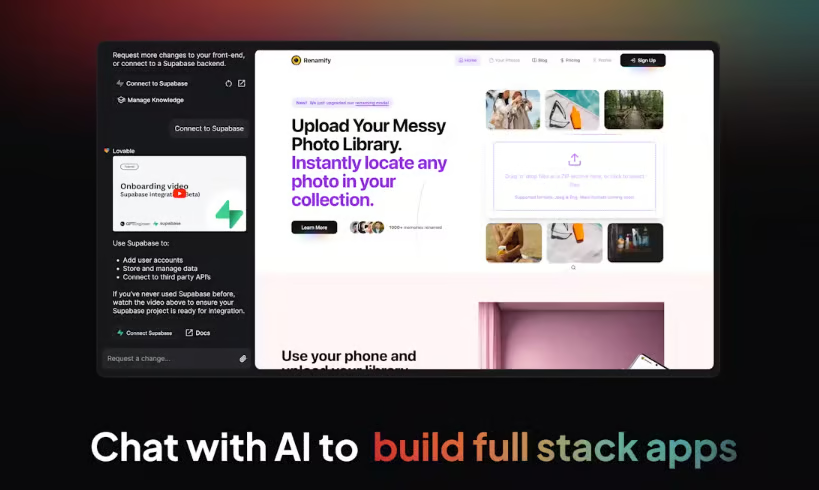
Several reviewers were impressed with Lovable’s ability to generate responsive applications that work across desktop and mobile devices. Users appreciated not having to build separate experiences for different screen sizes, allowing them to launch customer-facing applications efficiently while maintaining a consistent user experience. Likewise, rather than rebuilding projects from scratch, reviewers describe making iterative updates by adjusting prompts, refining workflows, or adding new functionality as requirements evolve. That conversational editing experience makes the platform particularly valuable for teams whose applications are expected to change over time.
Lovable also includes a built-in security audit that reviewers flagged as a meaningful differentiator. After a build is completed, the platform automatically checks for vulnerabilities, which means teams spend less time on manual application hardening. For non-technical users shipping real products, this removes a layer of risk that would otherwise require a developer’s review.
Like many AI-first platforms, Lovable uses a credit-based pricing model. Based on the reviews I evaluated, some users reported that credits were consumed faster than expected during larger projects or when multiple AI retries were needed. Most reviewers still felt the time savings justified the cost, but they recommended using focused prompts and planning iterations to keep usage predictable.
I also found that while Lovable generates an excellent starting point, reviewers occasionally needed to make manual refinements for highly customized interfaces or more complex application logic. That said, most users viewed these adjustments as part of polishing the final product rather than rebuilding it, especially considering how much of the initial development the AI completed automatically.
Even with those caveats, the consensus leans strongly positive. With a 4.6/5 rating on G2, Lovable is seen as one of the most empowering no-code AI app builders available today, especially for people without a technical background. It unlocks speed, experimentation, and personalization that would otherwise require hiring developers or stitching together multiple tools.
What I like about Lovable:
- According to the reviews I looked at, one of the biggest strengths is how quickly it turns plain-English ideas into working web or mobile apps. Most users say the first version comes together within minutes, making testing and iteration feel effortless.
- Lovable is approachable for non-developers as well. Many reviewers mention that prompts and guided edits make customization feel natural, and integrations help you tweak and connect the app without stitching together a bunch of separate tools.
What G2 users like about Lovable:
“I use Lovable to build websites for my clients, and it significantly reduces the gap between the initial concept and a functional prototype. I like how it addresses slow development cycles by letting me generate complex UI components and frontend logic instantly, so I can deliver projects in days rather than months. The integrations with sources like GitHub and Supabase are fantastic, and it’s not just a frontend builder—it handles the backend smoothly too. I also appreciate that the app feels production-ready from day one, with Supabase integration and a real database. The initial setup was easy and straightforward, and the drag-and-drop interface saves me hours each week. Overall, I would absolutely recommend Lovable to a friend or colleague.”
– Lovable review, Kaavish H.
What I dislike about Lovable:
- Based on my evaluation of G2 reviews, credits can get consumed faster than expected, especially during complex builds or error retries, making spending harder to predict without proactive usage monitoring. That said, staging builds and setting alerts keep costs manageable for most teams.
- For complex, multi-step requests, the AI occasionally needs multiple prompt iterations to get the result right, which can feel repetitive. Keeping prompts focused and scoped tightly resolves most of these cases and keeps momentum high.
What G2 users dislike about Lovable:
“Some advanced design refinements and responsive behavior still required iteration and manual tweaking, especially when aiming for a very polished luxury-style user experience. Certain UI details like dropdown layering and mobile responsiveness took additional adjustments, but overall, the platform made it much faster and easier to bring the vision to life compared to building from scratch.”
– Lovable review, Ephrem S.
2. Replit: Best for real-time collaborative coding and rapid prototyping
Replit comes up in reviews as one of the fastest ways to move from idea to working app, with zero local setup required. The browser-based integrated development environment (IDE) removes environment configuration entirely: open a tab, pick a template, and coding begins with hosting and deployment already wired in.
The biggest strength I noticed is Replit’s AI Agent. Across reviews, users describe asking the agent to generate applications, scaffold projects, build CRUD functionality, create APIs, refactor code, and troubleshoot errors using natural-language prompts. According to G2 Data, 82% of users rate Replit highly for prompt understanding, reinforcing the consistent feedback I found around its AI-assisted development experience. Instead of writing repetitive boilerplate, reviewers say they can focus on refining product ideas while the AI handles much of the implementation.
Speed to MVP is another recurring theme. Many reviewers mention that they can create proofs of concept, internal tools, and startup prototypes much faster than with traditional development environments. Built-in hosting, instant previews, and deployment remove much of the infrastructure work, making it easy to share applications with teammates or stakeholders for immediate feedback.
I also found that Replit’s collaborative development experience is one of its biggest differentiators. Reviewers frequently compare it to “Google Docs for code,” highlighting real-time editing, shared workspaces, and live previews that enable multiple people to collaborate. This makes it particularly valuable for startups, distributed teams, classrooms, and hackathons where rapid collaboration matters as much as writing code.
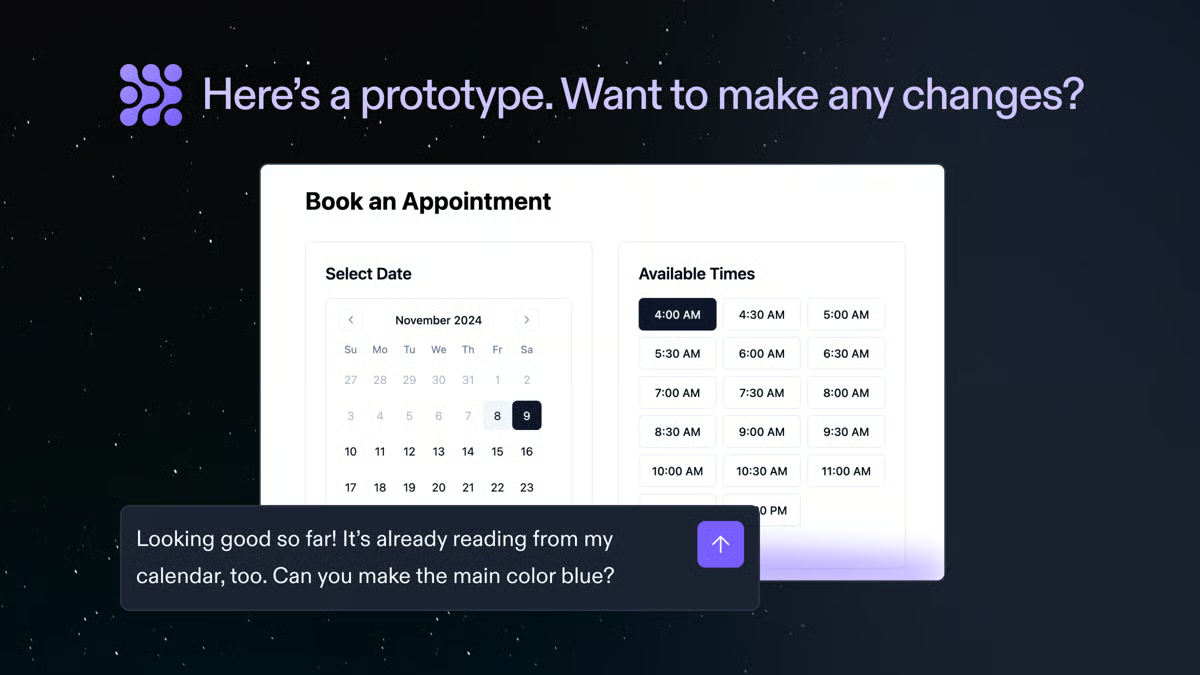
Another advantage reviewers consistently mention is the platform’s all-in-one workflow. Instead of switching between an IDE, a hosting provider, a deployment pipeline, and a preview environment, Replit combines those capabilities into a single workspace. That simplicity reduces setup time and allows teams to focus on building rather than configuring development infrastructure.
Several reviewers also appreciated that Replit makes AI-assisted coding approachable even for less experienced developers. Beyond generating code, the AI Agent often explains its suggestions, helping users understand why changes were made rather than simply accepting the generated output. I found this educational aspect especially valuable for teams learning new frameworks or experimenting with unfamiliar technologies.
Because Replit’s pricing scales with AI consumption, some users said costs increased as they relied more heavily on Agent features or tackled larger projects. Even so, many reviewers felt the productivity gains outweighed the additional expense, particularly for teams building prototypes or shipping quickly.
I also found that while the AI Agent performs exceptionally well on focused requests, reviewers occasionally needed to break larger projects into smaller prompts or provide additional context for more complex workflows. Most viewed this as a practical way to get better AI results rather than a limitation of the platform itself.
Overall, with a 4.4/5 G2 rating, Replit is one of the best AI-native development platforms I evaluated. With its browser-based IDE, collaborative workspace, AI Agent, and integrated deployment, it removes much of the friction between an idea and a working application. If your priority is rapid prototyping, collaborative development, and AI-assisted coding, Replit is one of the most compelling options available.
What I like about Replit:
- Replit’s biggest advantage is how quickly it transforms natural-language prompts into working applications. The AI Agent handles much of the repetitive coding, while built-in hosting and deployment help teams move from concept to MVP with very little setup.
- I also like how everything lives in one browser-based workspace. Reviewers consistently praise the combination of coding, collaboration, previews, hosting, and deployment, which keeps development simple and makes sharing projects almost effortless.
What G2 users like about Replit:
“Replit offers a simple, efficient development environment that brings coding, deployment, and AI assistance together in one platform. Its AI features help speed up development, and the cloud-based setup eliminates the need for environment management and simplifies collaboration. It has helped us quickly build and deploy internal automation and integration solutions.”
– Replit review, Darshan K.
What I dislike about Replit:
- Based on the G2 reviews I evaluated, AI usage costs can increase as projects become larger or teams rely more heavily on Agent features. Most reviewers still considered the pricing worthwhile for faster development, but they recommended planning AI usage as projects scale.
- I also noticed that the AI Agent occasionally needs additional guidance for longer or more complex workflows. Reviewers found that breaking larger tasks into smaller prompts generally produced more accurate and reliable results.
What G2 users dislike about Replit:
“The main downside is the cost of advanced features and AI usage. For beginners, it can sometimes be difficult to understand the pricing. Other than that, the platform is very useful and easy to use.”
– Replit review, Mahmoud A.
3. Microsoft Power Apps: Best for low-code business apps inside Microsoft 365
Microsoft Power Apps comes up in reviews as one of the most accessible ways to build apps without needing a traditional developer background.
The drag-and-drop interface is a recurring highlight: users say they can quickly turn an idea into a functional business app, from data collection forms to lightweight workflow tools. Because it sits inside the broader Microsoft ecosystem, reviewers consistently emphasize how smoothly it integrates with Teams, SharePoint, Dynamics, and Excel, a major advantage for organizations already invested in Microsoft 365.
A second strength is its balance of accessibility and depth. For citizen developers, it feels intuitive enough to design and publish apps without writing code. At the same time, IT and dev teams point out that they can extend apps through custom connectors, APIs, and advanced logic when needed. That dual appeal makes it especially useful in large organizations, where business units want quick solutions but central IT still needs oversight, governance, and scalability.
I also found that reviewers value Power Apps for its strong data foundation. Unlike tools that rely only on spreadsheets, Power Apps delivers a structured, secure data layer. Dataverse, SharePoint lists, Excel, SQL, and other data connections enable the creation of more complex apps, such as HR onboarding systems, compliance workflows, and customer service dashboards, without a separate backend. According to G2 Data, 78% of users rate its data and API integration features highly, which supports the review patterns I saw around connecting apps to existing business systems.
The Copilot and AI Builder integrations are equally appreciated. Reviewers reported being able to articulate a business problem in plain language and to have the platform automatically draft data tables, screens, and logic. G2 Data shows that 80% of users rate Power Apps highly for prompt understanding and context awareness. AI Builder adds capabilities such as invoice processing and predictive analytics, and Copilot agents allow teams to automate processes that previously required developer involvement.

Power Apps also benefits from Microsoft’s ecosystem stability. Reviewers appreciate that it inherits enterprise-grade security standards, including SSO, compliance certifications, and role-based access, as well as a predictable roadmap. For enterprises, reliability over time matters as much as features, and the assurance that apps built today will remain supported at scale is a meaningful advantage.
Non-technical staff note how much faster they can automate repetitive work, such as inspection checklists, vacation request forms, and approval flows, without waiting in the IT queue. For many organizations, this translates into faster iteration cycles and a culture in which the people closest to the problems can help solve them.
That said, performance on heavier builds may lag, particularly with larger datasets or complex canvas apps. Most teams address this through Dataverse, indexing, and cleaner data architecture. These approaches resolve the majority of cases without requiring structural changes to the app.
Licensing is another area where reviewers recommend planning ahead. Power Apps can be cost-effective for quick internal apps, but premium connectors, broader rollouts, and advanced features can make pricing harder to predict. For organizations already invested in Microsoft 365, the value remains strong, but upfront scoping helps avoid surprises as adoption expands.
Overall, I found Microsoft Power Apps to be one of the best options for organizations that want low-code app development inside an existing Microsoft environment. With a 4.3/5 G2 rating, Microsoft 365 integrations, and a growing AI-assisted builder experience, it’s best suited for teams that want to digitize internal workflows, centralize business data, and give non-developers a faster way to build practical apps.
What I like about Microsoft Power Apps:
- The M365 ecosystem fit is the clearest differentiator I found in G2 reviews. Having data, permissions, and workflows across Teams, SharePoint, Excel, Dynamics, and Dataverse in one place keeps governance simple for IT while enabling business users to ship quickly.
- The Copilot and AI Builder integration stood out as the most relevant addition. Reviewers described a problem in plain language and getting back drafted data tables, screens, and logic, which shortens the time from idea to a working app.
What G2 users like about Microsoft Power Apps:
“Easy to build low-code web applications where multiple screens can be customized and created with little to no code. It can be easily connected to data sources like SharePoint lists, and Power Apps automatically imports all the fields from the list along with their data types to create a basic form application. Further enhancements can also be added easily. Once the web application is ready, it can be deployed easily using the one-click publish option. The deployed application works great with zero downtime, and publishing updates is very quick as well.”
– Microsoft Power Apps review, Ashutha K.
What I dislike about Microsoft Power Apps:
- Based on my evaluation of G2 reviews, performance can lag on heavier builds, larger datasets, or complex canvas apps. This is typically resolved through Dataverse, proper indexing, and thoughtful data design rather than requiring app-level rebuilds.
- Licensing can be confusing, and costs rise as teams add premium connectors or more advanced AI features. Teams that scope usage and set guardrails early tend to keep spending predictably without losing flexibility.
What G2 users dislike about Microsoft Power Apps:
“A few things can be improved: Performance can be slow with large data sets or complex formulas, and error messages. Performance issues arise when loading large SharePoint lists or SQL data – Screen lags, galleries.”
– Microsoft Power Apps review, Jeet S.
4. ServiceNow App Engine: Best for automating complex enterprise workflows
After evaluating G2 reviews, I found that ServiceNow App Engine is best suited for organizations that want to replace manual, email-driven processes with scalable business applications and automated workflows. Reviewers consistently describe using the platform to build approval processes, employee service portals, request management systems, and internal applications that bring multiple departments onto a single governed platform.
One of the biggest strengths I noticed is how quickly teams can build business applications using App Engine Studio and prebuilt templates. Reviewers say they can create forms, service catalogs, approval workflows, and intake processes with minimal coding, allowing departments to digitize repetitive work without waiting for lengthy development cycles.
Another recurring advantage is the platform’s balance between low-code simplicity and enterprise flexibility. According to G2 Data, 84% of users rate its WYSIWYG editor highly, while 82% rate both UI code extending and programming code extending positively. From the reviews I evaluated, business users appreciate the visual builder, while developers value the ability to extend applications with custom scripts, APIs, and advanced business logic when requirements become more sophisticated.
I also found that ServiceNow App Engine stands out because it builds directly on the broader Now Platform. Reviewers frequently mention how easily applications connect with CMDB, existing ServiceNow records, notifications, role-based permissions, and other platform services. Instead of creating isolated applications, teams can build solutions that fit naturally into existing enterprise workflows.
Workflow automation is another capability reviewers consistently praise. I found recurring feedback around automated approvals, SLA tracking, task routing, audit trails, and reusable workflow components that help organizations replace spreadsheets and manual processes with standardized, trackable operations.
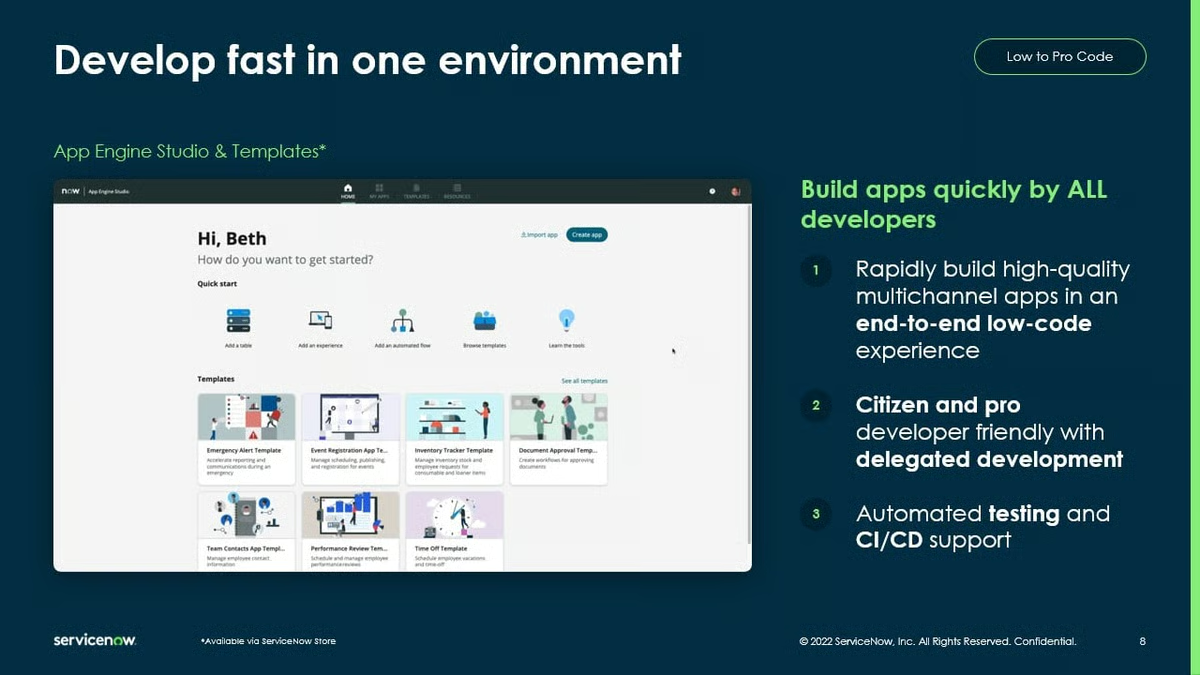
Enterprise governance is another area where ServiceNow App Engine performs particularly well. Reviewers appreciate its security controls, role-based access management, auditability, and centralized administration, making it easier for organizations to expand low-code development while maintaining compliance and operational oversight across departments.
A standout feature that came through clearly in reviews is the Now Assist and AI Agents capability. Reviewers described being able to generate complete applications in minutes using built-in AI, with AI agents automating repetitive tasks and decision workflows that previously required manual configuration. A few reviewers highlighted AI that predicts case details from emails and automates downstream processes — a level of intelligent automation that goes well beyond basic workflow templating and makes the platform increasingly relevant for enterprises modernizing their operations.
The biggest challenge I observed is that the platform becomes more complex as applications grow. While simple workflows are approachable, reviewers say advanced data modeling, scripting, and enterprise customization require additional expertise. Most organizations address this by starting with templates and gradually expanding functionality as teams become more familiar with the platform.
Licensing and implementation efforts also appear in reviewer feedback. Some organizations note that enterprise licensing and large-scale deployments require careful planning, particularly when migrating data or optimizing performance. However, reviewers generally view these as expected tradeoffs for a platform designed to support complex, enterprise-wide workflows rather than lightweight departmental apps.
With strong adoption across IT, HR, and operations teams and a 4.5/5 G2 rating, App Engine earns its place when governance and scale matter as much as speed. It lets teams consolidate on a platform with audit trails, security, and shared data rather than accumulating one-off tools.
What I like about ServiceNow App Engine:
- After reviewing G2 feedback, I like how quickly organizations can transform manual business processes into automated applications using App Engine Studio, templates, and reusable workflow components. Reviewers consistently mention faster deployment without sacrificing governance.
- I also like that the platform supports both business users and developers. Teams can start with visual low-code tools and later extend applications with custom scripting, APIs, and advanced logic as business requirements evolve.
What G2 users like about ServiceNow App Engine:
“I have been using ServiceNow App Engine for more than two years in my role as an IT Operations Manager. It’s become a core part of my daily work, and what stands out most is how much faster we can build internal applications and automate operational processes without spending months in development. Tools like App Engine Studio, Flow Designer, UI Builder, and the Service Catalog make it easier for us to deliver solutions faster and keep improving, relying on integration with Microsoft 36, Jira, REST APIs, which have made data sharing between systems much smoother and more straightforward.”
– ServiceNow App Engine review, Nurse B.
What I dislike about ServiceNow App Engine:
- Based on the G2 reviews I analyzed, there is a noticeable learning curve once projects move beyond basic workflows into advanced scripting, data modeling, or enterprise customization. Most reviewers said templates and implementation guidance helped teams become productive over time.
- I also found that licensing and large-scale deployments require thoughtful planning, particularly for organizations managing complex migrations or enterprise-wide rollouts. Even so, reviewers generally felt the platform’s governance and scalability justified the additional investment for larger implementations.
What G2 users dislike about ServiceNow App Engine:
“While I appreciate the capabilities of ServiceNow, the aspect I like least is its steep learning curve for new users, largely because of the platform’s extensive features and customization options. As a result, some tasks can feel complex at first and may require additional training or technical expertise to use effectively. That said, once users become familiar with the system, its powerful functionality and flexibility often outweigh these initial challenges, making the early effort feel worthwhile.”
– ServiceNow App Engine review, Keri K.
5. Airtable: Best for no-code operational app building with relational data
Airtable is not a native AI app builder. It is a relational database and interface platform that has expanded into app building through AI-powered automations, interface design, and workflow tools. I’m disclosing this upfront so you can evaluate it against your specific use case.
Airtable comes up in reviews as the platform teams reach for when spreadsheets have run out of headroom. Users describe a progression that starts with structured relational tables, including fields, linked records, and rollups, and gradually expands into full business systems: recruiting pipelines, procurement governance, sustainability tracking, and internal dashboards, all without heavy development involvement.
What makes Airtable stand out as an AI app-building platform is the combination of a flexible data layer, a purpose-built interface, and automation tools. Reviewers highlighted the ability to design databases, connect processes, create interfaces, and automate repetitive work inside a single platform, rather than stitching together a separate database, a front-end builder, and an automation tool. In fact, 95% of G2 users rate Airtable as meeting their requirements, and 95% rate its ease of use highly.
Unlike tools built around flat spreadsheets or simple forms, Airtable allows teams to model complex relationships between tables, build views tailored to different roles and teams, and surface exactly the data each function needs. Reviewers in regulated industries, including life sciences and compliance-heavy environments, specifically called out the ability to build auditable, relational data structures without IT involvement as a major differentiator.
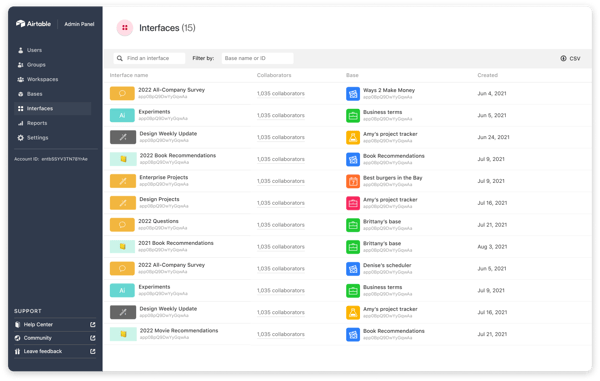
Reviewers also praised Airtable’s multiple view types, such as grid, kanban, calendar, and gallery, which let teams interact with the same underlying data in the format that fits their workflow. Combined with role-based permissions and governed access, this makes it practical for different departments to work off the same base without stepping on each other’s data or processes.
The automation capabilities came through strongly in reviews. Teams described replacing manual, repetitive work, including status updates, notifications, approval routing, and record creation, with Airtable automations that trigger based on field changes or a schedule. The integrations with external tools extend this further, with reviewers highlighting connections to Slack, Salesforce, Jira, and custom APIs as making Airtable the operational backbone rather than just a tracker.
Another strength that came through in reviews is Airtable’s AI fields and AI-powered features. Reviewers described using AI fields to automatically generate summaries, classify records, extract structured data from text, and enrich entries without writing code. One reviewer specifically highlighted AI predicting and populating fields based on linked inputs, which reduces manual data entry across large bases. With a 95% ease-of-use score and 93% quality-of-support rating on G2, the AI layer feels integrated rather than bolted-on, which matters for teams that need reliability at scale.
The biggest tradeoff I found is that Airtable becomes more difficult to manage as workspaces grow in size and complexity. Reviewers mention that large bases, interconnected relationships, and advanced automations require thoughtful organization to remain easy to maintain. Most teams considered this a natural consequence of building increasingly sophisticated applications rather than a limitation of the platform itself.
Pricing also appears in reviewer feedback, particularly for organizations expanding Airtable across larger teams. Some users noted that per-user licensing and premium AI capabilities can increase costs as adoption grows. Even so, many reviewers felt the platform’s flexibility and time savings justified the investment, especially compared to building custom internal applications from scratch.
With a G2 average rating of 4.6/5 and strong adoption across operations, product, and IT teams, Airtable earns its place on this list for teams that need structured, scalable business apps built around their data, without the overhead of a full development cycle.
What I like about Airtable:
- The combination of relational database power and a no-code interface builder is the clearest differentiator I found in G2 reviews. Teams can model complex data relationships, build role-specific views, and automate workflows inside a single platform, without requiring a separate backend, front-end tool, or automation layer.
- The AI field’s capability stood out as the most relevant 2026 addition. Reviewers described AI automatically generating summaries, classifying records, and extracting structured data from text, thereby reducing manual entry and keeping large datasets accurate at scale without developer involvement.
What G2 users like about Airtable:
“I love Airtable’s flexibility. It’s amazing because it’s like having a user-friendly, no-code, visual database, which is the cornerstone of any software. I appreciate that, even without technical expertise, I can build nearly any internal business application I need without purchasing new software. The additional features directly integrated with the database, like automation interfaces, make it so robust. Compared to web coding, Airtable is preferred for its ease of use—there’s no back-and-forth, no security issues, and I don’t need to build from scratch. I can just learn how to use it well and easily build and reuse various building blocks for future projects. This tool makes it so much easier to handle structured data, allowing me to filter, automate, and manage tasks effectively.”
– Airtable review, Vykintas G.
What I dislike about Airtable:
- Based on the G2 reviews I evaluated, larger workspaces with complex relationships and automations can require more planning to keep them organized. Most reviewers found that establishing a clear data structure early made long-term management much easier.
- I also noticed that per-user pricing can become more expensive as organizations scale or adopt premium AI capabilities. However, many reviewers still viewed Airtable as a cost-effective alternative to developing custom internal applications.
What G2 users dislike about Airtable:
“The API rate limit is where things start to break down for us. Once we had multiple team members and automated triggers hitting the base simultaneously, we quickly hit the 5-requests-per-second cap, which created real friction in our workflow. The Salesforce sync being one-directional and locked behind Business or Enterprise also feels like it should be a standard feature, honestly. Row-level permissions being basically nonexistent has been another issue, since we have sensitive financial data across different user roles, and the workarounds added complexity we really didn’t want to manage internally.”
– Airtable review, Kaleem A.
Comparison of the best AI app builder platforms for 2026
| Software | G2 Rating | Free plan and trial | Starting price of paid plans |
| Lovable | 4.6/5 | Free plan available; no free trial | $25 per month |
| Replit | 4.4/5 | Free plan available; no free trial | $20 per month |
| Microsoft Power Apps | 4.3/5 | Free plan and trial (30-day for Premium plan) available | $12 per user, per month |
| ServiceNow App Engine | 4.5/5 | No free plan or trial available | Custom pricing |
| Airtable | 4.6/5 | Free plan and trial (14-day for Team plan) available | $24 per user, per month |
Note: G2 ratings are based on user reviews and are subject to change.
Frequently asked questions about the best AI app builder platforms
Have more questions? Find the answers below.
Q. What are the best AI app builder platforms for founders building internal tools and customer-facing apps without development experience?
Lovable is the best choice for non-technical founders because it generates full-stack applications from plain-English prompts. Airtable is another excellent option for building internal tools, while Replit suits founders who want more flexibility as their applications grow.
Q. What are the best AI app builder platforms offering both AI-generated apps and AI agents in one place for rapid development?
ServiceNow App Engine combines AI-powered application development with AI Agents, making it a strong enterprise option. Replit also supports AI-assisted coding alongside agent-based development workflows for teams building more technical applications.
Q. Which AI app builder platforms turn ideas into working apps quickly using low-code drag-and-drop interfaces?
Lovable is the fastest platform for turning ideas into working applications with minimal technical effort. Microsoft Power Apps and Airtable are also excellent low-code choices for teams building internal business applications with visual development tools.
Q. What AI app builder tools integrate seamlessly with Microsoft 365, Excel, and Teams for internal request management?
Microsoft Power Apps is the best option for organizations using Microsoft 365. It integrates natively with Excel, Teams, SharePoint, and the broader Microsoft ecosystem, making it easy to build internal business applications and approval workflows.
Q. What are the top AI app builder platforms most relied on by consultants and founders for deploying client-facing tools without writing backend code?
Lovable is a good choice for founders and consultants who want to launch customer-facing applications without backend development. Replit is another excellent option for teams that need more customization while still benefiting from AI-assisted development.
Q. Which AI app builder platforms handle more complex features when the initial AI output needs significant refinement?
Replit is well suited for projects that require significant refinement after AI generates the initial application. Microsoft Power Apps and ServiceNow App Engine also provide greater flexibility for organizations building more complex business applications.
Q. Which AI app builder tools avoid expensive premium connector costs and offer truly free hosting without hidden fees?
Replit offers free hosting for many projects and includes deployment within the platform, making it a cost-effective choice for developers and startups. Lovable also provides an accessible pricing model for teams building applications quickly.
Q. Which AI app builder platforms do founders keep using beyond initial deployment and onboarding?
Lovable and Replit consistently receive positive feedback for long-term usability. Reviewers highlight their rapid iteration, ongoing AI assistance, and ability to support applications as business requirements evolve.
Q. Which is the highest-rated AI app builder software for small teams replacing manual spreadsheet processes with custom applications?
Airtable is one of the highest-rated platforms for replacing spreadsheet-based workflows with custom applications. Microsoft Power Apps is another strong option for organizations already managing business data within Microsoft 365.
Q. Which is the most trusted AI app builder software by founders and solo entrepreneurs based on user reviews?
Lovable is one of the most trusted AI app-building platforms among founders and solo entrepreneurs for its ease of use and rapid application development. Replit is another highly rated option for users who want greater control without having to manage complex infrastructure.
Turn prompts into products
After evaluating G2 reviews, my biggest takeaway is that long-term success depends less on how quickly an AI app builder generates your first application and more on how well it fits your team’s development process six months from now.
Before making a decision, shortlist two or three platforms and build the same application in each. Compare how accurately they interpret prompts, how much manual refinement the AI-generated output requires, how easily they connect to your existing systems, and whether non-technical users can confidently make updates after deployment. Those factors will have a much greater impact on adoption than feature lists alone.
I’d also recommend looking beyond the initial build experience. Evaluate pricing as usage grows, governance capabilities, collaboration features, and the quality of AI-generated output over multiple iterations. The best platform isn’t necessarily the one that creates the fastest prototype. It’s the one your team will continue using as applications become more complex and business needs evolve.
Finally, spend time reading recent G2 reviews from organizations with similar use cases. Consistent feedback about implementation, support, scalability, and day-to-day usability often reveals strengths and tradeoffs that product demos and marketing pages don’t, helping you make a more confident buying decision.
Want an extra boost while you build? Compare AI coding assistants to pair your builder with smart autocomplete, refactors, and reviews.