When evaluating the 20+ best label printing software tools, options such as Loftware Cloud, RF-SMART WMS, ShipJunction, BarTender, and Label LIVE often rank among the most popular for businesses and organizations looking to streamline labeling workflows.
Having led a nonprofit dedicated to sending sanitary pads to areas facing scarcity, I’ve personally navigated the challenges of managing shipments and ensuring each parcel reaches its destination with the right information.
Running such an initiative often required me to use label printing software, and trust me, it’s not as easy as it seems. From getting the right sizes to ensuring the labels stick properly, there’s a lot of behind-the-scenes work that goes into it. The process can become even more complex when you rely on outdated or inefficient tools. The wrong software can lead to errors, wasted time, and a lot of extra effort.
That’s why finding the right label printing solution is crucial. By streamlining the entire process, you can reduce manual effort and have peace of mind that every label is printed precisely.
5 best label printing software: My picks for 2026
| Software | Best for | Standout feature | Pricing |
| Loftware Cloud | Cloud-based label automation | Centralized label control, regulatory compliance, and enterprise system integrations | Available on request |
| RF-SMART WMS | Warehouse label printing natively in NetSuite | Native NetSuite architecture, scan-based label automation, and real-time inventory accuracy | Pricing available on request |
| ShipJunction | High-volume ecommerce shipping label automation | 1-second label printing, GS1/UCC-128 support, carrier rate shopping, NetSuite integration | Pricing available on request |
| BarTender | Enterprise-grade, high-volume labeling | Automation, data integration, regulatory compliance, and scalable label management | Starter plan at $199/year |
| Label LIVE | Collaborative label design for small teams | WYSIWYG designer, CSV/XML batch automation, cross-platform macOS and Windows support | $47.99 one-time |
These best label printing software are top-rated in their category, according to G2 Summer 2026 Grid Reports. I have also included their standout features and monthly pricing for easy comparison.
Did you know? The global label printing software market is projected to reach $1.035 billion by 2034, growing at a 5.1% CAGR from 2024 to 2034.
My top 5 best label printing software recommendations for 2026
Label printing software helped me efficiently manage and streamline the entire labeling process, from generating accurate labels to ensuring they stuck securely on parcels.
With so many options available, I know how involved it can be to find the right one. That’s why I’ve compiled a list of the best label printing software tools for 2026 to help you choose the one that best fits your needs and makes your labeling tasks hassle-free.
These tools aren’t just for nonprofits. Businesses can use them for product shipping, schools for event supplies, and individuals for organizing personal shipments.
No matter the industry, the right label printing software can make the task easier and more efficient.
How did I find and evaluate the best label printing software?
I evaluated the top label printing software by analyzing G2 reviews at scale and drawing on G2’s Summer 2026 Grid Reports to assess each tool’s features, usability, and overall value.
For tools I couldn’t access directly due to access limitations, I gathered insights from small business owners, nonprofit managers, and logistics coordinators with hands-on experience, then validated their feedback using verified G2 reviews. The screenshots in this article include both those captured during evaluation and images sourced from the vendor’s G2 page.
By combining in-depth analysis, expert opinions, and user reviews, I’ve curated a list of the best label printing software to help you find the right solution for your needs.
What I look for in the best label printing software
When evaluating the best label printing software, I focus on the following key features to ensure it meets the needs of businesses that require efficient, high-quality label creation and printing:
- Label design flexibility: I assess whether the software offers a wide range of design options, allowing users to create labels of various shapes, sizes, and layouts. The software should support custom dimensions and templates for different label formats (e.g., shipping labels, product labels, barcode labels, and packaging). It should also allow for advanced design customization, including font styles, color schemes, borders, and alignment tools to create professional-looking labels.
- Barcode and QR code generation: I check whether the software includes built-in tools to generate barcodes and QR codes. The ability to easily create different barcode types (e.g., UPC, EAN, Code 128) and customize their size, density, and alignment is essential. For businesses that require product tracking or inventory management, having robust barcode and QR code generation features ensures accurate, scannable labels.
- Integration with databases and spreadsheets: The best label printing software should be able to integrate with databases, spreadsheets, and other software systems to streamline the label generation process. I assess whether the tool supports importing data from CSV files, Excel spreadsheets, or live databases. This feature is particularly useful for printing large batches of labels with unique data, such as product names, prices, or shipping addresses.
- Support for different printing methods: I evaluate whether the software is compatible with various label printers, including desktop, industrial, and mobile printers. It should support both thermal transfer and direct thermal printing methods. Additionally, the software should allow users to adjust print settings such as print speed, resolution, and label alignment to optimize quality and efficiency.
- Template library: I assess whether the software offers a rich library of pre-designed templates and layouts to speed up the label creation process. Templates should be available for various industries, including retail, logistics, food and beverage, and healthcare. I also check if users can save their custom designs as templates for future use.
- Batch printing: The software should support batch printing, which is crucial for businesses that need to print large quantities of labels at once. Printing hundreds or thousands of labels with minimal intervention is essential for streamlining operations, especially in high-volume environments.
- Integration with inventory and shipping systems: I check if the label printing software integrates with popular inventory management, shipping, and e-commerce platforms (e.g., Shopify, Amazon, UPS, and FedEx). This integration allows businesses to automatically generate shipping labels without manually entering data, streamlining order fulfillment.
The list below contains genuine user reviews from our best Label Printing Software category page. To qualify for inclusion in the category, a product must:
- Include templates for various kinds of labels (e.g., shipping, inventory)
- Allow non-technical users to design and print labels
- Provide features to categorize labels and modify them by batch
- Deliver WYSIWYG label designers with options to drag and drop
- Support multiple languages and different types of barcodes
- Comply with regulations or industry standards such as GS1-128
This data has been pulled from G2 in 2026. Some reviews have been edited for clarity.
1. Loftware Cloud: Best for cloud-based label automation
Loftware Cloud is one of the more capable cloud-based labeling platforms I’ve come across in my research, and what stands out most from evaluating G2 reviews is how consistently it earns praise for centralizing the entire label lifecycle, from design and version control through to printing, across multiple sites and ERP environments. From what I found, reviewers describe it as a platform that eliminates the manual, error-prone steps that once bogged down label management at scale.
ERP integration is the capability I see praised most in the reviews. Reviewers across manufacturing, pharma, and logistics frequently describe seamless connections with SAP, Oracle, and other enterprise systems, with live data flowing directly into label templates at print time. According to my research, this eliminates duplicate data entry and the version-mismatch issues that arise when templates and databases aren’t synchronized. According to G2 data, Loftware Cloud earns a 90% score for ease of doing business with, which aligns with how consistently reviewers describe the integration process as reliable once configured.
Centralized template management is another area I see earning strong marks across G2 reviews. Reviewers highlight the ability to store, version-control, and govern label templates from a single cloud repository, making it straightforward to push updates across production lines or global sites without stopping operations. What I find notable is how much this governance layer, with role-based access, change-controlled workflows, and audit trails, is specifically valued by teams in regulated industries who need accountability at every step.
Compliance support is a theme I encountered repeatedly while reviewing feedback, particularly from medical device, food production, and chemical manufacturing teams. Reviewers cite GS1 Digital Link QR code support, UDI compliance, and built-in regulatory templates as features that meaningfully reduce compliance risk. The platform’s compliance score stands at 93% on the Summer 2026 G2 Grid, reflecting how reliably it handles the regulatory labeling requirements that many enterprises can’t afford to get wrong.
Scalability is something I see come up often in reviews from organizations managing operations across multiple sites. The cloud-based architecture means teams can add printers, users, or locations without rebuilding infrastructure. From what I’ve found, reviewers managing factories across multiple countries note that the system scales to support high-volume production without performance degradation, and that the pricing model, based on printer count rather than user count, works in their favor when headcount fluctuates seasonally.
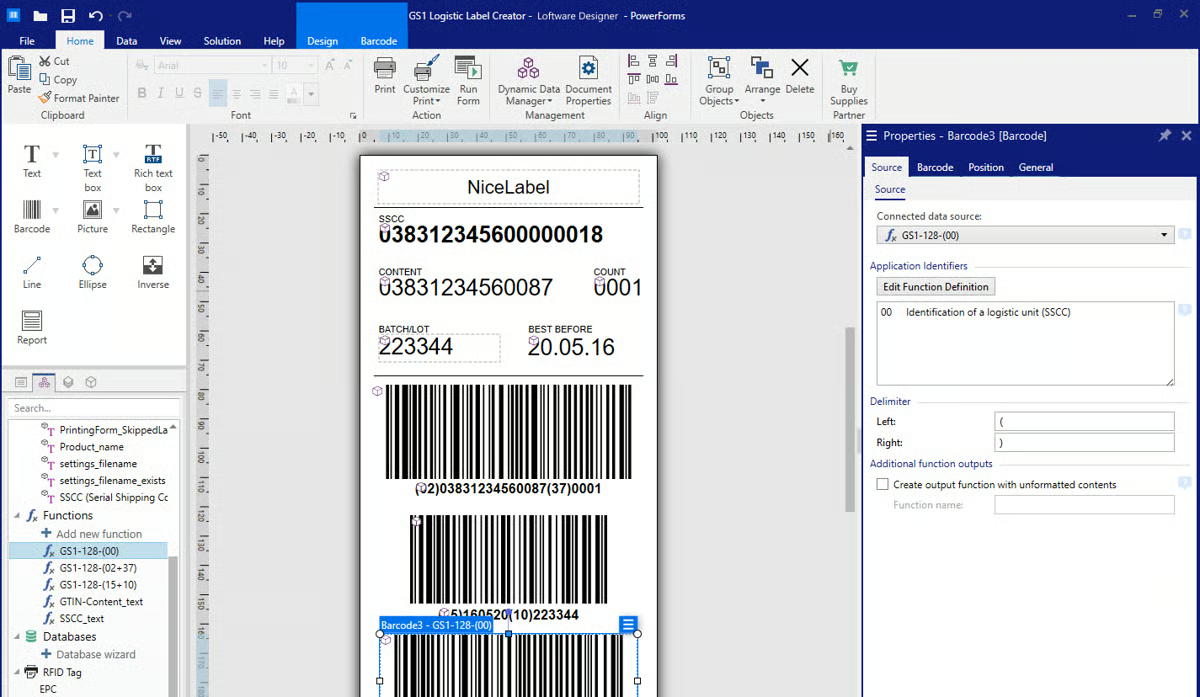
Ease of use for everyday label operations is a quality I see praised repeatedly in the reviews. Users describe the interface as clean and intuitive for standard label creation, barcode addition, and template adjustment. What stands out across reviews is how often new team members are described as productive quickly, without needing deep technical training, the WYSIWYG designer and drag-and-drop field placement making routine tasks accessible to operators who aren’t label design specialists.
Automation capabilities are the final area I consistently see highlighted in G2 reviews of Loftware Cloud. Reviewers highlight folder-based automation triggers, API integrations for programmatic label printing, and Python scripting support for advanced customizations. From what I’ve seen, teams managing automated packaging lines describe using these features to trigger labels directly from production events, reducing operator touchpoints and the errors that come with them.
Where the experience becomes more involved is during initial setup and configuration. Reviewers across multiple industries note that establishing ERP connections, migrating legacy templates, and configuring user roles take significant time and technical effort, particularly for organizations migrating from on-prem solutions. While the Loftware support team and partner network receive credit for helping teams through this process, the initial configuration phase is consistently described as something to plan for rather than expect to be quick.
Printer license management is another area that generates recurring feedback. Reviewers note that the per-printer licensing model, while sensible in principle, can become cumbersome when printers need to be swapped or updated, particularly the seven-day auto-expiry cycle for unused printer licenses, which requires operational workarounds in environments where printers are frequently rotated. That said, for teams with stable printer fleets, this limitation rarely affects day-to-day operations.
Loftware Cloud remains a strong fit for organizations that need enterprise-grade label governance, compliance support, and scalable cloud infrastructure without heavy on-premise overhead.
What I like about Loftware Cloud:
- From what I’ve found in G2 reviews, users consistently value the ERP integration, particularly the way live data from SAP and Oracle flows directly into templates, eliminating manual entry and version conflicts across production lines.
- Reviewers highlight the centralized template governance and compliance features, noting that audit trails, role-based access, and regulatory support make it far easier to manage labeling in highly regulated environments.
What G2 users like about Loftware Cloud:
“The user interface is really clean and intuitive. I didn’t need much training to get started, which saved our team a lot of time. The system handles label creation smoothly, and the templates are flexible enough to adapt to our specific requirements. Integration with SAP works seamlessly without constant glitches.”
– Loftware Cloud review, Jyoti K.
What I dislike about Loftware Cloud:
- The platform’s compliance and integration depth make it a strong enterprise choice, but the initial configuration takes considerably more time. Organizations with complex existing setups should plan for a structured onboarding phase to get the most out of it.
- The printer-based licensing model works well for stable production environments, but the way unused printer slots are reclaimed after seven days can require extra steps when hardware changes frequently. For teams with predictable printer fleets, this is rarely a day-to-day concern.
What G2 users dislike about Loftware Cloud:
“While Loftware Cloud provides strong centralized control and solid compliance features, the initial configuration and integration can feel overly complex. Getting set up and migrating templates from legacy systems often requires significant effort and a high level of technical expertise. Licensing and subscription costs may also be a concern for mid-sized organizations, particularly when scaling the number of users or printers. More intuitive UI improvements, along with more flexible pricing options, would help streamline adoption and further enhance the overall experience.”
– Loftware Cloud review, Raahul G.
Unlock greater efficiency and accuracy in your operations by integrating barcode software.
2. RF-SMART WMS: Best for warehouse label printing natively in NetSuite
RF-SMART WMS occupies a position I find genuinely distinct from the other tools I evaluated: it’s built natively inside NetSuite, which means every label printed, every scan processed, and every inventory movement recorded goes directly into the ERP as the single source of truth, no middleware, no syncing, no reconciliation overhead. From what I’ve found in G2 reviews, for businesses already running on NetSuite, that architecture fundamentally changes how label printing connects to operations.
The native NetSuite integration is what I see reviewers return to most consistently. Unlike third-party WMS solutions that require a separate integration layer, RF-SMART operates directly within the NetSuite environment, inheriting custom fields, workflows, and business logic already configured there. From what I found during my research, reviewers describe this as a meaningful operational advantage, label printing triggers fire from order receipts, production events, and fulfillment workflows without any manual bridging. According to the Summer 2026 G2 Grid, RF-SMART WMS earns a 97% score for ease of doing business with, reflecting how smoothly it fits into existing NetSuite operations.
Real-time inventory accuracy is the benefit I see cited most often when reviewers describe the impact of adopting RF-SMART. Because every scan-based transaction, receiving, picking, packing, and shipping, is recorded directly in NetSuite at the point of work, inventory data stays current without end-of-day batch updates or manual reconciliation. What stands out across reviews is how many teams describe going from significant inventory discrepancy rates to near-perfect accuracy after implementation, with some citing 99.9% inventory accuracy as a measurable outcome.
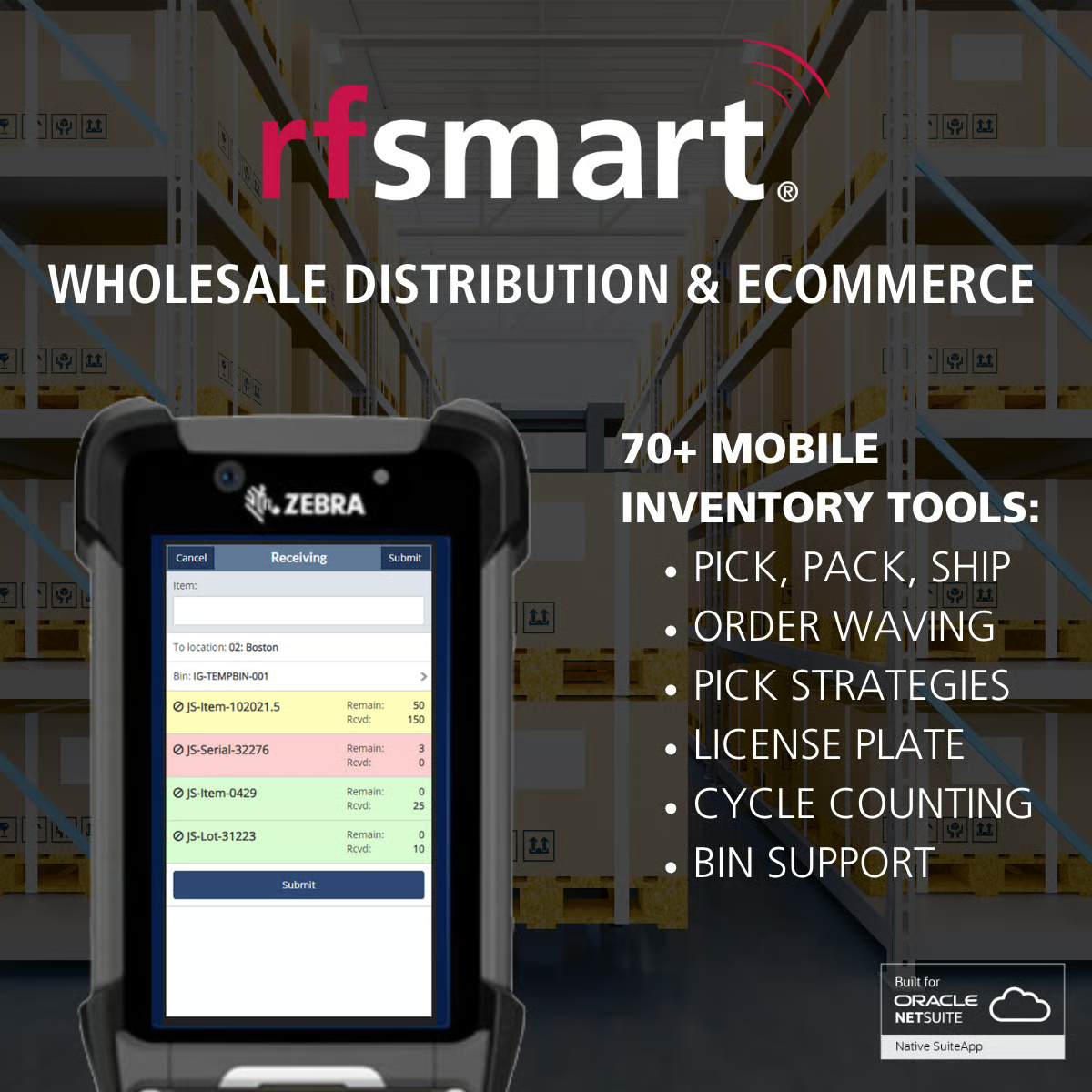
The system’s intuitive interface for warehouse operators is something I see praised consistently across G2 reviews. Reviewers highlight that the handheld scanner menus are clear, logical, and easy to navigate, enabling new warehouse staff to get productive quickly without extended training. According to my research, the scan-based validation at pick, pack, and ship stages also catches errors before they reach the customer, which reviewers in distribution and manufacturing describe as a meaningful reduction in mis-ships and order exceptions.
Customization flexibility is a capability I see valued highly across a wide range of reviewer profiles. RF-SMART supports one-to-many configurations for license plating, BOM management, and workflow customization, allowing teams to shape the system around their specific operational requirements rather than adapting their processes to a rigid framework. From what I’ve found, the implementation team receives repeated credit for helping organizations work through these configurations thoughtfully, which is particularly noted by teams with non-standard fulfillment models.
Customer support quality is the aspect of RF-SMART I see praised most consistently across all reviewer segments. Reviewers from small businesses to mid-market enterprises describe account managers and support staff as genuinely invested in their success, proactively identifying issues, providing custom reports when needed, and staying engaged well beyond go-live. According to G2 data, RF-SMART WMS scores 84% for quality of support, with reviewers frequently describing interactions as feeling more like a partnership than a vendor relationship, something I see called out repeatedly across the 2025–2026 reviews.
The platform’s scalability across distribution center operations is the final strength I see highlighted in reviews. RF-SMART handles picking, receiving, shipping, cycle counting, bin transfers, and label printing within a single interface, reducing the number of separate systems warehouse teams need to manage. From what I’ve found, reviewers running multi-facility operations note that expanding to new sites doesn’t add significant complexity, since the NetSuite-native architecture keeps everything unified under one system of record.
Where the cost structure becomes a point of consideration is around customizations. Because RF-SMART’s base functionality is designed to cover standard warehouse processes, teams with highly specific operational requirements, niche industry processes, and unusual fulfillment models often need custom development, which comes at an extra cost and can also affect eligibility for automatic base-software updates. This is a well-documented tradeoff reviewers acknowledge rather than a flaw, and teams that can operate within standard work rarely encounter it as a barrier.
Some advanced configuration options, particularly around user roles, permission structures, and certain integration settings, can take more time to get right, especially for teams new to WMS implementations. Reviewers note that the setup process is well-supported by the RF-SMART team, but the depth of configuration options means that teams with less technical runway benefit from working closely with implementation partners to get the system tuned correctly.
RF-SMART WMS is a natural fit for NetSuite-powered operations that want label printing, inventory control, and warehouse workflows unified under one native platform.
What I like about RF-SMART WMS:
- Reviewers consistently highlight the native NetSuite architecture as a genuine operational advantage, with label printing and inventory movements recorded directly in the ERP.
- The scan-based validation at every warehouse touchpoint draws repeated praise for reducing errors at pick, pack, and ship.
What G2 users like about RF-SMART WMS:
“Its flexibility to be configured and customized around our business processes is one of its greatest strengths. As a native NetSuite solution, it integrates seamlessly with our existing ERP environment, enabling us to leverage the custom fields, workflows, and business logic already established in NetSuite. The user interface is intuitive, clear, and straightforward, making it easy for users to learn and adopt. Implementation was relatively simple and efficient, supported by a knowledgeable and responsive team that was quick to provide guidance and resolve any issues throughout the process.”
– RF-SMART WMS review, Stefan T.
What I dislike about RF-SMART WMS:
- RF-SMART covers standard warehouse processes well, but teams with highly specialized operational requirements often need custom development to extend beyond the base package. Those customizations are valuable, but they do come at an extra cost, something worth factoring into longer-term planning.
- The platform’s depth of configuration is a strength for experienced teams, but some advanced setup options, particularly around user permissions and integration parameters, take more time to get right than teams with limited technical resources might expect. Working closely with the RF-SMART implementation team from the start helps significantly.
What G2 users dislike about RF-SMART WMS:
“Because it’s native to NetSuite, you need to manage NetSuite’s global settings as well, such as lot tracing and inventory status. For example, you can’t have inventory status enabled in your WMS if it isn’t also enabled in NetSuite.”
– RF-SMART WMS review, Samuel D.
Unlock the full potential of your label printing process by integrating RFID software, streamline inventory management and improve tracking accuracy today.
3. ShipJunction: Best for high-volume ecommerce shipping label automation
ShipJunction is built for e-commerce and wholesale operations where speed, accuracy, and carrier flexibility at scale aren’t optional; they’re what keep the business moving. Reviewers describe it not just as a shipping platform, but as the operational backbone behind high-volume fulfillment, with a support team that functions as an extension of the businesses it serves.
Label printing speed is the capability I see mentioned first across ShipJunction reviews. The system generates shipping labels, packing slips, pick lists, and GS1/UCC-128 compliant documents in under one second, which reviewers in fast-moving fulfillment environments describe as a genuine throughput advantage. From what I found, multiple reviewers managing peak-season volumes of hundreds of orders daily highlight how the batch fulfillment capabilities, pre-printing labels sorted by SKU, carrier, or customer, allow lean teams to process volume that would otherwise require significantly more headcount.
According to G2 Data, ShipJunction earns a 100% score for barcodes and a perfect 100% for printers on the Summer 2026 Grid, reflecting the reliability reviewers describe in real production environments.
Carrier rate shopping is another capability I see consistently highlighted as a key reason reviewers choose ShipJunction. ShipJunction automatically evaluates available carrier options against pre-configured business rules, delivery SLA, weight, destination, and cost, and selects the most cost-effective service for each order. According to my research, reviewers across retail, wholesale, and D2C businesses report meaningful shipping cost reductions after implementation, with some noting that the rate-shopping logic alone covers the platform’s cost. The system integrates directly with FedEx, UPS, USPS, and LTL carriers, handling both parcel and freight workflows from a single interface.
NetSuite integration is particularly deep for a shipping platform, and it’s something I see praised in reviews from teams that have tried other integration approaches. ShipJunction connects directly without third-party connectors, with orders, fulfillment records, and shipping data flowing back into NetSuite automatically after each shipment. From what I’ve found, reviewers describe this as eliminating the manual data entry that used to require dedicated staff time, with several noting that what previously took a team of people now runs with one operator. According to G2 Data, ShipJunction scores a 98% likelihood to recommend on the Summer 2026 Grid, the highest among tools in this roundup, which reflects the level of trust reviewers place in it as a core operational platform.
Customization depth is an area where I see ShipJunction reviews stand out compared to other shipping tools in the category. The platform handles highly complex label specifications, multi-plex label designs, channel-specific EDI documents, retailer-compliance requirements, without requiring the business to change its processes to fit the software. What stands out across reviews is how many long-term customers describe ShipJunction adapting to their evolving requirements over a decade or more, accommodating shifts from B2C to B2B, new carrier relationships, and increasingly complex label specifications as their businesses grew.
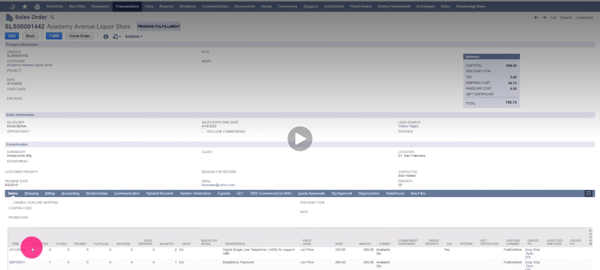
The support model is what earns ShipJunction some of its most enthusiastic reviews. Reviewers describe the team as proactive, often identifying and resolving potential issues before customers notice them, and engaging with a precision and responsiveness that reviewers with many vendor relationships specifically call out as unusual. Several describe backend configuration changes that would require developer intervention with other systems being handled quickly within ShipJunction, reflecting how much operational control the platform gives its team.
EDI and retail compliance labeling round out the platform’s key strengths for wholesale and omnichannel businesses. ShipJunction auto-generates UCC-128 labels and channel-specific documentation to meet trading partner requirements, reducing chargebacks and ensuring on-time retail deliveries without requiring teams to manually track retailer-specific rules.
Because ShipJunction is feature-rich and highly configurable, new users occasionally describe an initial period of orientation as they learn how the system’s rules engine, carrier configurations, and workflow settings work together. Reviewers are quick to note that the documentation is solid and the support team is responsive to questions during this phase, but teams expecting to be fully self-sufficient from day one may find it worthwhile to plan for a structured onboarding period.
Occasional reports of the system going offline due to external factors appear in a small number of reviews. Reviewers note that when this happens, the ShipJunction team is quick to communicate and restore service, but operations-critical teams may want to plan for contingencies during any unexpected downtime windows.
ShipJunction is best suited to ecommerce brands, wholesale distributors, and omnichannel businesses that need fast, accurate, carrier-flexible label generation with the depth to handle complex fulfillment environments.
What I like about ShipJunction:
- Reviewers consistently highlight how the carrier rate-shopping and business rules engine work together to reduce shipping costs without sacrificing delivery SLAs.
- The depth of label customization and EDI compliance support stands out across reviews.
What G2 users like about ShipJunction:
“Seamless integration with NetSuite that is reliable and updates Item Fulfillment Records very quickly. Flexible with GS1 and Pack Manifest customizations. Reliable integration with FedEx, UPS, USPS carrier APls. Flexible third-party and collect billing. Customizable shipping rules. Fast pack-verify. Fast label printing. Flexible LTL shipping. Great customer service.”
– ShipJunction review, Jimmy M.
What I dislike about ShipJunction:
- ShipJunction’s rules engine and carrier configurations are genuinely powerful, but new users may need some time to get comfortable with the platform’s extensive configuration options. The support team and documentation make this manageable, but it’s worth setting realistic expectations for the initial ramp-up.
- A small number of reviewers mention occasional platform downtime linked to external factors outside ShipJunction’s control. The team is consistently described as communicative and quick to restore service when issues arise.
What G2 users dislike about ShipJunction:
“Periodically, ShipJunction will go offline due to external factors not necessarily in their control. Thankfully, their support is quick to get us up and running.”
– ShipJunction review, Mark H.
4. BarTender: Best for enterprise-grade, high-volume labeling
BarTender by Seagull Scientific is one of the most established label printing platforms I’ve encountered in my research, and what I see across G2 reviews is a tool that organizations in manufacturing, regulated industries, and complex supply chains return to because errors in label output carry real compliance or operational consequences. From what I’ve found, reviewers describe a platform that, once implemented, handles production-scale labeling with a depth and reliability that’s genuinely difficult to replicate elsewhere.
The breadth of encoding and barcode capabilities is the differentiator I see cited most often in BarTender reviews. Reviewers across manufacturing, food production, and medical device industries describe the software’s support for virtually every barcode type, UPC, EAN, Code 128, Data Matrix, QR, RFID, and GS1 as a core reason they selected it. What I find particularly notable is the ability to encode RFID tags alongside printed barcodes in a single workflow, which reviewers in industries with dual-track traceability requirements describe as a capability that other tools simply don’t offer.
According to the Summer 2026 G2 Grid, BarTender earns a 100% score for WYSIWYG design and 98% for compliance, reflecting the consistent quality reviewers describe at the label output level.
Variable data printing from external sources is another strength I see described consistently across G2 reviews. Reviewers describe connecting BarTender directly to SAP, Oracle, SQL databases, and Excel spreadsheets to drive dynamic label content, product names, serial numbers, batch codes, expiry dates, without manual data entry at print time. From what I’ve found, this ERP-connected automation is especially valuable for businesses managing large SKU catalogs, where re-keying data would introduce unacceptable error risk, and multiple reviewers describe BarTender eliminating the need for operators to input any label data at all once templates are configured.
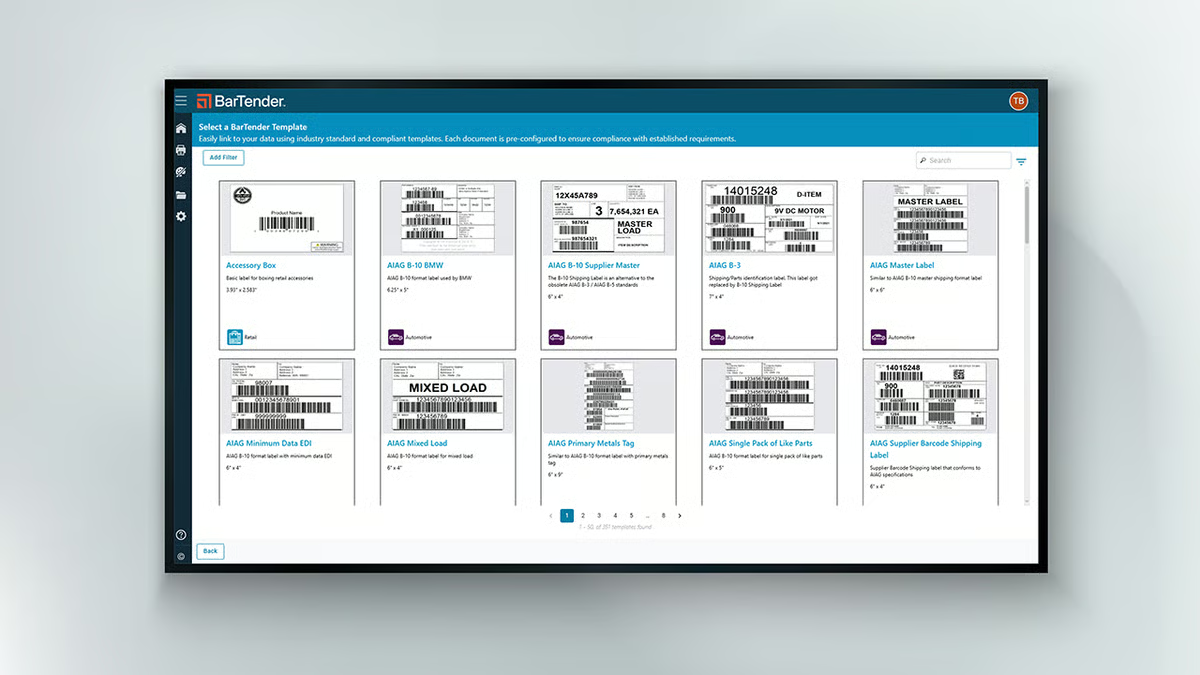
Pre-built template libraries consistently receive praise for accelerating label creation. Rather than building from scratch each time a new SKU or product line is introduced, reviewers describe customizing existing templates in minutes, which is particularly valuable when working under production deadlines. The template system also supports conditional logic, allowing a single template to display different content based on data values, which reduces the total number of templates teams need to maintain.
Integration depth with printing operations is a recurring theme I see in reviews from teams running automated production environments. Reviewers describe BarTender’s ability to communicate with printers, query databases, run pre-print checks, and confirm data accuracy before a label is produced, all in a single automated workflow. From what I’ve found, this goes well beyond basic print-to-label functionality and is what makes BarTender a natural fit for environments where label accuracy directly affects compliance, traceability, or customer delivery.
Reliability in sustained production environments draws repeated comments. Reviewers managing day-in, day-out production labeling describe BarTender as stable, consistent, and capable of handling high print volumes without degradation. Once a solution is configured and deployed, the system performs with a predictability that operations teams value highly. According to G2 Data, BarTender scores 81% for user adoption, reflecting a platform that, while it takes time to learn, becomes deeply embedded in workflows once teams are up to speed.
Flexibility across hardware and printing environments rounds out the platform’s key strengths. BarTender supports a wide range of thermal, industrial, and desktop printers and adapts to varied network printing architectures, including centralized print server models, distributed printing, and cloud-connected configurations, depending on the edition deployed.
BarTender’s depth of barcode encoding and data integration makes it a reliable choice for high-volume production environments. That said, reviewers note that attaching photos or importing scanned label artwork can produce blurry results, and recreating a label from a physical copy by scanning and importing it as an image works only to a point. Several reviewers mention that an AI-assisted tool to read and transcribe text from scanned label images would meaningfully improve this workflow. For teams whose labeling is primarily data-driven, serial numbers, barcodes, and ERP-connected variable fields, this limitation rarely surfaces as a day-to-day concern.
On the installation side, however, reviewers note that the software carries a heavier footprint than lighter alternatives, there is no streamlined install option for workstations that only need Print Station functionality, and the update process can be slow, particularly when multiple print stations need to be kept in sync. A small number of reviewers also note that printer errors can occasionally disrupt an active workflow until the issue is resolved. For teams running stable, well-maintained deployments where updates can be planned, these are manageable considerations rather than ongoing friction.
BarTender is a strong fit for enterprises and mid-market businesses that need a proven, compliance-capable labeling platform with deep data integration and high-volume production reliability.
What I like about BarTender:
- From what I’ve found across G2 reviews, users consistently value the depth of ERP and database connectivity, the ability to pull variable data from SAP, Oracle, and Excel directly into label templates.
- Reviewers highlight BarTender’s RFID encoding alongside barcode printing as a differentiator in regulated and traceability-heavy environments.
What G2 users like about BarTender:
“I find BarTender incredibly useful for printing labels for the medical devices we manufacture. It provides me with the appropriate tools to handle regulatory requirements both for the EC and US market in a high-quality and user-friendly environment. I particularly appreciate its high-quality machine interface, which simplifies usage, and its versatile functions that offer a wide range of possibilities. The ability to devise labels quickly and achieve high quality in a fraction of the time, thanks to its graphical human interface, is a big plus. Additionally, the initial setup was very easy, almost click-and-play.”
– BarTender Review, Estar M.
What I dislike about BarTender:
- BarTender handles data-driven label content, barcodes, serial numbers, and variable fields with consistent precision, but importing scanned artwork or photos can produce blurry results, and an AI-assisted transcription tool for scanned label images would close a real gap for teams recreating labels without a clean digital source file.
- Once deployments are stable, BarTender runs reliably across high-volume production environments, but the installation carries more weight than lighter alternatives; there’s no streamlined option for Print Station-only workstations, and updates across multiple stations can be slow. Printer errors can occasionally disrupt an active workflow, though they’re resolvable once addressed.
What G2 users dislike about BarTender:
“The ability to automate BarTender is a little bit involved. Not that it can’t be done, but it does take some of that learning. Accessing the resources that train that aspect of BarTender does not work as well for us and could be improved.”
– BarTender review, Eric W.
Unlock the full potential of your label printing process by integrating RFID software, streamline inventory management and improve tracking accuracy today.
5. Label LIVE: Best for collaborative label design for small teams
Label LIVE earns the Highest Performer badge on the G2 Label Printing Software Grid and has built a loyal following among small businesses, food producers, medical device companies, and event teams that need professional-quality label output without the overhead of enterprise software. What distinguishes it from heavier alternatives is a combination of genuine ease of use and a surprisingly deep feature set. Reviewers describe it as a tool that feels simple until you realize how much it can do.
Batch printing via CSV/XML automation is the capability I see praised most by reviewers with higher-volume needs. What stands out across reviews is how one reviewer describes automating their entire order printout workflow through CSV folder dumps, calling it a capability they hadn’t found in any other tool they’d evaluated. The batch processing engine reliably handles hundreds of labels per session, with the WYSIWYG interface ensuring what reviewers see in design is exactly what prints across different printer models.
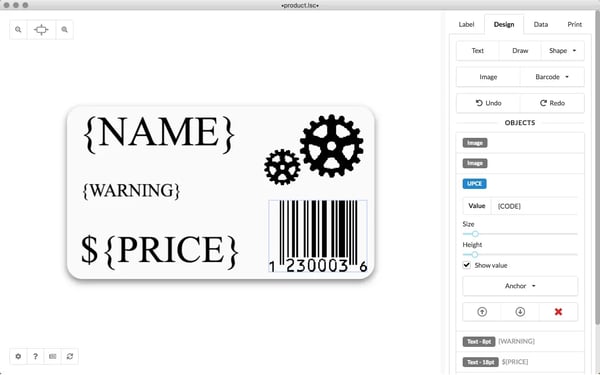
Spreadsheet and database integration is another strength I see described consistently by reviewers who need to manage label data at scale. Label LIVE connects directly with Excel and Google Sheets via HTTP/MQTT, pulling data into label templates without manual re-entry. Reviewers managing inventory labels, compliance labels with serial numbers, and batch product labels describe this as one of the features that move Label LIVE beyond basic design tools.
Cross-platform compatibility, supporting both macOS and Windows, is something I see called out as a genuine differentiator in the reviews. Several reviewers specifically highlight that this is rare in label software, where macOS support is frequently limited or absent.
Barcode and compliance label support rounds out the core strengths. Reviewers from medical device companies, food producers, and farms describe successfully generating FDA-compliant labels with GS1-standard serial numbers using simple Excel spreadsheets as the data source, without needing specialized labeling expertise.
Label LIVE handles UDI requirements, GS1 barcodes, and complex label structures with variable data, which earns it credibility in regulated industries that might otherwise assume a tool at this price point couldn’t meet compliance requirements. According to G2 Data, Label LIVE scores 95% for compliance and 91% for autofill on the Summer 2026 Grid, underscoring consistent performance in these areas.
Customer support quality is one of the most distinctive aspects of the Label LIVE experience, and reviewers describe it in terms that stand out even in a category where support is commonly cited. Multiple users describe interacting directly with the developer, who is responsive, technically expert, and willing to build new features based on feedback, sometimes within a day of a request. This hands-on developer engagement creates a level of responsiveness that reviewers with experience across many software vendors describe as genuinely unusual.
Occasional UI lag appears in a small number of recent reviews. Reviewers note it doesn’t happen often and doesn’t affect core functionality, but teams printing high volumes of labels in rapid succession may notice intermittent slowness. For most users, this is described as a minor inconvenience rather than a workflow-blocking issue.
The default font library is more limited than what professional design tools offer, and importing custom logos or high-resolution artwork can produce results that are less polished than reviewers accustomed to dedicated design software might expect. For teams focused primarily on functional labeling, barcodes, product data, and compliance content, this rarely surfaces as a barrier. Those with more demanding graphic design requirements may want to evaluate the design output quality for their specific use case.
Label LIVE is particularly well-suited to small businesses, independent retailers, medical device teams, and food producers who need reliable, professional-quality label output with minimal setup and a strong what you offer at an accessible price point.
What I like about Label LIVE:
- Reviewers consistently highlight the CSV/XML folder-drop batch automation as a standout feature, describing how it transforms label generation from a manual, label-by-label task into a largely hands-off process, particularly valuable for teams managing order processing or high-volume inventory labeling.
- The combination of cross-platform macOS and Windows support with direct spreadsheet integration draws consistent praise from small teams working in mixed environments, who note that finding a tool with both capabilities at this price point is genuinely rare.
What G2 users like about Label LIVE:
“Label Live makes it easy to layout a label design and map data to the design. Flexible barcode support and alignment options make it my go-to tool for any label need.
– Label LIVE review, Chris G.
What I dislike about Label LIVE:
- Label LIVE’s interface handles the vast majority of label workflows smoothly, but occasional UI lag may appear during high-volume print sessions. It does not appear to affect core functionality, though teams with high throughput requirements should test performance in their own environments.
- The platform works well for functional labeling needs, but its font library and graphic rendering options are more limited than design-focused tools. For teams prioritizing barcodes, data, and compliance labels over brand-heavy designs, this is unlikely to be a major issue.
What G2 users dislike about Label LIVE:
“I found that bringing in an already designed logo was not as graphic friendly in rendering high quality art as with the DYMO software in its day. The default font library is somewhat limited though I haven’t explored the ability to use the wider variety of system fonts installed on my computer.”
– Label LIVE review, Mark A.
Best label printing software: Frequently asked questions (FAQs)
Got more questions? Get your answers below!
Q1. What is the label printing software with the best value for small teams printing barcodes and shipping labels?
BarTender Starter and Seagull Scientific BarTender offer the best value for small teams printing barcodes and shipping labels. Both provide essential barcode and label printing features at a low per-seat cost, support major thermal printer brands, and include built-in templates for common label formats, making them cost-effective without sacrificing functionality.
Q2. What is the best label printing software for a small logistics or ecommerce company with ERP integration?
NiceLabel and Loftware Spectrum are the best label printing software options for a small logistics or ecommerce company with ERP integration. Both support direct integration with ERPs like SAP, Oracle, and Microsoft Dynamics, enabling automated label generation from live order and shipment data without manual data entry.
Q3. What is the label printing software with the best ease of use and shortest learning curve for small teams?
Canopy Labs LabelJoy and Avery Design & Print offer the best ease of use and shortest learning curve for small teams. Both feature drag-and-drop editors, pre-built templates, and guided setup flows that allow non-technical users to design and print labels within minutes of installation.
Q4. What is the label printing software with the best reliability for high volume printing without errors or downtime?
Loftware NiceLabel and TEKLYNX SENTINEL offer the best reliability for high volume printing without errors or downtime. Both are built for enterprise-grade print environments, support redundant print server configurations, and include error-handling and reprint management features that minimize label misprints and production stoppages.
Q5. What is the easiest label printing software to set up for a small operations team without IT support?
Shipstation and Pirateship are the easiest label printing software options to set up for a small operations team without IT support. Both are fully cloud-based, require no hardware configuration or driver installation, and offer step-by-step onboarding that allows teams to start printing shipping labels within the same day.
Q6. What is the label printing software with the best template customization for GS1 and compliance labels?
BarTender by Seagull Scientific and TEKLYNX CODESOFT offer the best template customization for GS1 and compliance labels. Both provide certified GS1 barcode symbologies, structured data fields, and compliance-ready templates for industries including food and beverage, pharmaceuticals, and retail, with built-in validation to ensure labels meet regulatory standards.
Q7. What is the best label printing software for thermal printers with ERP and shipping carrier integration?
NiceLabel and BarTender are the best label printing software options for thermal printers with ERP and shipping carrier integration. Both natively support Zebra, Honeywell, and SATO thermal printers, connect to major ERPs, and integrate with shipping carriers like UPS, FedEx, and DHL to pull live shipment data directly into label templates.
Q8. What is the best label printing software for Mac-based operations teams without third party driver dependencies?
Labelmaker for Mac and DYMO Label Software are the best label printing software options for Mac-based operations teams without third party driver dependencies. Both are designed for native macOS compatibility, work without requiring additional printer drivers, and support standard label and barcode formats out of the box.
Q9. What is the best barcode and shipping label software with ERP and warehouse management system integration?
Loftware NiceLabel and Seagull Scientific BarTender are the best barcode and shipping label software options with ERP and warehouse management system integration. Both offer pre-built connectors for leading ERP and WMS platforms, support real-time data triggers for automated label printing, and are widely deployed in warehouse and distribution environments.
Q10. What is the best label printing software for small manufacturing and ecommerce businesses?
BarTender Starter Edition and Finale Inventory with integrated label printing are the best label printing software options for small manufacturing and ecommerce businesses. Both balance affordability with functionality, supporting product labels, shipping labels, and compliance barcodes, while scaling as business volume grows.
May all your labels stick where they belong!
The best label printing software evaluated here offers a range of capabilities to meet different business needs, from ease of use and accessible pricing to enterprise-grade integrations and high-volume production reliability.
Your requirements will differ depending on the size of your business, your ERP environment, and the complexity of your labeling needs, so it’s always a good idea to evaluate a few options against your specific workflows before committing to one.
Design and customize labels like a pro with the best graphic design software.