I didn’t realize how much work goes into managing digital signage until I started reading reviews from the people responsible for keeping screens updated every day.
On paper, it sounds straightforward: put content on a screen and update it when needed. In reality, the people managing digital displays are often juggling menu changes, company announcements, promotions, event schedules, wayfinding information, and emergency messages across multiple screens and locations. The bigger the network gets, the harder it becomes to keep everything accurate, timely, and consistent.
That’s what stood out to me while evaluating the best digital signage software. Most teams aren’t looking for more ways to create content. They’re looking for a practical way to manage screens without turning every update into a manual task. Whether it’s a retailer updating promotions across stores, a healthcare facility sharing patient information, or an office communications team keeping employees informed, the underlying challenge is often the same: delivering the right content to the right screen at the right time.
To understand which platforms handle that challenge well, I evaluated digital signage software based on usability, content management capabilities, remote administration, deployment flexibility, hardware compatibility, scalability, and overall user feedback. In this guide, I’ll walk through the tools that stood out, where they fit best, and the trade-offs I found during my research so you can choose the right platform for your environment.
8 best digital signage software for 2026: My top picks
- Yodeck: Best for multi-location screen management without dedicated IT support
Combines easy deployment, remote management, scheduling, and integrations in a platform that scales with growing screen networks. (Free for one screen; paid plans start at $8/screen/month) - OptiSigns: Best for live data-driven digital signage
Connects screens to calendars, dashboards, spreadsheets, social feeds, and other real-time data sources that update automatically. (Plans start at $9/screen/month) - Rise Vision: Best for school communication and emergency alerts
Brings together digital signage, wireless screen sharing, and CAP-compliant emergency messaging for education-focused environments. (Plans start at $9.99/display/month) - Appspace: Best for workplace communication and space management
Combines digital signage, employee communications, desk booking, room reservations, and workplace management in one platform. (Pricing available on request from vendor) - ScreenCloud Digital Signage: Best for content governance across multiple locations
Helps organizations manage content permissions, screen groups, and communications workflows while maintaining control over who publishes what. (Plans start at $20/screen/month) - Zoom Workplace: Best for organizations already using Zoom
Extends Zoom’s collaboration ecosystem with digital signage, workspace reservations, visitor management, and room displays. (Included through Zoom Workplace and Zoom Spaces plans; paid plans start at $41.58/room/month) - Play Digital Signage: Best for budget-conscious organizations
Offers an affordable, easy-to-manage signage platform with a free first screen and broad hardware compatibility. (First screen free; paid plans start at $7.20/screen/month.) - REACH Media Network: Best for hands-on support and custom signage deployments
Pairs digital signage software with custom design assistance, onboarding support, and ongoing account guidance. (Plans start at $20/month.)
*These digital signage software solutions are top-rated in their category, according to the G2 Summer 2026 Grid Report, and each product has at least 100 verified G2 reviews. I’ve also added their monthly pricing to make comparisons easier for you.
Why I think every business should look into the best digital signage software
The need for digital signage isn’t slowing down anytime soon. In fact, the global digital signage market is projected to grow from $21.07 billion in 2026 to $30.91 billion by 2032 as organizations increasingly adopt digital displays to improve customer engagement and real-time communication.
That growth doesn’t surprise me. Across retail stores, healthcare facilities, schools, restaurants, corporate offices, and hospitality venues, screens have become an important part of how information is delivered. Whether it’s promoting products, sharing updates, displaying schedules, or communicating with employees, organizations are relying on digital signage for far more than simple advertising.
The challenge is that managing those displays becomes more complicated as screen networks grow. A handful of screens might be easy to update manually, but managing content across multiple locations, departments, or teams requires a more structured approach. That’s where digital signage software comes in. It gives organizations a central place to manage content, schedule updates, control displays remotely, and keep messaging consistent across every screen.
As I explored this category, I found that different platforms are built for different priorities. Some focus on simplicity and fast deployment, while others are designed for larger screen networks, workplace communications, or highly customized content experiences. The tools in this guide represent a range of approaches, making it easier to find a solution that fits your organization’s needs.
How did I find and evaluate these best digital signage tools?
I started with G2’s latest Grid Report for digital signage software to identify the highest-rated products in the category. To narrow down the list, I looked at G2 Score, customer satisfaction ratings, market presence, review volume, and review recency. This helped me focus on platforms that consistently receive positive feedback from verified users and are actively used by organizations managing digital displays.
From there, I analyzed user reviews to understand how these tools perform in real-world environments. I paid particular attention to feedback around content management, remote screen administration, deployment and setup, scheduling capabilities, hardware compatibility, scalability, reliability, integrations, and ease of use. My goal was to understand not just what each platform offers, but how effectively it helps teams manage displays across one or multiple locations.
I also used AI to analyze hundreds of G2 reviews and identify recurring themes, strengths, limitations, and common use cases across the category. This helped me understand which platforms are best suited for different needs, whether that’s managing a handful of screens with limited IT support, coordinating content across distributed locations, improving internal communications, or supporting larger digital signage networks.
The screenshots featured in this article come from G2 vendor listings and publicly available product documentation.
What I looked for before recommending these digital signage tools
When I started narrowing down the list, I wasn’t looking for the platform with the most templates, integrations, or flashy display options. Those can be useful, but they don’t matter much if the tool makes everyday screen management harder than it needs to be. What mattered more to me was how well each platform helps teams keep content updated, manage displays remotely, and maintain a consistent experience across one or multiple locations.
- Ease of setup and daily use: Digital signage often sits with operations, marketing, facilities, HR, or office teams, not always dedicated IT teams. I paid close attention to whether users could set up screens, upload content, build playlists, and make updates without a steep learning curve.
- Content management and scheduling: A good digital signage platform should make it easy to organize content and decide when and where it appears. I looked for tools that support scheduling, playlists, templates, and location-based content control because these features are what keep screen updates from becoming repetitive manual work.
- Remote screen management: Once displays are installed, teams need a reliable way to manage them without being physically present. I considered how well each platform supports remote updates, screen monitoring, device grouping, and troubleshooting across different locations.
- Hardware flexibility: Some teams want to use existing TVs, media players, or smart displays, while others prefer a more controlled hardware setup. I looked at how flexible each tool is when it comes to devices and deployment options, especially for organizations trying to avoid unnecessary hardware changes.
- Reliability and performance: Digital signage is only useful when screens stay online and content displays as expected. I paid attention to user feedback around uptime, playback consistency, offline support, and how quickly teams can identify or resolve screen issues.
- Scalability across locations: Managing one or two screens is very different from managing displays across branches, campuses, clinics, restaurants, or offices. I gave more weight to tools that help teams organize screen networks, assign permissions, and scale without adding too much operational complexity.
- Fit for different communication needs: Not every team uses digital signage the same way. Some need menu boards and promotions, others need workplace announcements, school updates, patient communications, or wayfinding. I looked for platforms that clearly support specific use cases rather than treating every screen network the same way.
In total, I reviewed more than 20 digital signage solutions before narrowing the list to the eight platforms featured in this guide. While no single product will be the right fit for every organization, each tool stood out for addressing a specific screen management challenge particularly well.
The list below contains genuine user reviews from G2’s Digital Signage Software category. To be included in this category, a solution must:
- Display various types of content, such as images, text, and video
- Allow for content to be uploaded to an electronic sign
- Give users the ability to manage content from a remote location
- Provide the ability to update content frequently
*This data was pulled from G2 in 2026. Some reviews may have been edited for clarity.
1. Yodeck: Best for multi-location screen management without dedicated IT support
Yodeck is a cloud-based digital signage platform that helps organizations create, schedule, and manage content across multiple displays from a centralized dashboard. As I evaluated the platform, I found that its biggest appeal isn’t a single standout feature. It’s how consistently users describe Yodeck as easy to deploy, easy to manage, and capable of supporting growing screen networks without requiring specialized expertise.
Ease of use was one of the strongest themes I found in G2 reviews. Several users mention creating playlists, publishing content, and managing displays shortly after getting started. That feedback aligns with Yodeck’s 94% ease-of-use score on G2. What stood out to me was that reviewers often described the platform as approachable enough for operations, marketing, and administrative teams rather than just IT staff.
I noticed a similar trend around setup. Many reviewers describe getting screens connected and content live much faster than they expected, whether they were using Raspberry Pi devices or Amazon Signage Sticks. Yodeck’s 94% ease-of-setup score reflects that experience well. For organizations deploying digital signage for the first time, that lower barrier to entry can make a meaningful difference.
Remote content management is where I think Yodeck creates the most value. Several reviewers managing displays across offices, retail locations, schools, and community spaces described being able to update content and monitor screens without ever visiting the site. For distributed organizations, that level of control can significantly reduce administrative work. It’s also Yodeck’s highest-rated capability on G2, earning a 97% satisfaction score.
Content scheduling came up repeatedly during my research. Users frequently mention scheduling announcements, promotions, and recurring content weeks in advance rather than making manual updates every day. I found that many teams view scheduling as a practical time-saving feature rather than a convenience. That likely explains why it remains one of Yodeck’s strongest-rated capabilities, earning a 93% satisfaction score.
Integrations surfaced more often in reviews than I expected. Yodeck connects with Canva, Microsoft 365, Google Workspace, OneDrive, Power BI, Airtable, Monday.com, and BambooHR. Several users describe workflows where content updates automatically from tools their teams already use, reducing the need to manage everything directly inside the signage platform. For organizations with shared content ownership, that flexibility appears particularly valuable.
Another area that impressed me was customer support. Several reviewers specifically mention responsive communication, helpful troubleshooting, and support teams that stay involved until issues are resolved. I tend to pay attention when support appears repeatedly in unsolicited feedback because it usually signals a meaningful part of the user experience. In Yodeck’s case, that positive sentiment aligns with its 94% support rating on G2.
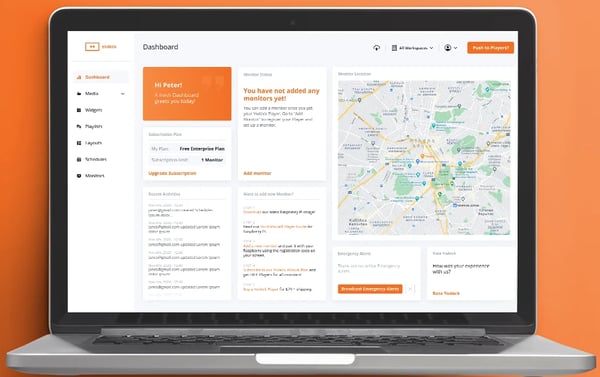
That said, I did come across some recurring feedback around advanced layout customization. While users generally find everyday content management straightforward, reviewers creating complex multi-zone displays occasionally describe the design process as more involved. The platform offers plenty of flexibility, but teams building highly customized layouts may need extra time to learn how zones, widgets, and dynamic content work together.
I also found some discussion around pricing as deployments grow. The free first screen and affordable entry point are often cited as reasons users choose Yodeck initially. However, some reviewers note that costs become more noticeable as additional screens are added or advanced plans become necessary. For smaller deployments, this rarely seems to be an issue, but organizations planning larger rollouts should account for long-term scaling costs.
What ultimately stands out to me about Yodeck is how well it balances simplicity and scalability. It gives smaller teams an accessible starting point while offering enough scheduling, remote management, and integration capabilities to support growth. For organizations managing screens across multiple locations without dedicated AV or IT resources, it’s one of the strongest fits I found in this category.
What I like about Yodeck:
- The remote management capabilities stood out to me. Several reviewers managing displays across multiple locations describe being able to update content and monitor screens from anywhere as a major operational advantage.
- I also like how approachable the platform feels. Based on the reviews I analyzed, teams can get started quickly without sacrificing the scheduling, integrations, and management features they need as deployments grow.
What G2 users like about Yodeck:
“Yodeck offers many ways to share information on screens. It not only allows you to upload your own images, but it also integrates with tons of apps. The performance is great once you get everything connected, and if you’re having any issues, the customer service is very helpful. The backend is very user-friendly, which is a huge plus for teaching others how to use it. But one of the biggest pluses of them all is the pricing. I’ve worked with multiple services similar to this, and by far, the pricing is the best for what YoDeck offers.”
– Yodeck review, Genesis R.
What I dislike about Yodeck:
- Based on G2 feedback, creating highly customized multi-zone layouts can take more effort than the platform’s otherwise intuitive workflows might suggest. Teams with straightforward signage needs are unlikely to encounter this often, but organizations focused on complex screen designs should expect a learning curve.
- Some reviewers mention that per-screen pricing becomes a bigger consideration as deployments expand. For small and mid-sized organizations, the value remains strong, but teams planning large-scale screen networks should evaluate long-term costs as part of their decision.
What G2 users dislike about Yodeck:
“One inconvenience is the pricing structure: even when the same content is displayed across multiple screens, each screen is billed separately. It would be more reasonable if identical content on multiple screens could be grouped without additional charges.”
– Yodeck review, Seong-Wook .
2. OptiSigns: Best for live data-driven digital signage
The more I evaluated OptiSigns, the more I saw it as a content automation platform rather than a traditional digital signage tool. Many users aren’t simply uploading images and videos. They’re connecting calendars, dashboards, spreadsheets, social feeds, and other live data sources to screens that update automatically throughout the day.
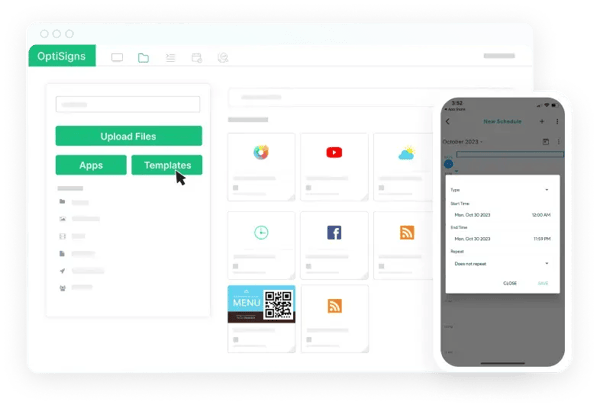
That ability to pull in dynamic content is what stood out most to me. OptiSigns integrates with more than 140 applications, including Google Calendar, Power BI, Tableau, Excel, Canva, and social media platforms. Several reviewers describe replacing manual screen updates with automated workflows, allowing content to stay current without constant attention.
I also found that teams use OptiSigns for a surprisingly wide range of use cases. Some display meeting room schedules and company announcements, while others use it for menus, visitor information, operational dashboards, or promotional content. What ties these deployments together is the need for information that changes frequently.
Hardware flexibility is another area where OptiSigns differentiates itself. The platform works across Android, Windows, ChromeOS, Linux, Raspberry Pi, Fire TV Stick, and several smart TV environments. I came across multiple reviews highlighting native support for LG webOS and Samsung Tizen displays because it allows organizations to launch signage without adding separate media players.
Another theme I noticed was decentralized content ownership. Many reviewers described giving departments control over their own displays instead of routing every request through IT. That experience aligns with OptiSigns’ 93% satisfaction score for multi-user access. For organizations managing a large number of screens, that shift can reduce bottlenecks and speed up content updates.
Remote management also earns consistently strong feedback. Users managing displays across multiple locations frequently mention being able to update content, swap playlists, and publish announcements from any browser. It’s one of the platform’s highest-rated capabilities on G2, with a 95% satisfaction score, and it appears to be a key reason organizations can scale their deployments efficiently.
What’s interesting is that ease of use remains a recurring positive despite the platform’s depth. Several reviewers mention getting comfortable with OptiSigns quickly, even while managing multiple content sources and integrations. That feedback is reflected in its 93% ease-of-use rating and suggests the platform balances flexibility with accessibility reasonably well.
 Source: OptiSigns
The most common criticism I found relates to navigation. Some reviewers mention that managing playlists, assets, and folders can feel less streamlined than they’d like, especially as content libraries grow. However, the feedback typically centers on efficiency rather than capability, and many users say the experience improves once their content structure is established.
I also came across occasional concerns about pricing tiers. Some advanced functionality sits behind higher plans, which can catch teams off guard if they don’t evaluate requirements upfront. For most standard signage deployments, the core plans appear sufficient, but organizations with more specialized design needs may want to review plan limitations before committing.
If your displays depend on information that changes constantly, OptiSigns makes a compelling case. The combination of live integrations, hardware flexibility, collaborative content management, and automation makes it particularly well-suited for organizations that want screens to stay current without relying on manual updates.
What I like about OptiSigns:
- The integration ecosystem is one of the strongest I evaluated. Several reviewers describe connecting calendars, dashboards, spreadsheets, and social feeds directly to displays so content updates automatically.
- I also like the hardware flexibility. Native support for LG webOS and Samsung Tizen displays can reduce deployment complexity and eliminate the need for additional media players.
What G2 users like about OptiSigns:
“It’s easy to share files (folders) and playlist access across users, which makes managing the screens a shared responsibility and really encourages collaboration. I also like how simple it is to upload images and drop them straight into a playlist. The website runs quickly, so making updates is smooth and hassle-free. And being able to use the app on a smart TV is a huge win!”
– OptiSigns review, Hope W.
What I dislike about OptiSigns:
- Based on G2 feedback, organizing assets, playlists, and content libraries can require more navigation than some users expect. The platform remains highly capable, but larger deployments benefit from a clear content structure from the start.
- Some reviewers note that certain advanced features are reserved for higher-tier plans. For most organizations, the available functionality covers everyday signage needs, but teams with specialized requirements should verify feature availability before scaling.
What G2 users dislike about OptiSigns:
“Optisigns has some useful features, but I found the interface a bit confusing and not as intuitive as expected. It took longer than anticipated to set everything up, and the support response time could be faster. With some improvements in user-friendliness and quicker support, it could be a stronger platform.”
– OptiSigns review, Paul A.
3. Rise Vision: Best for school communication and emergency alerts
Rise Vision feels less like a traditional digital signage platform and more like a communication hub for schools and community-focused organizations. As I evaluated the platform, I found that its strongest differentiators weren’t flashy design tools or extensive integrations. Instead, Rise Vision focuses on helping organizations share information, present content, and communicate during critical situations from a single system.
The first thing that stood out to me was the template library. Several reviewers mention that the ready-made templates helped them launch displays quickly without relying on designers or creating content from scratch. With templates covering announcements, events, achievements, menus, and dashboards, the platform appears particularly useful for teams that need polished content with minimal effort.
Ease of use was another recurring theme. Many reviewers are educators, administrators, or office staff rather than dedicated signage managers, yet they frequently describe the platform as approachable. That feedback aligns with Rise Vision’s 93% ease-of-use score on G2. I found several examples of users training colleagues to update displays without extensive onboarding.
What separates Rise Vision from most competitors is its built-in screen sharing capability. Instead of purchasing a separate presentation solution, users can wirelessly share content to displays directly through the platform. For classrooms, meeting spaces, and training environments, that combination of signage and presentation functionality can simplify technology management considerably.
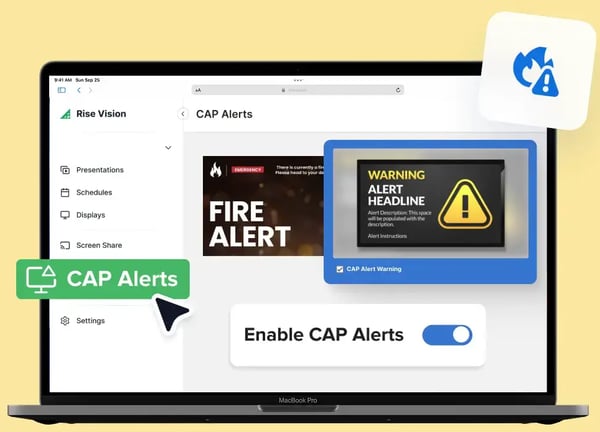
Emergency alerting is another capability that repeatedly surfaced during my research. Rise Vision supports Common Alerting Protocol (CAP) compliant alerts, allowing organizations to automatically display emergency notifications across connected screens. For schools and healthcare facilities, where timely communication can be critical, this adds a layer of value that extends well beyond standard digital signage.
I also noticed how frequently reviewers mentioned Google ecosystem integrations. Rise Vision connects with Google Workspace, Google Classroom, Google Drive, and YouTube, making it easier to display information that teams are already managing elsewhere. For educational institutions that rely heavily on Google tools, these integrations appear to streamline content updates and reduce duplicate work.
Remote content management remains one of the platform’s strongest-rated capabilities, earning a 95% satisfaction score on G2. Several reviewers managing screens across multiple buildings describe being able to update announcements, schedules, and presentations from a central location. For districts and organizations with distributed facilities, that centralized control seems to save significant time.
 Source: Rise Vision
One limitation I encountered involves template customization. While users generally praise the quality of the template library, some reviewers mention that editing layouts beyond their intended structure can feel restrictive. For routine announcements and school communications, this doesn’t appear to be a major issue, but organizations with strict branding requirements may occasionally want more design flexibility.
I also found some feedback around the platform’s scheduling structure. A few reviewers mention needing time to understand how presentations, schedules, and displays connect within the system. Most describe this as an onboarding challenge rather than a long-term frustration, and many note that the platform becomes much easier to manage once those relationships are understood.
Rise Vision makes the most sense for organizations that view displays as part of a broader communication strategy. Schools, churches, healthcare facilities, and community organizations that need digital signage, screen sharing, and emergency messaging in one platform are likely to find more value here than in tools focused solely on content display.
What I like about Rise Vision:
- The combination of digital signage, wireless screen sharing, and emergency alerting makes Rise Vision feel uniquely suited for schools and community-focused organizations.
- I also like the template library. Several reviewers mention being able to create professional-looking displays quickly without needing dedicated design resources.
What G2 users like about Rise Vision:
“Rise Vision is a great way to keep our school community informed. We use it to share important news, celebrate success, and welcome new staff. The templates are incredible. They have everything that you need for special events, holidays, and easy to use countdowns! The templates save A LOT of time. This has really helped build school morale and improve communication.”
– Rise Vision review, Matt H.
What I dislike about Rise Vision:
- Based on G2 feedback, customizing prebuilt templates can feel limiting for organizations that need highly specific layouts or branding standards. For most communication-focused use cases, the templates work well, but advanced customization may require external design tools.
- Some reviewers mention an initial learning curve around understanding how schedules, presentations, and displays work together. Most users describe this as a setup-stage challenge that becomes easier once the platform structure is familiar.
What G2 users dislike about Rise Vision:
“The only downside we have found so far is restriction in some of the animated templates. I wish there was a way to add in some animation when designing from a blank template to keep content engaging instead of having to use the pre-made templates for animated pieces. But they all look lovely and we use them anyway!”
– Rise Vision review, Kaitlyn C.
4. Appspace: Best for workplace communication and space management
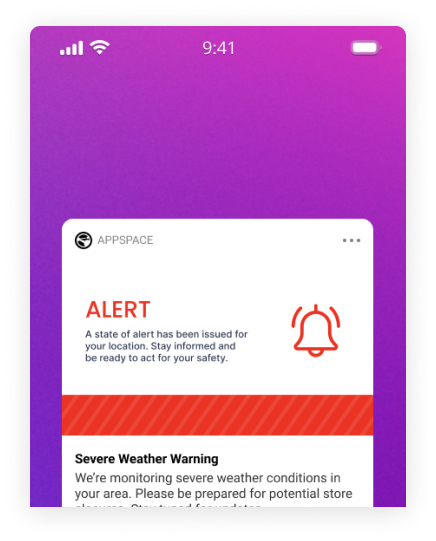
Most digital signage platforms focus on screens. Appspace takes a broader approach. As I evaluated the platform, I found that digital signage is only one part of the story. Appspace combines employee communications, desk and room booking, workplace management, and digital signage into a single platform, making it particularly relevant for organizations looking to consolidate multiple workplace tools.
Ease of use stood out immediately. Several reviewers describe implementing and managing the platform without extensive technical expertise, which is notable given how much functionality Appspace includes. That feedback aligns with its 96% ease-of-use score on G2. I found that many users viewed Appspace as surprisingly approachable for a platform aimed at larger organizations.
The strongest value proposition, in my view, is consolidation. Rather than managing separate solutions for digital signage, employee communications, desk reservations, and visitor experiences, organizations can run those functions through a single system. Several reviewers specifically mention replacing disconnected workplace tools and simplifying administration as a result.
Space management is another area where Appspace differentiates itself from every other platform on this list. Users can manage desk reservations, meeting room bookings, floor plans, and workplace occupancy from the same environment that powers digital signage. I found several reviews from hybrid workplaces where employees used Appspace to see who would be in the office, reserve workspaces, and navigate facilities more efficiently.
Employee communication capabilities surfaced frequently in the feedback I analyzed. Beyond displaying content on screens, Appspace supports company news, announcements, newsletters, mobile communications, and targeted messaging. Several reviewers describe using the platform to reach both office-based and frontline employees through a single communication channel, helping reduce information gaps across distributed teams.
I was also interested in the platform’s growing use of AI. Appspace includes tools for content creation, template customization, and content generation, helping teams create workplace communications more efficiently. For organizations producing large volumes of content across departments and locations, these capabilities appear to reduce some of the manual work involved in keeping communications current.
Appspace’s one of the strongest-rated capabilities is remote content management, earning a 96% satisfaction score on G2. Users managing displays across offices frequently describe being able to update content, schedule campaigns, and control screens from a central location. That level of control becomes especially valuable for organizations operating across multiple buildings or regions.
 Appspace: Appspace
One trade-off I see is that Appspace’s breadth can create complexity. Some reviewers mention that the interface feels dense at first because communications, signage, booking, and workplace management capabilities all live within the same platform. Organizations adopting multiple modules often view this depth as a benefit, but teams looking for only a basic signage solution may find the platform more extensive than they need.
I also came across occasional feedback related to signage synchronization and large-scale administration. A small number of reviewers mention issues involving content syncing or managing large deployments efficiently. These concerns don’t appear frequently enough to overshadow the platform’s overall satisfaction ratings, but organizations running business-critical communications across many locations may want to validate those workflows during evaluation.
Appspace makes the most sense for organizations trying to unify workplace experiences rather than simply manage displays. If your goals include employee communications, hybrid workplace management, room and desk booking, and digital signage under one roof, Appspace offers a level of consolidation that few competitors in this category can match.
What I like about Appspace:
- What stands out most to me is the platform’s ability to combine digital signage, employee communications, and workplace management in a single system. Several reviewers describe replacing multiple tools and simplifying administration as a result.
- I also like how deeply Appspace supports hybrid work environments. Desk booking, room reservations, floor plans, and workplace communications all work together instead of operating in separate applications.
What G2 users like about Appspace:
“The best tools that I like is the content card system in Appspace. It’s what made the switch for our comms team effective. With it, I can create a piece of content once and decide where it goes. The same content can go to mobile apps, the lobby screen, and the Internet simultaneously without any need for reformatting or republishing. Previously, our communication coordinator had to manually upload the same content to three separate systems each time something needed to be shared.”
– Appspace review, Suhaila I.
What I dislike about Appspace:
- I can see why some reviewers describe Appspace as a lot to take in initially. Communications, signage, desk booking, and workplace management all live in the same platform, which is valuable if you’re using multiple modules but can feel heavier than necessary if signage is your only priority.
- A few reviewers point to occasional synchronization and administration challenges in larger deployments. These comments aren’t common, but organizations managing business-critical communications across many locations may want to validate those workflows during implementation.
What G2 users dislike about Appspace:
“I would say the layout editor is pretty “clunky”. Anytime I try to create something with a little more precision (multiple zones or widgets) it becomes quite fiddly very quickly and often times doesn’t act the way I expected it to. There are some integrations that are also restricted more than I would like regarding the display of information. A small, but somewhat annoying issue – sometimes when a screen loses its connection to the internet, it is not always immediately clear in the dashboard until the screen remains blank for a while.”
– Appspace review, Marc F.
5. ScreenCloud Digital Signage: Best for content governance across multiple locations
As I evaluated ScreenCloud Digital Signage, I found that its biggest differentiator is content control. The platform feels designed for organizations that need to manage messaging across multiple locations, teams, and stakeholders without losing visibility into who can publish what and where. That focus makes it particularly appealing to marketing, communications, and IT teams operating at scale.
The first thing that stood out to me was how often reviewers praised the user experience. Several users describe the platform as intuitive enough for non-technical teams while still offering the controls larger organizations need. That feedback aligns with ScreenCloud’s 94% ease-of-use rating on G2. What I found interesting is that many reviewers were comparing it to other signage platforms rather than evaluating it in isolation.
Content organization is where ScreenCloud makes its strongest case. Its Channels feature allows teams to group and distribute content across specific screens, locations, or audiences. Several reviewers mention using Channels to manage regional campaigns, seasonal promotions, and location-specific messaging without manually updating every display. For organizations managing large screen networks, that structure appears to simplify ongoing operations.
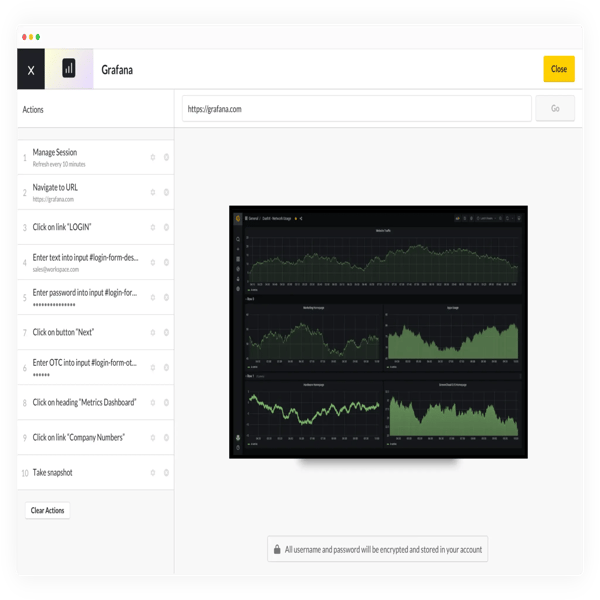
Reliability surfaced as another recurring theme. As I worked through the reviews, I found several users describing ScreenCloud as a platform that simply runs in the background without requiring constant attention. That experience is reflected in its remote content management score, which earns a 95% satisfaction rating on G2. For teams responsible for screens across multiple sites, dependable remote administration can be just as important as content creation itself.
Security and governance came up more frequently here than with most other products I evaluated. ScreenCloud supports features such as SSO, SAML, and role-based permissions, allowing organizations to control who can create, edit, and publish content. Several reviewers specifically mention these controls as important for managing signage across multiple departments while maintaining oversight and consistency.
I also noticed growing interest in the platform’s AI-assisted workflows. Users describe pulling information from websites, generating content summaries, and publishing updates without moving between multiple tools. While these capabilities aren’t the primary reason organizations adopt ScreenCloud, they appear to help communications teams keep content current with less manual effort.
Another strength is the platform’s ability to support internal communications. Several reviewers use ScreenCloud to display company announcements, KPI dashboards, operational updates, and workplace information rather than traditional marketing content. That flexibility allows organizations to treat digital signage as an employee communication channel rather than simply a display network.
 Source: ScreenCloud Digital Signage
The most common criticism I encountered relates to customization. Some reviewers mention wanting more control over templates and layout design, particularly when trying to create highly specific branded experiences. The existing editor appears sufficient for most common use cases, but teams with strict design requirements may occasionally run into limitations.
Pricing was the second area where I found recurring concerns. ScreenCloud’s per-screen pricing can become a larger consideration as deployments grow, particularly for organizations managing displays across many locations. Several reviewers still view the platform as a worthwhile investment, but teams planning large-scale rollouts should evaluate long-term costs alongside the governance and security benefits they’re receiving.
ScreenCloud stands out most for organizations that view digital signage as a managed communications channel rather than a collection of screens. If content governance, security controls, and multi-location consistency matter as much as the content itself, ScreenCloud offers a level of structure that few other platforms in this category emphasize as strongly.
What I like about ScreenCloud Digital Signage:
- The Channels feature stood out to me because it gives teams a structured way to organize and distribute content across locations without manually managing every screen.
- I also like the platform’s emphasis on governance and security. Features like role-based permissions, SSO, and SAML support make it easier to manage content ownership across larger organizations.
What G2 users like about ScreenCloud Digital Signage:
“I like ScreenCloud Digital Signage because of its ability to create channel playlists and individual media playlists. This feature allows me to really narrow down where and what content is going, which is great for tailoring our messaging to specific locations. Additionally, I appreciate being able to set availability and time expirations for content, which is really helpful for adjusting during season changes and product updates. The platform being very easy and intuitive makes it an all-in-one solution for our needs.”
– ScreenCloud Digital Signage review, Danny F.
What I dislike about ScreenCloud Digital Signage:
- ScreenCloud works well for most common signage use cases, but I noticed some reviewers wanting more freedom when customizing layouts and templates. Teams with highly specific branding standards may occasionally find themselves looking for additional design flexibility.
- Pricing tends to come up most often among organizations managing a large number of displays. Many users still view the platform as a worthwhile investment, but it’s worth mapping out costs early if you expect your screen network to grow significantly.
What G2 users dislike about ScreenCloud Digital Signage:
“The analytics could be better. More detailed reporting would help track engagement and improve content effectiveness. Some integrations could use more customization to fit specific needs, and adding more built-in features would reduce the need for third-party apps. But overall, it’s a solid system that works well for us.”
– ScreenCloud Digital Signage review, Blake C.
6. Zoom Workplace: Best for organizations already using Zoom
Most digital signage platforms start with screens and expand outward. Zoom Workplace takes the opposite approach. It starts with meetings, communication, and collaboration, then extends into digital signage, room management, desk booking, and visitor experiences through Zoom Spaces. As I evaluated the platform, it became clear that its biggest advantage isn’t signage itself—it’s the ability to add signage into an ecosystem many organizations already use every day.
The first thing that stood out to me was familiarity. Several reviewers mention that employees already know how to use Zoom, which removes much of the adoption challenge that comes with introducing new workplace technology. That feedback aligns with Zoom Workplace’s 91% ease-of-use score. Instead of training teams on another platform, organizations can extend tools they’re already comfortable using.
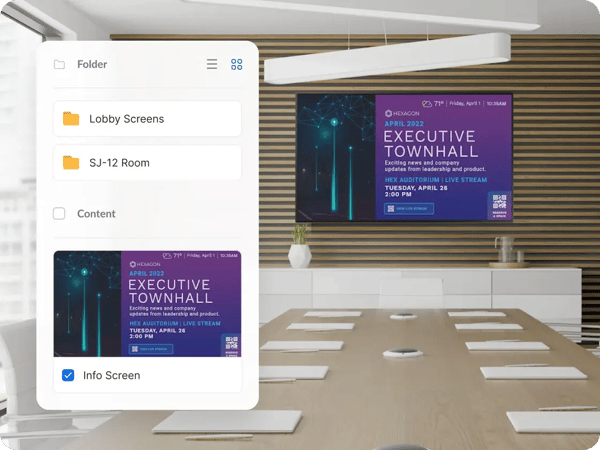
I found the strongest value proposition in Zoom Spaces. Through the same platform, organizations can manage digital signage, meeting room displays, workspace reservations, and visitor check-ins. Several reviewers describe consolidating multiple workplace functions into a single environment rather than maintaining separate systems for communications and space management.
AI Companion was another capability that appeared repeatedly in recent feedback. Users mention relying on it for meeting summaries, action items, transcriptions, and follow-up content. What makes it particularly notable is that these AI capabilities are included within paid plans rather than requiring a separate add-on. For organizations already using Zoom heavily, that additional functionality can create meaningful workflow efficiencies.
Video communication remains one of Zoom’s biggest strengths. Several reviewers specifically mention reliability during large meetings, company-wide broadcasts, and cross-functional collaboration. While this isn’t directly a signage feature, I found it relevant because many organizations adopting Zoom Spaces are looking for a broader workplace platform rather than a standalone display solution.
Another advantage is platform consolidation. Zoom Workplace combines meetings, chat, phone, calendar, whiteboards, documents, and workplace management into a single experience. Several reviewers describe reducing the number of tools employees switch between throughout the day. For organizations focused on simplifying technology stacks, that consolidation appears to be a meaningful benefit.
Content scheduling is one of Zoom Workplace’s strongest-rated signage capabilities, earning a 90% satisfaction score on G2. Users managing displays across offices mention being able to schedule announcements, workplace information, and digital content through the same environment used for broader employee communications. That connection between signage and communication workflows feels like one of the platform’s more practical strengths.
 Source: Zoom Workplace
One challenge I encountered in the reviews is that Zoom Workplace has grown significantly beyond its original purpose. Some users mention that the interface can feel crowded because meetings, chat, AI features, workplace tools, and signage all live within the same ecosystem. For organizations using multiple modules, that breadth can be valuable. For teams seeking a dedicated signage solution, however, it may feel like more platform than they actually need.
Pricing was the second area where I found recurring concerns. Several reviewers note that advanced workplace capabilities, room solutions, and add-ons can increase costs beyond the base subscription. For organizations already invested in Zoom, the consolidation benefits may offset those expenses. For teams evaluating Zoom primarily for digital signage, the economics may be less straightforward than purpose-built alternatives.
Zoom Workplace makes the most sense for organizations that already rely on Zoom as their communication backbone. If meetings, chat, collaboration, and workplace management are already happening inside Zoom, extending that environment to include digital signage through Zoom Spaces can be a simpler and more efficient approach than introducing another standalone platform.
What I like about Zoom Workplace:
- I think the biggest advantage is consolidation. Several reviewers describe managing communications, room booking, workplace reservations, and digital signage through a single platform rather than juggling multiple vendors.
- AI Companion stands out as a practical addition. Users frequently mention meeting summaries, action items, and transcription capabilities helping reduce administrative work without requiring a separate AI subscription.
What G2 users like about Zoom Workplace:
“I find the Workspaces tab in Zoom Workplace really useful for allowing employees to reserve desks, manage visitors, and use digital signage. I appreciate the Zoom Rooms features like ‘smart name tags’ that help remote participants identify in-person colleagues. I love that Zoom Workplace consolidates meetings, phone, team chat, email, and calendar into one app, eliminating the ‘toggle tax’ and saving about four hours per week lost while switching between different tools.”
– Zoom Workplace review, Vijaykumar B.
What I dislike about Zoom Workplace:
- One trade-off of Zoom Workplace is that signage sits inside a much larger collaboration platform. Several reviewers mention that the growing collection of meetings, chat, AI, and workplace tools can make navigation feel busier than dedicated signage solutions.
- I also came across feedback from organizations evaluating Zoom primarily for signage. In those cases, the bundled workplace capabilities can increase costs beyond what a purpose-built signage platform might require, even though existing Zoom customers often benefit from the consolidation.
What G2 users dislike about Zoom Workplace:
“Zoom Workplace is definitely feature-rich, but the growing number of tools and settings can make the interface feel a bit overwhelming at times, especially for new users. I’ve also noticed that resource usage can be more noticeable during longer meetings. On top of that, some of the more advanced collaboration features are limited to higher-tier plans, which may not be ideal for smaller teams working with tighter budgets.”
– Zoom Workplace review, Sumisha J.
7. Play Digital Signage: Best for budget-conscious organizations
As I evaluated Play Digital Signage, I kept coming back to one theme: simplicity. Unlike some platforms that expand into workplace management, employee communications, or enterprise governance, Play focuses on helping organizations get professional signage running quickly and affordably. That focus makes it especially appealing to small businesses, schools, churches, non-profits, and community organizations.
Ease of use is the first thing that stood out to me. Several reviewers describe creating playlists, publishing content, and managing displays on the same day they signed up. That feedback aligns with Play’s 94% ease-of-use score on G2. What I found particularly interesting is how often users with little or no signage experience described the platform as intuitive.
The pricing model is another major differentiator. Play offers a permanently free first screen and starts at $7.2 per screen per month after that. Several reviewers specifically mention the free screen as the reason they decided to try the platform in the first place. For organizations working with limited budgets, lowering the financial barrier to entry can make digital signage much easier to justify.
Remote content management is where Play delivers the most practical value. Users frequently describe updating screens, changing playlists, and scheduling content without needing physical access to displays. That experience is reflected in the platform’s 96% satisfaction score for remote content management, its highest-rated capability on G2. For organizations managing screens across different locations, that convenience appears to save considerable time.
I also found that Play offers more layout flexibility than its simple interface initially suggests. Several reviewers mention using screen zones to combine videos, announcements, weather updates, social feeds, and tickers on a single display. For organizations that want dynamic content without building complex workflows, those layout options appear to strike a good balance between functionality and ease of use.
Integrations came up frequently in the reviews I analyzed as well. Canva, Google Drive, YouTube, RSS feeds, social media platforms, and Google Calendar are among the tools users commonly connect to their displays. Several reviewers describe building content in Canva and publishing it directly through Play, creating a workflow that feels accessible even for organizations without dedicated design resources.
Another strength I noticed was hardware flexibility. Play supports Amazon Fire TV Stick, Android, Windows, Linux, Raspberry Pi, and Google TV devices. Users frequently praise how quickly they can get screens running on existing hardware, particularly with Amazon Fire TV deployments. That flexibility helps keep both setup costs and technical complexity relatively low. 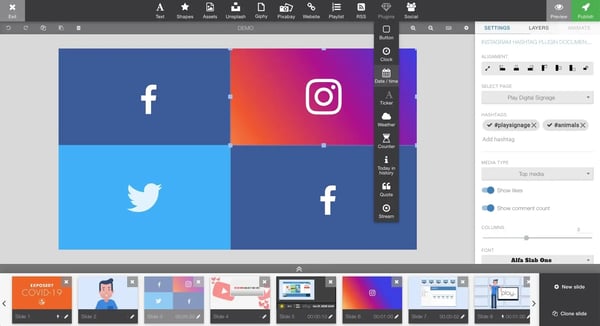
There are things to consider, too. While users generally appreciate the platform’s simplicity, some reviewers mention that the native editor can feel standard when creating highly customized layouts. For most announcements, promotions, and informational displays, this doesn’t appear to be an issue, but organizations with detailed branding requirements may prefer to create content in external tools like Canva.
I also found occasional feedback around scaling and device performance. Some reviewers managing larger screen networks mention that per-screen pricing becomes a bigger consideration as deployments grow. A few users also note that performance can vary on lower-spec or unsupported hardware. Reviews remain largely positive overall, but organizations planning large deployments should pay attention to both hardware recommendations and long-term costs.
Play Digital Signage makes the strongest case for organizations that want professional signage without contracts, complexity, or enterprise-level overhead. If your goal is to launch displays quickly, manage them remotely, and keep costs predictable, Play offers one of the most accessible paths into digital signage that I found during my evaluation.
What I like about Play Digital Signage:
- The permanently free first screen lowers the barrier to entry significantly. Several reviewers mention being able to test and run signage without making a major financial commitment.
- I also like how approachable the platform feels. Based on the reviews I analyzed, users can create content, publish displays, and manage screens without needing dedicated technical expertise.
What G2 users like about Play Digital Signage:
“We use Play Digital Signage at our school as a welcome screen at the main entrance, and we are very satisfied with it. The system is easy to use and makes it simple to share important information, news updates, events, and announcements with students, colleagues, and visitors.
Updating content is quick, and everything can be managed remotely with ease. This ensures that the information displayed on the screen is always up to date. Adding images, videos, and presentations is also straightforward and hassle-free.”
– Play Digital Signage review, Remco P.
What I dislike about Play Digital Signage:
- Play’s simplicity is one of its strengths, but it does come with some trade-offs. Reviewers looking for highly customized layouts or detailed branding controls occasionally mention reaching the limits of the native editor and turning to Canva for additional flexibility.
- A small number of reviewers mention that the economics become less compelling as screen counts grow. I also saw occasional comments about performance differences on lower-spec hardware, which makes it worth following the platform’s recommended device guidelines.
What G2 users dislike about Play Digital Signage:
“In the beginning, the platform has many options and settings, which can cause some confusion for new users. Some settings are not so intuitive at first glance, but after the initial adaptation period, usage becomes simpler and more efficient.”
– Play Digital Signage review, Umberto A.
8. REACH Media Network: Best for hands-on support and custom signage deployments
Most digital signage platforms sell software. As I worked through REACH Media Network reviews, I got the impression that REACH is selling something broader: software backed by a highly involved service team. That difference shows up repeatedly in how customers describe their experience. Rather than focusing solely on features, many reviewers talk about onboarding, design guidance, and ongoing support as key reasons they continue using the platform.
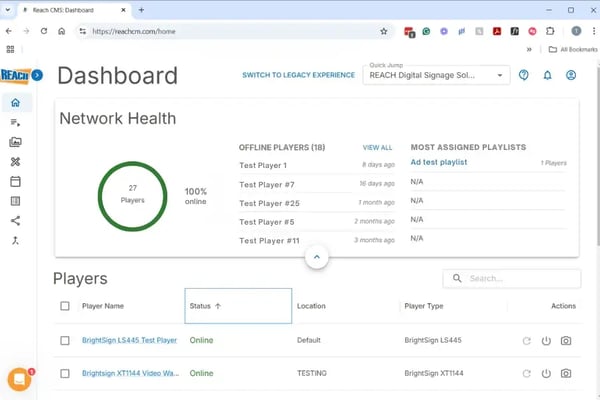
Support is where REACH separates itself most clearly from the rest of the category. Several reviewers describe account managers helping with deployment planning, technical questions, security reviews, and content strategies long after implementation. That experience helps explain why support is REACH’s highest-rated category on G2, earning a 98% satisfaction score. Few products on this list receive that level of praise for the people behind the platform.
I also noticed that design assistance comes up far more often than I expected. Instead of relying entirely on prebuilt templates, several organizations describe working with REACH to create custom-branded layouts tailored to their specific needs. For teams without dedicated designers, that support appears to remove one of the biggest barriers to launching professional-looking displays.
One audience kept surfacing throughout the reviews: employees who don’t sit behind desks. HR teams, warehouse managers, manufacturers, and operations leaders frequently describe using REACH to communicate with workers who rarely check email or collaboration tools. In these environments, signage functions as a primary communication channel rather than a supplemental one.
Remote content management is another area where REACH performs exceptionally well. Users managing screens across campuses, facilities, and multiple locations frequently mention being able to schedule content, update messaging, and control displays from a central dashboard. That feedback aligns with REACH’s 97% satisfaction score for remote content management, one of the highest feature ratings in the category.
Content scheduling appears to be equally important for many customers. Several reviewers describe setting content to expire automatically, rotating messages throughout the day, and managing communications across different locations without constant manual updates. The platform’s 95% satisfaction score for content scheduling reflects how central that capability is to everyday use.
I was also struck by how often customers discussed live data integrations in practical terms. Rather than simply connecting data sources for the sake of it, reviewers describe pulling transit information, menu updates, schedules, and operational data directly onto screens. For organizations where information changes regularly, that automation helps reduce administrative effort while keeping content accurate.
 Source: REACH Media Network
The most common challenge I encountered relates to platform complexity. Some reviewers mention that advanced customization options and feature depth can feel overwhelming initially, particularly for users responsible for larger deployments. Organizations with straightforward signage needs may find simpler platforms easier to learn, although many reviewers say REACH’s support team helps shorten the learning curve considerably.
I also came across feedback from users who had built workflows around integrations that later changed or were discontinued. These comments are relatively uncommon compared to the overall sentiment, but they highlight the importance of confirming how existing content creation processes fit into the platform before making a long-term commitment.
REACH Media Network makes the strongest case for organizations that want more than software. Schools, healthcare providers, government agencies, manufacturers, and multi-site organizations that value guidance, custom design support, and ongoing partnership will likely find its service-oriented approach as valuable as the platform itself. If having experts available throughout the lifecycle of your signage program matters as much as the technology, REACH stands out from every other tool I evaluated.
What I like about REACH Media Network:
- What stood out most to me was the support experience. Several reviewers describe REACH as a partner throughout deployment and ongoing operations rather than simply a software vendor.
- I also like the custom design assistance. Organizations without dedicated design resources can launch branded, professional-looking displays without building everything from scratch.
What G2 users like about REACH Media Network:
“The Support. Reach Media worked with us through the lengthy evaluation phase and the vetting of the equipment on our network, which took months. Any questions or concerns from our IT department and Chief Risk Officer were addressed in detail. The support was amazing.
After-sales support has been great. End-user questions can be directly addressed, or my department can send in the request for them.
Training is a simple click of a link and picking a time for new users. No, or little, responsibility on our end.”
– REACH Media Network review, Edward J.
What I dislike about REACH Media Network:
- REACH offers considerably more guidance and customization than many competitors, but that depth can create a learning curve at first. Reviewers managing larger deployments occasionally mention needing time to become comfortable with the platform’s more advanced capabilities.
- I also found some feedback from organizations that had built content processes around specific integrations. While these comments are relatively uncommon, they highlight the importance of confirming that your existing workflow aligns with the platform’s current integration options before rollout.
What G2 users dislike about REACH Media Network:
“There are several “clicks” required to upload new media. I’ll also admit there are elements I have to play around with to fully understand, and I’m sure there are additional features I’m not yet well-versed in. I just wish the layout, buttons, and overall features were more user-friendly for those of us who aren’t the best with tech-savvy terms. Sometimes the Display screen doesn’t load right away.”
– REACH Media Network review, verified user
Best digital signage software: Frequently asked questions (FAQs)
Have more questions? Find more answers below.
Q1. What’s the best digital signage provider?
The best digital signage provider depends on your use case. For most organizations, Yodeck stands out for its balance of ease of use, remote management, scheduling, and integrations. If you need workplace communications and space management alongside signage, Appspace is a strong alternative.
Q2. What is the best digital signage software with live TV?
OptiSigns is the strongest option for organizations that need live and constantly changing content on displays. Its extensive integration library supports live data feeds, dashboards, calendars, social media content, and other real-time information sources that keep screens updated automatically.
Q3. How do you choose the best digital signage software?
I recommend focusing on your specific use case rather than the longest feature list. Look for ease of setup, remote management, scheduling capabilities, hardware compatibility, scalability, and content management features. Organizations with multiple locations should also consider user permissions, integrations, and reliability.
Q4. What is the best cloud-based digital signage software?
Yodeck, OptiSigns, and ScreenCloud Digital Signage stand out for centralized cloud management. Each allows teams to manage screens, schedule content, and push updates remotely from a browser.
Q5. What is the best digital signage software for small teams managing displays across multiple locations without IT support?
Yodeck is my top recommendation for this scenario. It combines an intuitive interface, strong remote management capabilities, and straightforward deployment, making it well-suited for organizations that don’t have dedicated AV or IT teams.
Q6. Which is the cost-effective digital signage software for healthcare facilities needing quick deployment and staff-friendly controls?
Yodeck and Play Digital Signage are both strong options. Yodeck offers an easy setup process and remote management, while Play Digital Signage provides an affordable entry point and a simple interface that non-technical staff can manage comfortably.
Q7. Which digital signage platforms work with existing hardware like Google TVs instead of proprietary equipment?
Play Digital Signage, OptiSigns, and Yodeck all support a broad range of hardware, including Android-based devices and Google TV environments. These platforms allow organizations to use existing displays instead of investing in proprietary hardware.
Q8. Which is the digital signage software with the easiest UI and lowest learning curve for non-technical operations staff?
Based on G2 review data, Yodeck stands out for ease of use. Several reviewers mention being able to create playlists, publish content, and manage screens without prior digital signage experience. Play Digital Signage is another strong option for simplicity.
Q9. Which is the highest-rated digital signage software for managing restaurant and clinic displays on a budget?
Play Digital Signage is one of the strongest choices for budget-conscious organizations. Its free first screen, affordable pricing, and straightforward management tools make it a practical option for restaurants, clinics, and small businesses.
Q10. Which is the most trusted digital signage software by operations teams at small medical centers based on user reviews?
Yodeck and REACH Media Network are the tools I would consider first. Yodeck is frequently praised for ease of deployment and management, while REACH Media Network earns exceptionally strong feedback for customer support and hands-on assistance.
Q11. Which is the reliable digital signage platforms that maintain uptime and avoid screen management headaches after deployment?
ScreenCloud Digital Signage, Yodeck, and REACH Media Network stand out for reliability. Reviewers consistently describe these platforms as dependable once deployed, with strong remote management capabilities that reduce ongoing maintenance effort.
Q12. Which are the top digital signage platforms designed for hospitality venues that need reliable systems with fast setup?
Yodeck, OptiSigns, and Play Digital Signage are all strong choices for hospitality environments. They combine straightforward deployment, remote content management, and scheduling features that help hospitality teams keep displays current without extensive technical oversight.
Q13. Which digital signage software lets you manage and update screens from a single dashboard without training?
Yodeck is the clearest fit here. Reviewers frequently describe managing screens, playlists, and content updates through a centralized dashboard with little or no formal training. Play Digital Signage is another user-friendly option.
Q14. Which digital signage systems prevent downtime and content delivery failures across distributed locations?
For organizations managing displays across multiple locations, Yodeck, ScreenCloud Digital Signage, and REACH Media Network offer some of the strongest remote management and administration capabilities. These platforms give teams centralized visibility into displays and make it easier to keep content running consistently across distributed networks.
Finding the right screen for the job
After evaluating these platforms, one thing stood out to me: the best digital signage software isn’t necessarily the one with the most features. It’s the one that makes it easy to keep content updated, relevant, and visible across your organization.
What I found is that every tool on this list solves a slightly different problem. Some prioritize simplicity and affordability, while others focus on workplace communications, live data integrations, space management, or enterprise-level governance. The right choice ultimately comes down to your goals, team size, and how you plan to use your displays.
My advice is simple: focus on the workflows you need today, but choose a platform that can grow with you tomorrow. A little extra flexibility upfront can save a lot of headaches down the road.
If you’re looking to improve communication beyond digital displays, explore the best employee communication software to see how organizations connect with both desk-based and frontline employees.