[ad_1]
In this article, you will learn how to transform a basic tool-calling script into a resilient agent that gracefully handles failures from misbehaving tools, malformed model outputs, and unavailable services.
Topics we will cover include:
- How to structure an iterative agent loop with a safety cap on iteration count.
- The four distinct categories of failure an agent encounters when calling tools, and how to handle each one.
- How to design tool error messages that teach the model how to recover, reducing wasted iterations.
Building a Multi-Tool Gemma 4 Agent with Error Recovery
Introduction
In a previous article, we wired up Gemma 4 to a handful of Python functions using Ollama’s tool-calling API. That gave us a working single-turn dispatcher: the model picks a tool, our code runs it, the model answers. It’s a useful starting point, but it’s a long way from an agent.
One of the things that turns a tool-calling demo into an actual agent is how it handles things going wrong. Tools fail. The model hallucinates a function name, or passes a string where you wanted a number, or asks about a city your lookup table has never heard of. An upstream API times out. A required argument is missing. In the previous tutorial, any of these would either crash the script or get swallowed by a try/except that prints a message and gives up. That’s fine for a single path demo. It’s not fine for anything you’d want to leave running.
This article rebuilds the agent around the assumption that things will go wrong, and shows how to recover gracefully when they do. The pattern is simple: catch errors at the boundary, convert them into messages the model can read, send them back to the model, and let the model decide whether to retry, route around the problem, or explain the failure to the user. We’ll also wrap everything in a proper iterative agent loop with a safety cap on iteration count.
The full script can be found here. This article walks through the parts that matter.
Rethinking the Tool Loop
The original dispatcher ran a single round: send the user query, collect tool calls, run them, send the results back, print the model’s reply. That’s a one-shot interaction. It works fine when the model’s first response correctly answers the user’s question, but it has nowhere to go when something goes wrong. If a tool fails, the model gets one chance to react and then we’re done. If the model wants to call another tool after seeing the first result, too bad; we already exited.
A proper agent loop is iterative. The structure is straightforward:
- Send the current message history to the model.
- If the model produces tool calls, execute each one, append every result to the history, and loop again.
- If the model produces a plain text response, that’s the final answer. Return.
- Cap the loop at
MAX_ITERATIONSso a confused model can’t burn through your CPU forever.
That last point is non-negotiable. Small models occasionally get stuck calling the same tool repeatedly, or oscillating between two tools, and there’s nothing more demoralizing than walking back to your terminal to find your laptop’s fans screaming because Gemma decided to look up the weather in London thirty times in a row.
Here’s the loop:
|
1 2 3 4 5 6 7 8 9 10 11 12 13 14 15 16 17 18 19 20 21 22 23 24 25 26 27 28 29 30 31 32 33 34 35 36 37 38 39 40 41 42 43 44 45 |
def run_agent(user_query): messages = [{“role”: “user”, “content”: user_query}]
for iteration in range(1, MAX_ITERATIONS + 1): payload = { “model”: MODEL_NAME, “messages”: messages, “tools”: available_tools, “stream”: False, }
print(f“[EXECUTION — iteration {iteration}]”) print(” ● Querying model…\n”)
try: response_data = call_ollama(payload) except Exception as e: print(f” └─ [ERROR] Error calling Ollama API: {e}”) print(f” └─ Make sure Ollama is running and {MODEL_NAME} is pulled.”) return
message = response_data.get(“message”, {}) tool_calls = message.get(“tool_calls”) or []
# Branch A: the model wants to use tools if tool_calls: print(f“[TOOL EXECUTION — {len(tool_calls)} call(s)]”) messages.append(message) tool_messages = print_tool_calls(tool_calls) messages.extend(tool_messages) print() continue
# Branch B: the model produced a final answer print(“[RESPONSE]”) print(message.get(“content”, “”) + “\n”) return
# Safety rail: we exhausted MAX_ITERATIONS without a final answer print(“[RESPONSE]”) print( f“Hit the {MAX_ITERATIONS}-iteration cap without a final answer. “ “This usually means the model is stuck in a tool-calling loop. “ “Try simplifying the query.\n” ) |
The pattern is worth committing to memory because it shows up in every agent framework you’ll ever read: the message history is the state. For each iteration we send the entire conversation (the original user query, the model’s tool-call request, our tool results, any follow-up model messages) back to the model. The model is stateless; the list is the agent’s memory.
This iterative structure is also what makes error recovery possible. When a tool fails and we send the error back as a tool message, the model gets to see that error and react to it on the next iteration. Without the loop, there’s nothing to react into.
Building the Tool Registry
Here we build our four tools, all deterministic, all offline. No API keys, no network calls, no flaky external services to debug. The point of this article is the error-handling architecture, not the tools themselves, so we want the tools to behave predictably so we can focus on the framework around them, and so we can deliberately trigger every failure mode at will.
The tools are:
get_weather(city): looks up a city in a small dict of canned weather dataget_local_time(city): computes the real current time in that city’s timezone usingzoneinfoconvert_currency(amount, from_currency, to_currency): does the math against a hardcoded USD-anchored rate tableget_city_population(city): another lookup against a small dict
The static data lives at the top of the file:
|
CITY_DATA = { “london”: {“timezone”: “Europe/London”, “population”: 8_982_000}, “tokyo”: {“timezone”: “Asia/Tokyo”, “population”: 13_960_000}, “sao paulo”: {“timezone”: “America/Sao_Paulo”, “population”: 12_330_000}, “paris”: {“timezone”: “Europe/Paris”, “population”: 2_161_000}, “new york”: {“timezone”: “America/New_York”, “population”: 8_336_000}, “sydney”: {“timezone”: “Australia/Sydney”, “population”: 5_312_000}, “mumbai”: {“timezone”: “Asia/Kolkata”, “population”: 20_410_000}, }
EXCHANGE_RATES = { “USD”: 1.00, “EUR”: 0.92, “GBP”: 0.79, “JPY”: 156.40, “BRL”: 5.12, “CAD”: 1.37, “AUD”: 1.51, “INR”: 83.20, } |
The functions are deliberately simple, but they raise on bad input rather than returning error strings. Here’s get_weather:
|
def get_weather(city: str) -> str: “”“Returns current weather conditions for a known city.”“” key = city.lower().strip() if key not in WEATHER_DATA: raise ValueError( f“Unknown city: ‘{city}’. Known cities: {‘, ‘.join(sorted(WEATHER_DATA.keys()))}.” ) data = WEATHER_DATA[key] return f“The weather in {city.title()} is {data[‘conditions’]} with a temperature of {data[‘temp_c’]}°C.” |
Two things to call out about that error message. First, it’s specific: it tells the caller what went wrong and what the valid options are. Second, the tool raises a ValueError rather than returning the error as a string. Don’t catch and string-format errors inside the tool; instead, let them propagate. We want the dispatcher to handle every kind of failure in one place, and we want the message the model sees on a bad input to be informative enough that the model can correct itself.
get_local_time does the only real work — actual timezone-aware datetime arithmetic — and that’s also the tool we’ll later use to demonstrate graceful degradation against a simulated upstream failure:
|
1 2 3 4 5 6 7 8 9 10 11 12 13 14 15 16 17 18 19 20 21 22 23 24 25 26 27 28 29 30 31 32 33 34 35 36 37 38 39 40 41 42 43 44 45 46 47 48 49 50 51 52 53 54 55 56 57 58 59 60 |
def get_local_time(city: str) -> str: “”“Returns the current local time for a city, with a cached fallback.”“” key = city.lower().strip()
# Simulate an upstream geocoding service that may fail unpredictably if SIMULATE_GEOCODING_OUTAGE and random.random() < 0.6: if key in TIMEZONE_FALLBACK_CACHE: tz_name = TIMEZONE_FALLBACK_CACHE[key] now = datetime.datetime.now(ZoneInfo(tz_name)) return ( f“[cached] The current local time in {city.title()} is “ f“{now.strftime(‘%H:%M on %A, %B %d, %Y’)} ({tz_name}). “ “Note: geocoding service is currently unavailable; this value is from the local cache.” ) raise ToolUnavailableError( f“Geocoding service is unavailable and ‘{city}’ is not in the local cache. “ “Please try again later or use a city from the cache: “ f“{‘, ‘.join(sorted(TIMEZONE_FALLBACK_CACHE.keys()))}.” )
if key not in CITY_DATA: raise ValueError(f“Unknown city: ‘{city}’. Known cities: {‘, ‘.join(sorted(CITY_DATA.keys()))}.”) tz_name = CITY_DATA[key][“timezone”] now = datetime.datetime.now(ZoneInfo(tz_name)) return f“The current local time in {city.title()} is {now.strftime(‘%H:%M on %A, %B %d, %Y’)} ({tz_name}).” That <code>SIMULATE_GEOCODING_OUTAGE</code> flag lets us reproduce a real–world failure mode without needing real infrastructure to fail. We‘ll come back to it.
The tool schemas are unchanged from <a href=”https://machinelearningmastery.com/how-to-implement-tool-calling-with-gemma-4-and-python/” target=”_blank”>the previous tutorial’s</a> style: standard Ollama function–calling format, with clear descriptions of what each tool does and what arguments it expects.
<h2>The Four Error Recovery Patterns</h2> Time to get serious. There are four distinct failure modes you‘ll encounter when an agent talks to tools, and each one needs its own strategy. They’re handled in a single dispatcher function, but it‘s worth understanding them as separate concepts.
<h3>Pattern 1: Tool Execution Errors</h3> The first defense is the dispatcher itself. It wraps every tool call in a structured <code>try</code>/<code>except</code> block and converts every kind of failure into a <code>(status, content)</code> pair the agent loop can pass back to the model:
<pre class=”lang:default decode:true”>def dispatch_tool_call(tool_call): function_name = tool_call[“function”][“name”] arguments = tool_call[“function”][“arguments”] or {}
# Defense 1: validate the tool name against the registry if function_name not in TOOL_FUNCTIONS: return “error”, ( f”Unknown tool ‘{function_name}‘. “ f”Valid tools are: {‘, ‘.join(TOOL_FUNCTIONS.keys())}.“ )
func = TOOL_FUNCTIONS[function_name]
# Defense 2: catch argument errors (wrong types, missing or extra args) try: result = func(**arguments) return “ok“, str(result) except TypeError as e: return “error“, f”Bad arguments for {function_name}: {e}“ except ValueError as e: return “error“, str(e) except ToolUnavailableError as e: return “error“, f”Tool temporarily unavailable: {e}“ except Exception as e: return “error“, f”Unexpected error in {function_name}: {type(e).__name__}: {e}“ |
The key insight: return the error to the model as a tool result instead of raising it back to the agent loop. The model can read the error, see that it asked for “Atlantis” and Atlantis isn’t a known city, and pivot to a different city, or apologize to the user. If you raise instead, you’ve stripped the model of the ability to recover.
Notice the four different exception types and the catch-all at the bottom. Each one corresponds to a real category of failure: domain errors (ValueError), signature mismatches (TypeError), infrastructure outages (ToolUnavailableError), and the Don Rumsfeld unknown unknowns (Exception). Separating them gives you cleaner error messages, which give the model better signals for recovery.
The catch-all is important and perhaps controversial. Some style guides will tell you never to catch a bare Exception. In an agent dispatcher, the alternative — letting an unexpected exception kill the loop — is worse. The model loses the chance to recover, the user loses the response, and you lose the conversation history you could have used to debug what happened. Better to catch, log, and hand the message to the model.
Pattern 2: Malformed Tool Calls From the Model
The model occasionally hallucinates a tool name that doesn’t exist, or sends arguments under the wrong keys (town instead of city, for example). The first defense in the snippet above handles the first case: before we even try to dispatch, we check the name against the registry and return a corrective message listing the valid names.
The wrong-argument case is handled by the second defense. Python’s **arguments unpacking raises TypeError if the model sends a keyword the function doesn’t accept, or omits a required one. We catch the TypeError, format it cleanly, and the model gets a useful error on the next iteration:
|
[ERROR]: Bad arguments for get_weather: get_weather() got an unexpected keyword argument ‘town’ |
That message contains everything the model needs to correct itself: the tool name, the offending argument, and an implicit signal that the right name is something else. In practice the model usually fixes the call on its next turn.
There’s also a more subtle argument-related failure: type drift. The model knows amount should be a number, but in longer conversations it occasionally starts sending "100" as a string. Letting convert_currency raise on that would force an extra turn for the model to correct itself. A better approach is defensive coercion in the tool itself:
|
def convert_currency(amount: float, from_currency: str, to_currency: str) -> str: # Defensive type coercion: the model sometimes sends numbers as strings try: amount = float(amount) except (TypeError, ValueError): raise ValueError(f“‘amount’ must be a number, got: {amount!r}”) # … rest of the function |
This silently fixes the common case ("100" becomes 100.0) while still raising a clean error for the genuinely broken case ("fifty"). The principle: be liberal in what you accept from the model, and strict in what you complain about.
Pattern 3: Domain-Level Errors
These are the errors the tool itself raises when the inputs are well-formed but the request can’t be satisfied, such as asking for the weather in Atlantis, or converting from a currency that isn’t in the rate table. These should produce error messages that teach the model how to recover, not just say “failed.”
Compare these two error messages:
|
Good: “Unknown city: ‘Atlantis’. Known cities: london, mumbai, new york, paris, sao paulo, sydney, tokyo.” |
The good version gives the model everything it needs to either retry with a valid input or explain the limitation to the user. The bad version forces the model to guess. Every error message in the tool functions follows this pattern: say what went wrong, and where possible, list the valid alternatives.
This isn’t just a UX nicety. It directly affects how many iterations the agent loop will burn before getting to a good answer. A vague error can cost you a full extra round trip while the model gropes for a fix. A specific error usually gets corrected on the very next turn or, when the input is genuinely unrecoverable, lets the model produce a clean explanation without trying again at all.
Pattern 4: Graceful Degradation for Unavailable Tools
The last pattern is for the situation where a tool isn’t broken, just gone — a geocoding service is down, an API quota is exhausted, a database is having a bad day. You have three options here, roughly in order of how much you trust the model to handle the situation:
- Return a cached or default value and flag it in the result. Best when the tool’s freshness isn’t critical.
- Skip the tool entirely and return a clear message about what couldn’t be provided. Let the model decide whether to retry or work around it.
- Surface the outage to the user by having the agent stop and ask for guidance.
get_local_time demonstrates option 1. When SIMULATE_GEOCODING_OUTAGE is on and the random check trips, the tool first tries the local cache:
|
if SIMULATE_GEOCODING_OUTAGE and random.random() < 0.6: if key in TIMEZONE_FALLBACK_CACHE: tz_name = TIMEZONE_FALLBACK_CACHE[key] now = datetime.datetime.now(ZoneInfo(tz_name)) return ( f“[cached] The current local time in {city.title()} is “ f“{now.strftime(‘%H:%M on %A, %B %d, %Y’)} ({tz_name}). “ “Note: geocoding service is currently unavailable; this value is from the local cache.” ) raise ToolUnavailableError( f“Geocoding service is unavailable and ‘{city}’ is not in the local cache. “ “Please try again later or use a city from the cache: “ f“{‘, ‘.join(sorted(TIMEZONE_FALLBACK_CACHE.keys()))}.” ) |
If the city is in the cache, the tool returns a successful result tagged with [cached] and a note explaining that the live service is unavailable. The model sees a perfectly usable answer and a small caveat it can choose to mention to the user. If the city isn’t in the cache, the tool falls through to option 2: it raises ToolUnavailableError with a message listing what is cached.
That ToolUnavailableError is intentionally a separate exception type rather than a ValueError. The dispatcher gives it its own catch arm with a distinct error prefix (“Tool temporarily unavailable”) so the model can tell the difference between “you asked for something I don’t have” and “the service is down right now.” Those two failures have very different appropriate responses — retry later versus pick a different input — and giving the model a clear signal helps it pick the right one.
In production, you’d extend this pattern with a retry-with-backoff policy before falling through to the fallback. The structure stays the same: the dispatcher distinguishes recoverable from unrecoverable failures, and the model is told enough about each one to make a sensible next move.
Putting It All Together
Time to actually run the thing. Here’s a query that exercises everything — multiple cities, multiple tools, and an intentional bad input to trigger error recovery in flight:
|
python main.py “What’s the weather in London, Tokyo, and Atlantis right now? And convert 50 GBP to JPY.” |
The exact iteration count and tool-call ordering will vary from run to run depending on how Gemma decides to sequence the work, but here’s a representative trace, slightly trimmed:
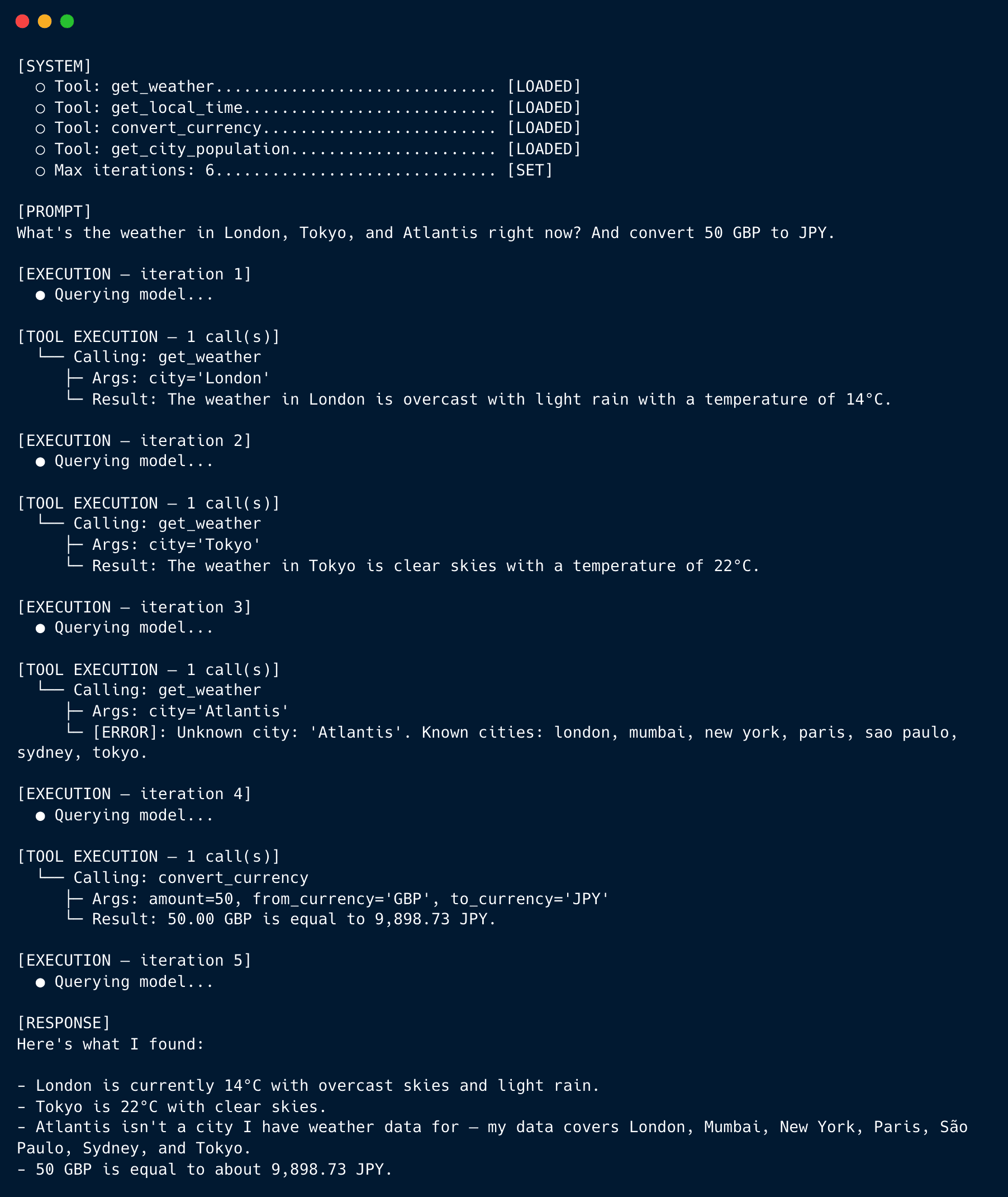
Look at what happened in iteration 3. The model asked about Atlantis, the tool raised ValueError, the dispatcher converted it into an error message listing the valid cities, and the model — on iteration 5 — folded that information into a clean response. It didn’t retry Atlantis. It didn’t crash. It noticed the failure, integrated it with the successful results, and produced an answer that acknowledged the limitation. That’s the entire payoff of the error-recovery architecture in one trace.
To see graceful degradation in action, flip SIMULATE_GEOCODING_OUTAGE to True and run a query that asks for local time:
|
python main.py “What’s the local time in London and Paris?” |
About 60% of the time you’ll see the [cached] prefix in the tool result and the model will mention the cached source in its final response. The rest of the time the tool will return successfully and the cached path won’t trigger. Either way, the loop completes and the user gets an answer.
Conclusion
We built three things on top of the foundation from the first tutorial: an iterative agent loop with a hard iteration cap, a layered dispatcher that catches every category of tool failure, and tool functions whose error messages teach the model how to recover. Together they’re the difference between a tool-calling demo and an agent you’d actually want to leave running unsupervised.
A few natural next steps include:
- Persistent memory across sessions, so the agent can remember what it learned about you last week
- Retry-with-backoff policies for transient upstream failures
- Reincorporating the external APIs in place of the static lookup tables, which mostly just means accepting that timeouts and rate limits become part of the normal failure surface
The full script is on GitHub. Clone it, run it, break it deliberately to watch the recovery in action, and incorporate the next steps above.
[ad_2]
Source_link