
[ad_1]
The fastest way to get more Google reviews is to ask every happy customer at the right moment and give them a direct, one-click link. Research consistently shows that 70–80% of customers will leave a review when asked directly — but fewer than 10% do it without a prompt. That gap between those two numbers is your entire opportunity, and it costs you nothing but a system.
A plumber in my network has 289 Google reviews. His website is fine. His logo hasn’t changed since 2011. He doesn’t post on Instagram. But he shows up in the top three map results for every “plumber near me” search in his area. His competitor — better website, active social media — has zero Google reviews and isn’t even on the map.
Google reviews are the marketing asset that works while you sleep, compounds over time, and directly affects whether a stranger picks up the phone and calls you or scrolls past. And yet most small business owners treat them as an afterthought — something they hope happens on its own. This article gives you the exact system to change that. To get more Google reviews consistently, you need three things: a direct link, a moment to ask, and a process that runs without you remembering to do it.
Why Google Reviews Beat Social Media for Most Small Businesses
Here’s the distinction that changes everything: people on social media are in browse mode. People on Google are in buy mode.
When someone types “plumber near me” or “best accountant in Columbus,” they are not browsing. They have a problem and they want it solved today. That’s the search intent that Google reviews capture — and it’s the intent that Instagram posts almost never reach.
Businesses with more reviews and higher ratings consistently outrank competitors in local map results, even when competitors spend more on other marketing. A business that moves from a 3.7-star rating with 40 reviews to a 4.6-star rating with 150 reviews can double or triple inbound calls. That’s not a minor improvement — that’s a business transformation driven by a free strategy.
If you want a deeper look at how online reviews have replaced traditional referrals as the first trust signal customers check, read Online Reviews Are the New Word-of-Mouth Referral. It explains exactly why the psychology works — and why a 4.8-star rating with 200 reviews carries the weight of a personal recommendation from a friend.
Step 1: Get Your Google Review Link and Put It Everywhere
Before you ask anyone for a review, you need a direct link that drops the customer straight onto the review form — no searching, no clicking around. This single step removes the biggest reason reviews don’t happen: friction.
Here’s how to get it:
- Log into your Google Business Profile
- Click on the “Reviews” section
- Select “Get more reviews” to generate your short link
- Save that link everywhere — CRM, phone text snippets, email templates, email signature, website
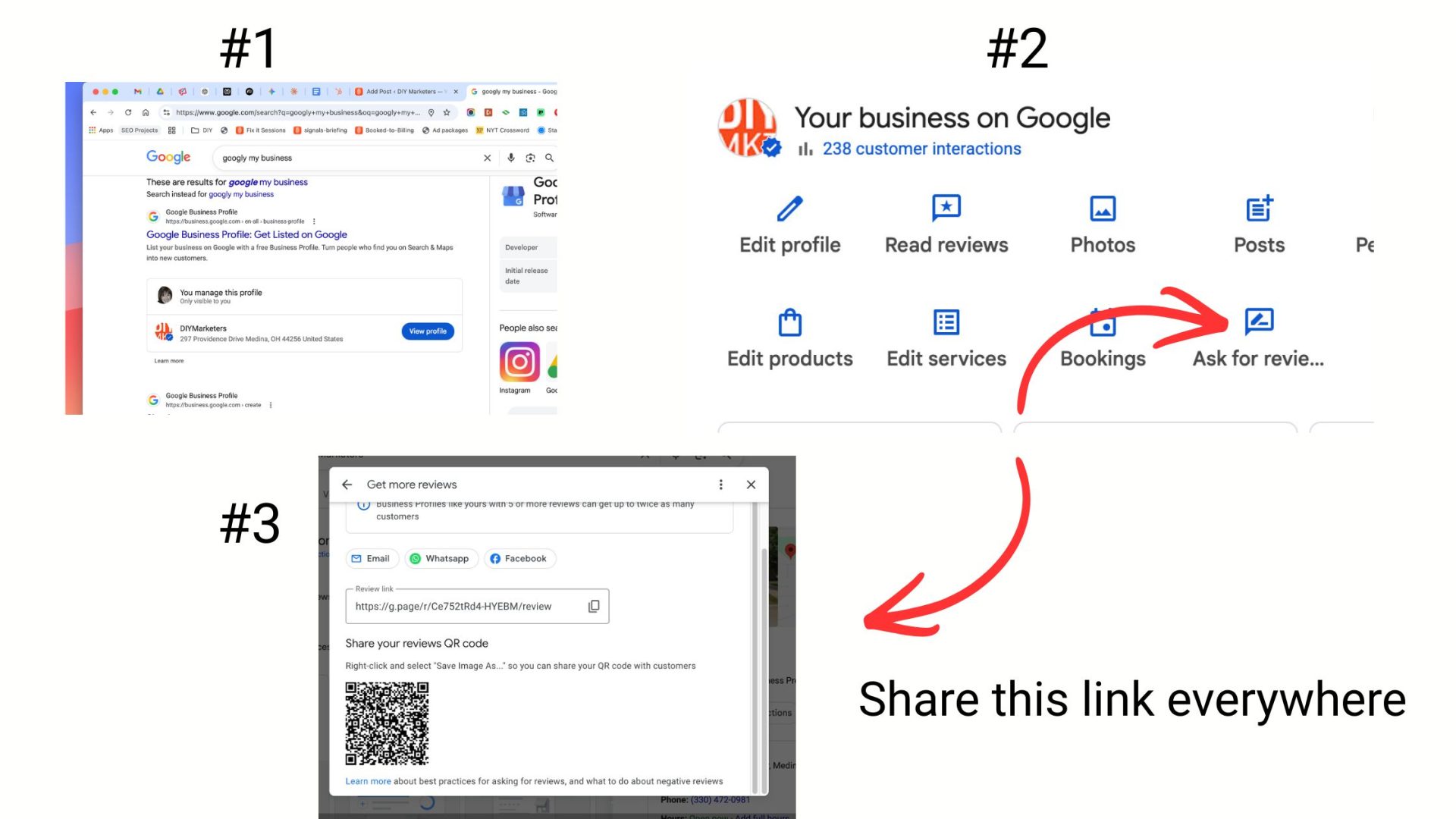
From that link, generate a QR code (free tools like QRCode Monkey work fine). Put the QR code on receipts, invoices, thank-you cards, business cards, counter signs, and service van clipboards. The goal is one scan — and they’re on the form.
Some businesses take this a step further with a branded review URL (like reviews.yourbusiness.com) that redirects to the Google form. It’s easier to say out loud on the phone, looks more credible in texts, and gives you a cleaner asset to put in print materials.
💡 STRATEGY ALERT
NFC “review tap cards” are one of the fastest-growing tools in local service businesses right now. A technician or stylist taps their card on the customer’s phone at checkout and the review form opens instantly — no QR scan, no typing. If you’re in a service business where you’re physically with the customer, this one tool can double your review volume overnight.
Step 2: Ask for Google Reviews at the Right Moment
The timing of your review ask matters as much as the ask itself. The single best moment is right after a positive interaction — when your customer is visibly pleased, thanks you, or says something like “wow, that looks great.”
That micro-win moment is your window. The emotional experience is fresh, the goodwill is at its peak, and the customer is most likely to act before life pulls them in another direction.
Here are the moments that consistently generate the most reviews:
- Right after a completed service when the customer sees the results
- After a problem has been resolved well (an even better moment than a smooth job)
- At project handoff or final walkthrough
- After a client completes their first successful appointment with you
In-person script you can use verbatim:
“It really helps our neighbors find honest [service] when customers share their experience on Google. Would you mind if I texted you the link — takes about 30 seconds?”
Then send the link immediately while they’re still standing there. The review rate drops significantly if you wait and they have to go hunting for your listing later.
Step 3: Make Leaving a Google Review Ridiculously Easy

One tap from request to review form. That’s the goal. Every additional step cuts your conversion rate.
SMS follow-up (highest response rate for most service businesses):
“Thanks again for choosing us today, [Name]! If you can spare 30 seconds, a Google review really helps other locals find us: https://diymarketers.com/how-to-get-more-google-reviews/. We appreciate you.”
Email follow-up (works well for appointments and invoiced services):
Send an automated email 2–4 hours after the completed visit with a short thank-you, one clear CTA button (“Leave a Google Review”), and the direct link. Keep the email short — under 100 words total. The longer it is, the fewer clicks it gets.
Printed prompts at point of service:
A small card with “Loved your experience? Tell Google.” and a QR code is worth more than three Instagram posts. Put them on your front counter, in appointment packets, on invoices, and in the hands of your team when a customer says anything positive.
According to research from The HOTH and Smith.ai, businesses that add QR codes and direct links into existing customer communications see significant jumps in review volume simply because customers no longer have to search for the listing on their own.
⚠️ REALITY CHECK
Most business owners think they’re asking for reviews. They’re not. Saying “if you get a chance, feel free to leave us a review” at the end of a conversation is not asking. It’s hinting. Asking means you hand them the link, send the SMS, make it the next logical step. The difference in response rate between a hint and an ask is enormous.
Step 4: Build the Review Process Into Your Operations
One-off campaigns don’t build lasting review volume. A repeatable process does. The goal is to treat review generation the same way you treat invoicing: it’s a step in the job, not an optional extra.
Here’s how to operationalize it:
- Add “Asked for Google review? Yes/No” as a field in your job-completion workflow
- Set a weekly KPI: “Ask 80% of happy customers this week”
- Use your CRM, booking platform, or invoicing tool to automatically send a review request after each completed job
- Train staff with one clear criterion: “If the customer smiles, thanks you, or says anything positive — invite them to review”
Local SEO experts tracking 2026 Google algorithm behavior now emphasize “review velocity” — the steady, consistent trickle of new reviews over time — over occasional spikes. A business that gets 3–5 reviews a week consistently outperforms one that gets 40 reviews in a campaign and then nothing for six months. Google’s filters are watching for that pattern.
BrightLocal’s 2026 Local Consumer Review Survey found that star rating and review freshness are now the top two factors consumers use to judge a local business before making contact — ranking above written review content, total review count, and how recently the owner responded. That finding reframes the entire goal: the businesses that win are not the ones with the most reviews, they’re the ones with the most recent reviews. A system that automatically asks after every completed job solves both problems at once.
This is the same principle behind any good marketing strategy: consistency beats intensity. A system that runs automatically — even a simple automated SMS — removes the human memory problem from the equation.
Step 5: Respond to Every Google Review — Positive or Negative
Responding to Google reviews isn’t just good manners. It’s a local SEO signal, a trust builder, and a review magnet in its own right. When customers see that you respond to every Google review — positive or negative — they’re more likely to leave one themselves. It shows that the review matters and that someone is actually reading it.
For positive reviews, keep your response short and specific:
“Thank you so much, [Name]! We’re thrilled the [specific service] went well. We look forward to working with you again.”
For negative reviews, respond publicly with calm professionalism, acknowledge the issue, and take the conversation offline:
“We’re sorry your experience didn’t meet your expectations. Please reach out to us directly at [email/phone] so we can make this right.”
A well-handled negative review can actually build more trust than ten positive ones. Prospects are reading those responses. They want to see how you behave when things go wrong.
Google’s own guidance states that “helpful replies can help your business stand out” in local search — and that businesses which respond to reviews signal engagement that the algorithm rewards. Responding to every Google review is also the fastest no-cost action you can take to encourage more of them. It makes the review section feel alive rather than abandoned, and alive profiles attract more reviews.
Creative Ways to Get More Google Reviews Beyond the Basics
The tactics above are the foundation. Once you have the system running, these approaches can accelerate your review growth significantly.
Frame the ask as community service. Home service businesses and professional services that reframe the review ask around helping their neighbors consistently see higher response rates. “We rely on word-of-mouth so your neighbors can avoid bad experiences — would you share yours on Google?” This shifts the ask from “help my business” to “help your community.”
Tie the ask to a specific outcome. After a strong result, remind the customer of the win: “We reduced your heating bill by about 18% this month. Would you be willing to share a quick Google review mentioning that result? It helps people searching for that exact solution find us.” This makes writing the review easier because you’ve given them something specific to say.
Incentivize your staff, not your customers. With Google cracking down on customer incentives tied to ratings, shift the reward internally. Track which staff members generate the most positive review mentions each month and give shout-outs or small bonuses. This focuses your team on delivering review-worthy experiences and asking at the right moment — without risking a policy violation.
Use reviews as content. Share a “review of the week” in your email newsletter or on social media with a CTA: “Want to share your story? Leave a Google review here.” This validates people who’ve already reviewed, and seeds the idea for customers who haven’t yet.
For more on how referrals and reviews work together as a growth system, see How to Get Referrals and How to Ask for Referrals. The mechanics are nearly identical — the difference is that reviews scale in a way that personal referrals alone cannot.
How Handwritten Cards and Letters Build Your Google Reviews
Some of your best customers still do things the old-fashioned way. They send a handwritten thank-you card. They drop off a note. They mail a letter. And most business owners stick those in a drawer and smile — then do nothing with them.
Those cards are marketing gold. Here’s exactly what to do with them.
Snap a clean photo and upload it to your Google Business Profile. A photo of an authentic, handwritten customer note is one of the most credible things you can put on your GBP — and uploading it does double duty. It’s genuine social proof that a prospect can see when browsing your profile, and it’s a photo upload that signals active engagement to Google.
This matters more than most people realize. Research from Rio SEO shows that businesses with photos on their GBP receive 42% more direction requests and 35% more website clicks than those without. And multiple local SEO studies in 2026 now document visibility drops for profiles that go 30 or more days without new photos or updates. Google interprets consistent activity as a signal that your business is real, current, and worth showing to searchers.
A handwritten card gives you a completely authentic reason to add a photo — no staging required.
Turn the letter into a GBP Post as well. In addition to uploading the photo directly to your GBP photo gallery, create a simple quote-card graphic using the customer’s words (you can blur the signature for privacy) and publish it as a Google Business Profile Post. That’s a second activity signal from the same piece of content — and Posts are one of the clearest ways to tell Google your business is active and engaged.
The practical workflow takes under five minutes:
- Take a bright, clean photo of the card or letter
- Log into your Google Business Profile at business.google.com
- Upload the photo under your photo gallery (categorize it under “At work” or “Team”)
- Create a Post using the key quote from the letter, add the photo, and publish
- Share the same image on your social channels for extra reach
One genuine handwritten letter becomes a GBP photo, a GBP Post, and a social media post. Three pieces of content, one five-minute workflow, zero ad spend. And every piece of it helps you get more Google reviews visibility with customers who are actively looking for your type of business.
Whitespark’s annual Local Search Ranking Factors survey consistently ranks photo activity and overall GBP engagement among the top signals for local map pack visibility. The businesses uploading new photos weekly — whether professional shots or a snapshot of a customer’s thank-you note — outperform static profiles with identical review counts. The message is simple: Google rewards the businesses that show up consistently, not the ones that set it and forget it.
💡 STRATEGY ALERT
Google Business Profile rewards consistent activity — photos, posts, responses to reviews, and updated information all send signals that your business is actively managed. This is why uploading one photo a week, even a simple one, outperforms uploading 20 photos in one session and then going quiet for months. Build a simple habit: every time a customer sends a card, pays an invoice, or completes a job that goes well, look for the photo opportunity. Handwritten letters, before-and-after shots, team photos at job completion — all of these count.
What Happens When Your Referral Network Meets Your Review Engine
The most effective local marketing combines both channels: referrals create the warm introduction, and Google reviews validate it. When someone gets a personal referral and then Googles you and sees 200+ reviews averaging 4.8 stars, the trust compounds. The referral converts at a higher rate. The Google search converts people who were never referred at all. This is why the goal to get more Google reviews isn’t just an SEO play — it’s a conversion play that makes every other marketing channel work better.
If you’re working on building referral systems alongside your review strategy, this article on why referral marketing stops working is worth reading before you build anything. Most referral systems fail for predictable reasons — and Google reviews fill the gaps those systems leave.
For professional services and consultants specifically, the combination of referrals plus visible Google reviews is one of the highest-ROI investments in customer retention as well. Long-term clients who leave reviews tend to stay longer, refer more, and be more forgiving when things go sideways.
One more thing worth building into your ask: encourage specific, detailed Google reviews rather than just stars. You can do this ethically by reminding customers of the concrete outcome they received before the ask. Reviews that mention specific services, results, and locations carry more local SEO weight than generic “great service!” reviews — and they’re more persuasive to future customers too. Brief coaching without scripting is your goal: “Would you mind mentioning what we did for your heating bill?” is helpful. “Please write that we saved you 18% and give us 5 stars” crosses the line.
What Google Will Penalize — and What to Avoid
Google has tightened its review policies significantly in 2026, and enforcement is now automated using Gemini-powered systems. According to Google’s 2025 Trust and Safety Report, the company blocked or removed over 292 million policy-violating reviews last year — roughly 22% of all review activity. That number tells you the system is watching, actively, in real time.
⚠️ REALITY CHECK
Two new violations were added in April 2026 that many businesses don’t know about yet. In-store review kiosks and shared tablets are now explicitly prohibited — you cannot hand a customer your device and ask them to leave a review on the spot. Asking customers to mention specific staff members by name in their review is also now a violation. If you’ve been running either practice, stop immediately. The enforcement is automated and reviews are being removed without warning.
🛑 DON’T DO THIS
Google updated its review policies in April 2026 — and some of what used to be standard practice is now an explicit violation. Here’s what’s off the table: Offering incentives for reviews (discounts, gifts, loyalty points) remains prohibited. Review gating — pre-screening customers by sentiment before sending the link — is actively enforced and reviews are being removed. In-store review kiosks and shared tablets where customers leave reviews on your premises are now explicitly banned. Asking customers to mention specific staff members by name is a new violation added in April 2026. And never ask for a “5-star review” — always ask for “honest feedback.” Google’s enforcement is now Gemini-powered and automated, catching patterns in real time. Ask all customers equally, invite honest feedback, and keep any rewards internal — for your team, not your customers.
The If-This-Then-That System for Google Reviews
Here’s a quick-reference table for matching your ask method to the situation:
| If You See This… | It Means… | Your Next Move |
|---|---|---|
| Customer says “thank you” or looks pleased | You’re at the micro-win moment | Verbal ask + send SMS link immediately |
| Service or job just completed | Perfect trigger for automated follow-up | Auto-send SMS or email with direct link within 4 hours |
| Customer complains and you resolve it well | Trust is at an unusual high after a recovery | Follow up personally 1 week later — ask for an updated review |
| Long-term customer who’s never reviewed | Untapped advocate with high trust | Personal email from you — not automated — referencing the relationship |
| Customer refers someone to you | They’re already an advocate — reviews are natural next step | Thank them and ask if they’d share that trust on Google too |
Frequently Asked Questions About How to Get More Google Reviews
How many Google reviews does a small business need to see results?
There’s no magic number, but local SEO research consistently shows that businesses with 50+ reviews start seeing measurable improvements in local search rankings, and businesses with 100+ reviews at 4.5 stars or higher perform significantly better in map pack results. The more important metric is recency — a steady trickle of new reviews signals active credibility, while a static count (even a high one) loses impact over time. Aim for at least 3–5 new reviews per month and let the number grow from there.
Is it against Google’s rules to ask customers for reviews?
Asking customers for reviews is perfectly acceptable and encouraged by Google. What violates Google’s policies is offering incentives specifically tied to leaving a positive review, buying fake reviews, or using review-gating systems that only send happy customers to Google while routing unhappy ones elsewhere. Ask all customers equally, invite honest feedback, and never tie a reward to a specific star rating. You can reward your own staff for generating reviews — that’s an internal business practice, not a consumer incentive.
What’s the best way to ask for a Google review without being awkward?
The awkwardness usually comes from making the ask too transactional or apologetic. The frame that works best is community service: “We rely on Google reviews so people in the area can find reliable help — would you be willing to share your experience?” This positions the review as a favor to future customers, not a favor to you. Pair that with an immediate SMS or QR code and you’ve removed all friction from the process. Practice the line until it sounds natural, and it will.
How long does it take for Google reviews to improve local search rankings?
Most local SEO practitioners report seeing ranking movement within 4–8 weeks of a consistent review-collection push, though this varies by market competitiveness and starting position. Reviews are one of several local ranking factors — your Google Business Profile completeness, keyword relevance, and overall listing activity also matter. That said, reviews tend to produce faster, more visible results than most other local SEO tactics because they’re directly weighted in the map pack algorithm. The key word is consistent: steady accumulation outperforms occasional bursts.
Can I use handwritten customer cards and letters to build my Google presence?
Handwritten cards and thank-you letters are some of the most underused marketing assets a small business has. Take a clean photo of the card or letter and upload it directly to your Google Business Profile photo gallery — it counts as a genuine activity signal and serves as authentic social proof for anyone browsing your profile. Then go one step further and create a GBP Post using the customer’s words and the same photo. That’s two activity signals from one piece of content, and Google interprets consistent activity as a sign that your business is real and engaged. The whole workflow takes about five minutes. A profile that adds new photos and posts regularly outperforms a static profile with the same review count every time.
Should I respond to negative Google reviews?
Always respond to negative reviews — publicly and promptly. A calm, professional response to a negative review demonstrates to every future prospect reading it that you take feedback seriously and that you’re accountable. Responding to a negative review without getting defensive, then resolving the issue offline, is one of the most trust-building moves a small business can make. Some local marketing experts argue that a handled negative review carries more credibility weight than five unchallenged five-star reviews, because it proves you’re real and responsive.
Additional Reading
[ad_2]
Source_link