[ad_1]
In this article, you will learn how to use Google Colab’s AI-assisted coding features — especially AI prompt cells — to generate, explain, and refine Python code directly in the notebook environment.
Topics we will cover include:
- How AI prompt cells work in Colab and where to find them
- A practical workflow for generating code and running it safely in executable code cells
- Key limitations to keep in mind and when to use the “magic wand” Gemini panel instead
Let’s get on with it.
Setting Up a Google Colab AI-Assisted Coding Environment That Actually Works
Image by Editor
Introduction
This article focuses on Google Colab, an increasingly popular, free, and accessible, cloud-based Python environment that is well-suited for prototyping data analysis workflows and experimental code before moving to production systems.
Based on the latest freely available version of Google Colab at the time of writing, we adopt a step-by-step tutorial style to explore how to make effective use of its recently introduced AI-assisted coding features. Yes: Colab now incorporates tools for AI-assisted coding, such as code generation from natural language, explanations of written code, auto-completion, and smart troubleshooting.
Looking into Colab’s AI-Assisted Capabilities
First, we sign in to Google Colab with a Google account of our choice and click “New Notebook” to start a fresh coding workspace. The good news: all of this is done in the cloud, and all you need is a web browser (ideally Chrome); nothing needs to be installed locally.
Here is the big novelty: if you are familiar with Colab, you would be familiar with its two basic types of cells: code cells, for writing and executing code; and text cells, to supplement your code with descriptions, explanations, and even embedded visuals to explain what is going on in your code. Now, there is a third type of cell, and it is not clearly identifiable at first glance: its name is the AI prompt cell.
This is a brand-new, special cell type that supports direct, one-shot interaction with Google’s most powerful generative AI models from the Gemini family, and it is especially helpful for those with limited coding knowledge.
Creating an AI prompt cell is simple: in the upper toolbar, right below the menus, click on the little dropdown arrow next to “Code” and select “Add AI prompt cell”. Something like this should appear in your still blank notebook.
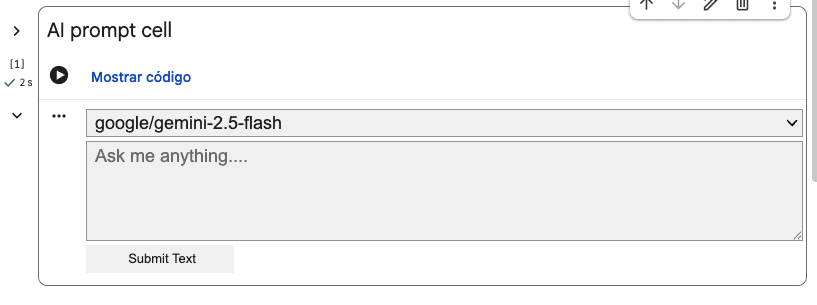
Creating an AI prompt cell to generate code from natural language
Let’s give it a try by writing the following in the “Ask me anything…” textbox: Write Python code that generates 100 values for five different types of weather forecast values, and plots a histogram of these values
Be patient for a few seconds, even if it seems like nothing happens at first. The AI is working on your request behind the scenes. Eventually, you may get a response from the selected Gemini model that looks like this:
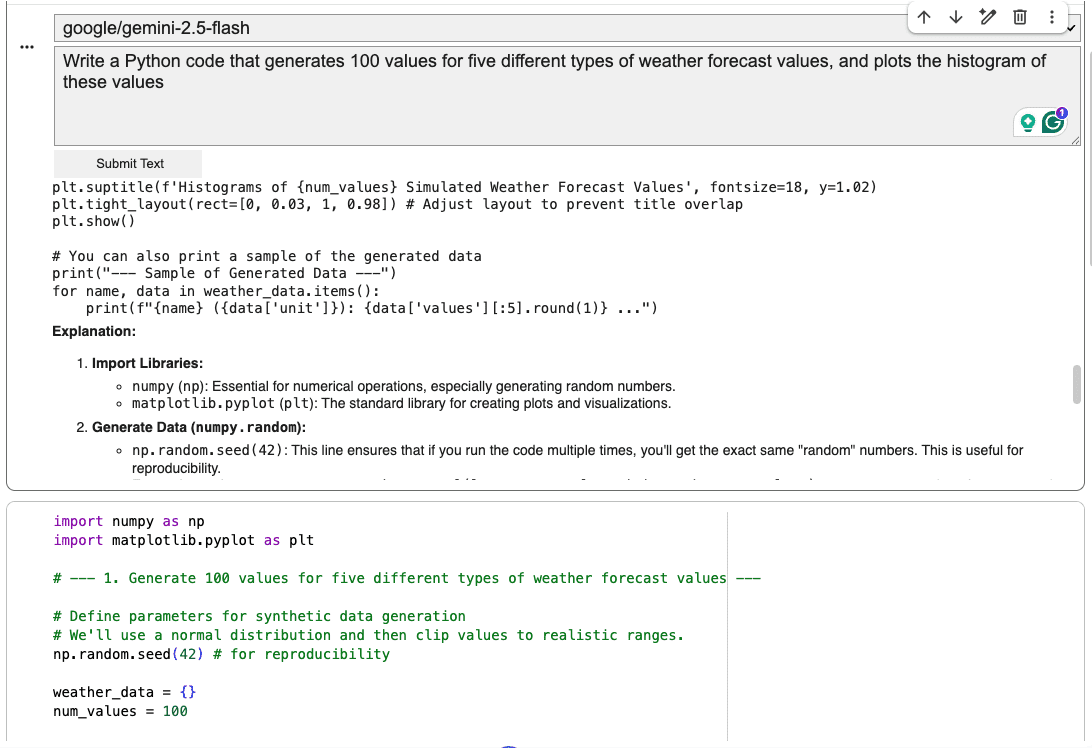
Taking advantage of AI prompt cells and executable code cells
This new feature provides a comfortable AI-assisted coding environment that is ideal not only for code generation, but also for quick prototyping, exploring new ideas, or even making existing code more self-explanatory, e.g. by prompting the AI to insert explainable features or informative print statements in relevant parts of a program. Understanding the capabilities of this new cell type is key to leveraging Colab’s newest AI-assisted coding features correctly.
A standard code cell right below each of your AI prompt cells makes for a practical symbiosis. Why? Because the output of AI prompt cells is not directly executable code, since it often comes with text descriptions before and/or after the code. Simply copy the code portion of the response and paste it into a code cell below to try it.
Not everything works as expected? No problem. The AI prompt cell stays there, in its dedicated place in your notebook, so you can continue the interaction and refine your code until it fully meets your requirements.
Be aware, however, of some limitations of this newly introduced cell type. Regardless of where in your notebook an AI prompt cell is located, it is not automatically aware of the content in the rest of your notebook. You will need to provide your code to an AI prompt cell in order to ask something about it.
For instance, imagine we placed the previously generated code in several code cells for step-by-step execution. Then, at the bottom of the notebook, we add another AI prompt cell and ask the following:

AI response when asking for code outside the AI prompt cell
Notice the response: the AI is asking you to explicitly provide (paste) the code you want it to analyze, explain, and so on, no matter where that code exists in the notebook. You also cannot reference cells by identifiers like #7 or #16, nor ask something like “rewrite the third code cell in a more concise, Pythonic style“.
Here is a summary of the best-practice workflow we recommend getting used to:
- Add AI prompt cells immediately after a cell (or small group of cells) where you expect a lot of analysis, refining, and potential changes in the code.
- Paste the target code and use explicit instructions with action verbs like “explain”, “refactor”, “simplify”, “add error handling”, and so on.
- Review and execute the results manually in a backup code cell, carefully placed depending on your data transformation workflow (it may need to go before or after the cell containing the original code).
AI prompt cells are great for comfortable code-creation experimentation in the main playground, but bear in mind that for other AI-assisted tasks like explaining a piece of code in a cell or transforming it, the magic wand icon available in a code cell — which opens a Gemini tab on the right-hand side of Colab for continued interaction — is still the best and most flexible approach.
Wrapping Up
Google Colab is continuously releasing new AI-assisted coding features, with clear strengths but also important limitations. In this article, we reviewed the latest capabilities, with special focus on the AI prompt cell as one of the newest additions, and we described how to make the best use of it — and when to resort to other functions for tasks like explaining or refactoring existing code.
[ad_2]
Source_link