[ad_1]
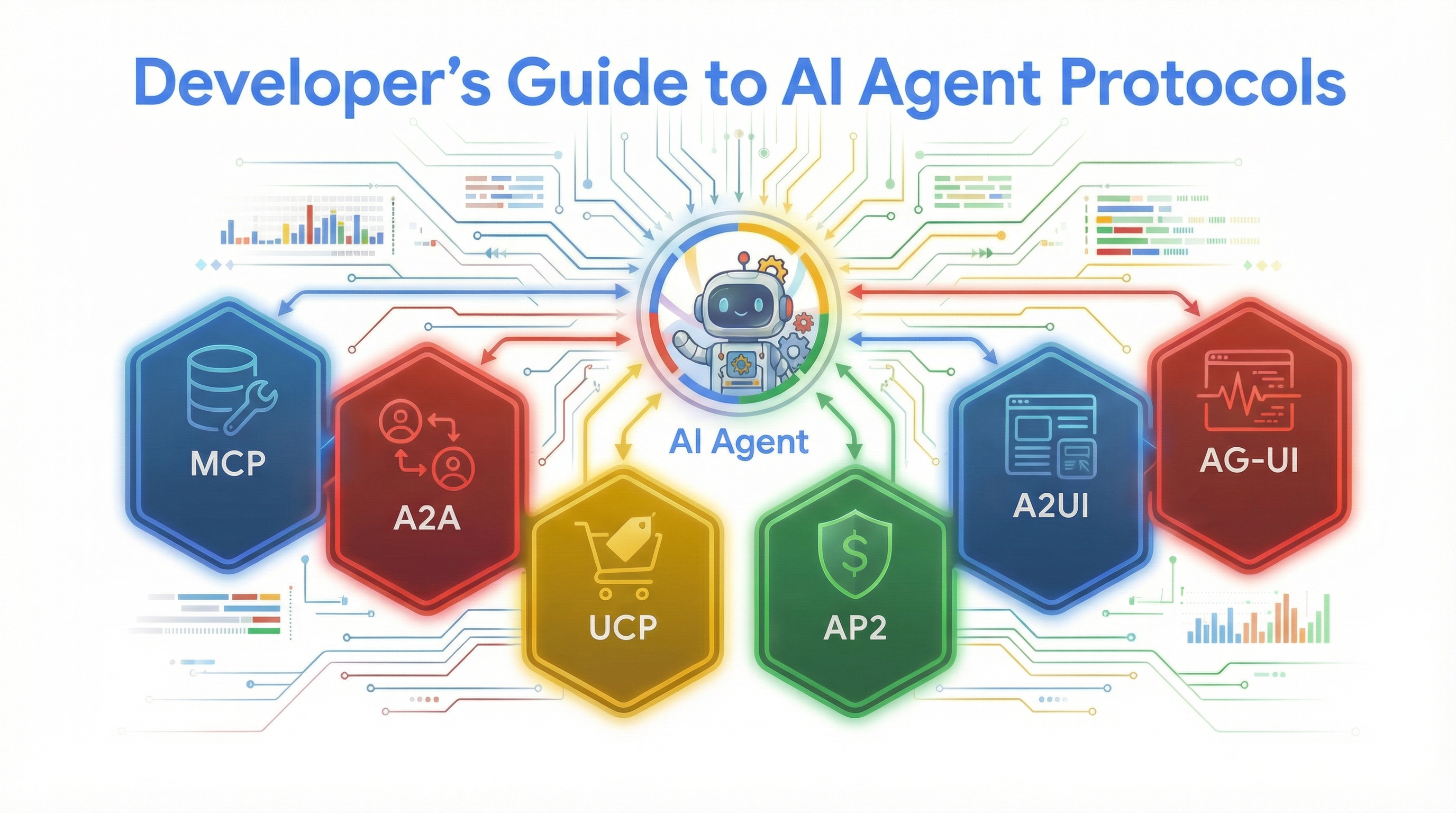
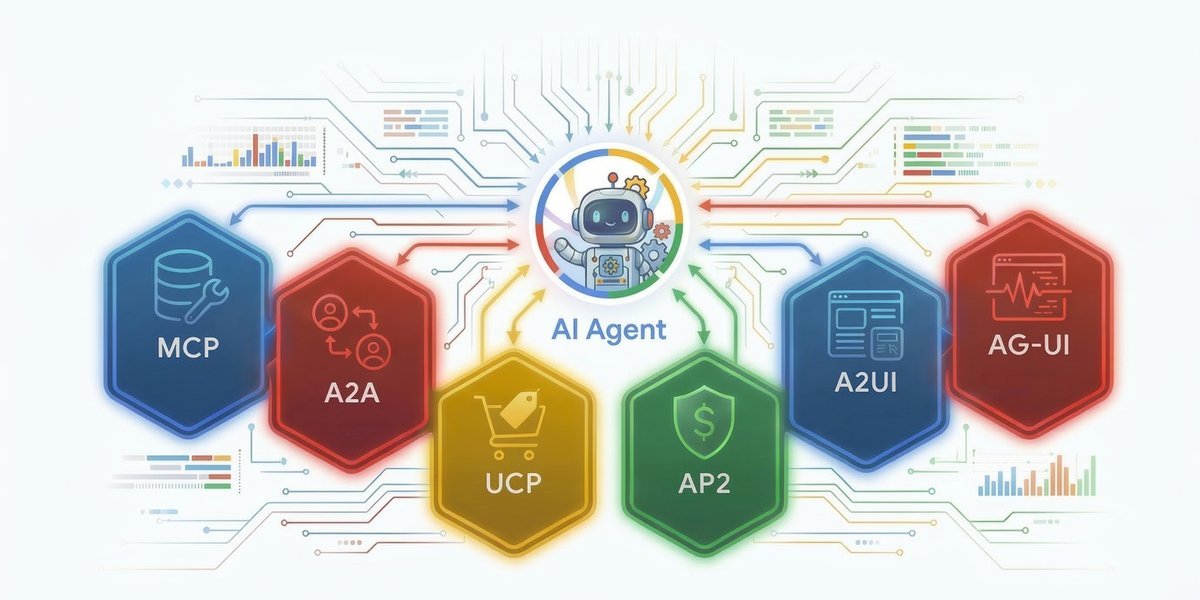
The growing landscape of AI agent development is overloaded with acronyms: MCP, A2A, UCP, AP2, A2UI, and AG-UI, just to name a few. If you’ve ever looked at this list of protocols and felt like you were staring at a wall of competing standards, you are not alone. To help you understand their value, we are going to demonstrate what each one does to save you from writing and maintaining custom integration code for every single tool, API, and frontend component your agent touches.
We will put these protocols into practice by using Agent Development Kit (ADK) to build a multi-step supply chain agent for a restaurant. This scenario works well as a test case because ordering wholesale ingredients requires checking inventory databases, communicating with remote supplier agents, executing secure transactions, and rendering interactive dashboards.
We’ll start with a bare LLM that hallucinates everything, then add protocols one by one until it can check real inventory, get specialist quotes, place orders, authorize payments, and render interactive, streaming dashboards.
1. Model Context Protocol (MCP)
Let’s look at the first hurdle you hit when building an agent: connecting it to your systems and your data. If your kitchen manager agent needs to check inventory or email a supplier, you would normally have to write custom integration code for that specific API. If a service has a dozen endpoints, you’re writing and maintaining a dozen custom tools just for that service.
The Model Context Protocol (MCP) eliminates this busywork by giving you a single standard connection pattern for hundreds of servers. Servers advertise their tools, and your agent discovers them automatically. And because the MCP servers are maintained by the teams who built those systems, your agent always gets the latest tool definitions without you writing or updating any integration code.

ADK provides first-class support for this via McpToolset. Instead of writing a bunch of API requests from scratch, our kitchen manager can now read from a real PostgreSQL database using the MCP Toolbox for Databases, look up recipes via the Notion MCP, and take action by emailing suppliers using the Mailgun MCP.
from google.adk.agents import Agent
from google.adk.tools.mcp_tool import McpToolset
from google.adk.tools.mcp_tool.mcp_session_manager import StdioConnectionParams
from google.adk.tools.toolbox_toolset import ToolboxToolset
from mcp import StdioServerParameters

# 1. Inventory database - MCP Toolbox for Databases (PostgreSQL, SQLite, BigQuery, etc.)
inventory_tools = ToolboxToolset(server_url=TOOLBOX_URL)

# 2. Kitchen SOPs and recipes - Notion MCP (read menus, ingredient lists, supplier contacts)
notion_tools = McpToolset(connection_params=StdioConnectionParams(
    server_params=StdioServerParameters(
        command="npx", args=["-y", "@notionhq/notion-mcp-server"],
        env={"NOTION_TOKEN": NOTION_TOKEN}),
    timeout=30))

# 3. Email suppliers about orders - Mailgun MCP (send confirmations, track delivery)
mailgun_tools = McpToolset(connection_params=StdioConnectionParams(
    server_params=StdioServerParameters(
        command="npx", args=["-y", "@mailgun/mcp-server"],
        env={"MAILGUN_API_KEY": MAILGUN_API_KEY}),
    timeout=30))

kitchen_agent = Agent(
    model="gemini-3-flash-preview",
    name="kitchen_manager",
    instruction="You manage a restaurant kitchen. Check inventory, look up recipes, email suppliers.",
    tools=[inventory_tools, notion_tools, mailgun_tools],
)
Python
You can browse the full ecosystem of MCP integrations in ADK to see what’s available.
2. Agent2Agent Protocol (A2A)
With MCP handling data access, the next challenge is expertise. Your kitchen manager can check inventory, but it doesn’t know today’s wholesale prices, supplier quality grades, or delivery windows. That knowledge lives with different remote agents, potentially built by different teams, on different frameworks, running on different servers. In some cases, the raw data might never be exposed by API but could be exposed via an agentic interface. Without a standard protocol, you’d have to write and maintain custom integration code for each one, and redeploy every time a remote agent changes.
The Agent2Agent (A2A) protocol standardizes how agents discover and communicate with each other. Each A2A agent publishes an Agent Card at a well-known URL (/.well-known/agent-card.json) that describes its name, capabilities, and endpoint. See the A2A protocol docs for the full specification.
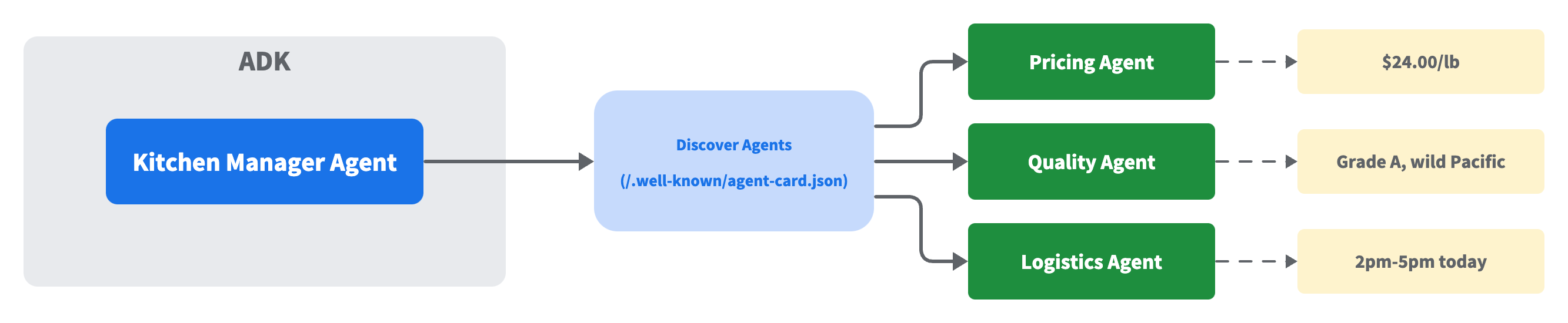
Our kitchen manager agent fetches these cards to learn what each remote agent does, then routes queries to the right one at runtime. Adding a new remote agent is as simple as adding a new URL, eliminating the need for manual code change or re-deployments.
ADK’s RemoteA2aAgent routes to one remote agent per turn. When a query spans multiple remote agents, such as checking price, quality, and delivery at once, you can use the a2a-sdk directly, which is the approach we use here.
# An A2A agent serves an Agent Card at /.well-known/agent-card.json:
# {
#   "name": "pricing_agent",
#   "description": "Checks today's wholesale market prices for food items.",
#   "skills": [{"id": "pricing", "name": "Price Check",
#               "description": "Check current wholesale market prices"}],
#   "url": "http://pricing-agent:8001/",
#   "version": "1.0.0"
# }

# EXPOSE: Turn any ADK agent into an A2A service
from google.adk.a2a.utils.agent_to_a2a import to_a2a
app = to_a2a(pricing_agent, port=8001)

# DISCOVER: Resolve the Agent Card and create a client - just a URL
from a2a.client.client_factory import ClientFactory
client = await ClientFactory.connect("http://pricing-agent:8001")
card = await client.get_card()
print(f"{card.name} - {card.description}")
# -> "pricing_agent - Checks today's wholesale market prices for food items."

# CALL: Send a message via the A2A protocol
from a2a.client.helpers import create_text_message_object
msg = create_text_message_object(content="What's today's wholesale price for salmon?")
async for response in client.send_message(msg):
    ...  # response is a Task (with artifacts) or a direct Message
Python
Try the A2A samples to see discovery and communication patterns in action.
3. Universal Commerce Protocol (UCP)
Your agent can now discover suppliers and get quotes. But when it’s time to actually place an order, every supplier has a different API. If your agent needs to source ingredients from five wholesale distributors, you’re integrating five different checkout flows.
The Universal Commerce Protocol (UCP) standardizes the shopping lifecycle into modular capabilities through strongly typed request and response schemas that remain consistent across any underlying transport. Instead of building custom integrations for every supplier, your agent interacts with them through a unified pattern. This remains true whether the connection is established via REST, Model Context Protocol (MCP), Agent2Agent (A2A), or Embedded Protocols (EP) for browser-based flows.
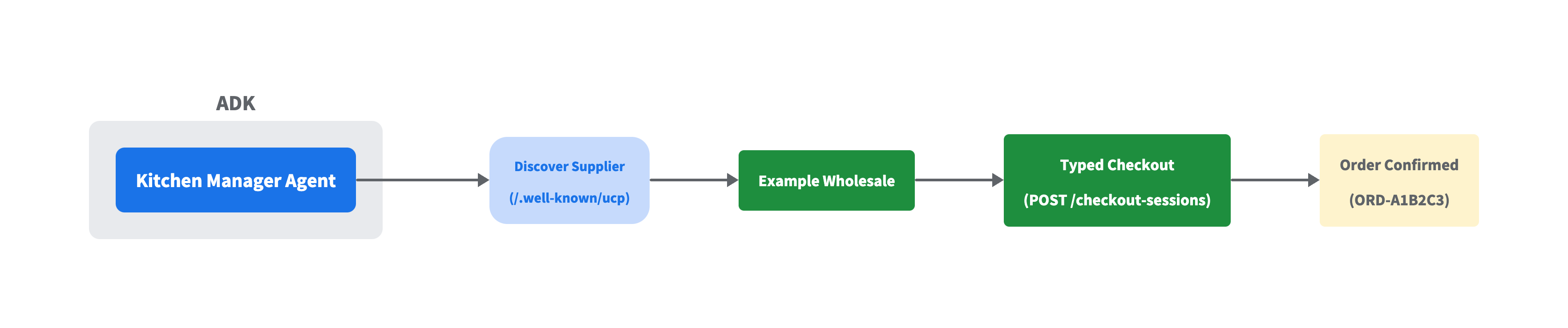
Our kitchen manager agent can discover a supplier’s catalog using the same well-known URL pattern we saw in A2A (/.well-known/ucp), then construct a typed checkout request and complete the order. Because UCP also supports standard REST API, it works with whatever HTTP client your project already uses. No proprietary SDK required.
import httpx, uuid
from ucp_sdk.models.discovery.profile_schema import UcpDiscoveryProfile
from ucp_sdk.models.schemas.shopping.checkout_create_req import CheckoutCreateRequest
from ucp_sdk.models.schemas.shopping.types.line_item_create_req import LineItemCreateRequest
from ucp_sdk.models.schemas.shopping.types.item_create_req import ItemCreateRequest
from ucp_sdk.models.schemas.shopping.payment_create_req import PaymentCreateRequest

# DISCOVER: Parse the supplier's UCP profile
async with httpx.AsyncClient() as c:
    profile = UcpDiscoveryProfile.model_validate(
        (await c.get("http://example-wholesale:8182/.well-known/ucp")).json())

# ORDER: Build a typed checkout request
checkout_req = CheckoutCreateRequest(
    currency="USD",
    line_items=[
        LineItemCreateRequest(quantity=10, item=ItemCreateRequest(id="salmon")),
        LineItemCreateRequest(quantity=3,  item=ItemCreateRequest(id="olive_oil")),
    ],
    payment=PaymentCreateRequest(),
)

# SEND: Create checkout + complete (with required UCP headers)
# UCP-Agent header should point to your agent's capability profile
headers = {"UCP-Agent": 'profile="https://kitchen.example/agent"',
           "Idempotency-Key": str(uuid.uuid4()), "Request-Id": str(uuid.uuid4())}
async with httpx.AsyncClient() as c:
    checkout = (await c.post("http://example-wholesale:8182/checkout-sessions",
        json=checkout_req.model_dump(mode="json", by_alias=True, exclude_none=True),
        headers=headers)).json()
    headers["Idempotency-Key"] = str(uuid.uuid4())  # New Idempotency-Key per operation
    order = (await c.post(
        f"http://example-wholesale:8182/checkout-sessions/{checkout['id']}/complete",
        headers=headers)).json()
Python
The UCP samples repository includes an AI-powered shopping assistant built with ADK that combines UCP with A2A for end-to-end shopping workflows.
4. Agent Payments Protocol (AP2)
In the previous section, our kitchen manager gained the ability to place orders with suppliers. But who authorized that spending? There’s no record of what limits were set, which merchants are approved, or when the authorization expires.
The Agent Payments Protocol (AP2) adds that missing layer with typed mandates that provide non-repudiatable proof of intent and enforce configurable guardrails on every transaction. UCP handles what you order and who you order from, whereas AP2 handles who approved the purchase and provides the audit trail. They work together: AP2 plugs into UCP as an extension, adding cryptographic proof of authorization to the checkout flow.
Instead of an uncontrolled transaction, you configure guardrails for your agent to follow. You define an IntentMandate to specify allowed merchants and set a spending limit for auto-approval. The agent then generates a PaymentMandate bound to a specific cart and amount. If the order exceeds the limit, the mandate remains unsigned until a manager explicitly approves it. A PaymentReceipt closes the audit trail.

The following code snippet uses real AP2 types from the official repo to show the full authorization flow, from intent through signed mandate to receipt.
from ap2.types.mandate import IntentMandate, PaymentMandate, PaymentMandateContents
from ap2.types.payment_request import PaymentCurrencyAmount, PaymentItem, PaymentResponse
from ap2.types.payment_receipt import PaymentReceipt, Success

# The restaurant owner configures guardrails
intent = IntentMandate(
    natural_language_description="10 lbs salmon, 3 bottles olive oil",
    merchants=["Example Wholesale"],    # ONLY these suppliers
    requires_refundability=True,            # must be refundable
    user_cart_confirmation_required=False,  # auto-approve under limit
    intent_expiry="2026-02-23T20:00:00Z",   # expires in 1 hour
)

# Agent creates a PaymentMandate binding payment to the intent
mandate = PaymentMandate(payment_mandate_contents=PaymentMandateContents(
    payment_mandate_id="abc123",
    payment_details_id="order-001",
    payment_details_total=PaymentItem(
        label="10 lbs salmon + 3 bottles olive oil",
        amount=PaymentCurrencyAmount(currency="USD", value=294.00)),
    payment_response=PaymentResponse(request_id="order-001", method_name="CARD"),
    merchant_agent="Example Wholesale",
))

# Manager signs (simulated - real AP2 uses JWT/biometric on secure device)
mandate.user_authorization = "signed_hash_abc123"

# PaymentReceipt closes the audit trail
receipt = PaymentReceipt(
    payment_mandate_id="abc123", payment_id="PAY-001",
    amount=PaymentCurrencyAmount(currency="USD", value=294.00),
    payment_status=Success(merchant_confirmation_id="ORD-A1B2C3"),
)
# IntentMandate -> PaymentMandate (signed) -> PaymentReceipt
# Full audit trail: what was intended, authorized, and paid
Python
AP2 is in v0.1 and its types are provided as a separate package, not built into ADK core. Explore the protocol and reference implementation in the AP2 repo.
5. Agent-to-User Interface Protocol (A2UI)
At this point, our kitchen manager can check inventory, get quotes, place orders, and authorize payments. But every result comes back as plain text and sometimes text isn’t enough. When your agent needs to present an inventory dashboard, an order form, or a supplier comparison, you’d normally have to build a separate frontend component for each one. Every new UI requirement means more frontend code to write and maintain.
The Agent-to-User Interface Protocol (A2UI) solves this by letting the agent dynamically compose novel layouts from a fixed catalog. It uses a declarative JSON format made up of just 18 safe component primitives, such as rows, columns, and text fields.

A2UI separates the UI structure from the underlying data. The agent sends a flat list of components referencing each other by ID, followed by a separate data payload. A renderer on the client side turns this JSON into native UI using frameworks like Lit, Flutter, or Angular.A2UI separates the UI structure from the underlying data. The agent sends a flat list of components referencing each other by ID, followed by a separate data payload. A renderer on the client side turns this JSON into native UI using frameworks like Lit, Flutter, or Angular.
# This is what the agent sends. A renderer (Lit, Flutter, Angular) turns it into native UI.

a2ui_messages = [
    # 1. Create a rendering surface
    {"beginRendering": {"surfaceId": "default", "root": "card"}},

    # 2. Send the component tree (flat list, ID references - not nested)
    {"surfaceUpdate": {"surfaceId": "default", "components": [
        {"id": "card", "component": {"Card": {"child": "col"}}},
        {"id": "col", "component": {"Column": {"children": {"explicitList": ["title", "price", "buy"]}}}},
        {"id": "title", "component": {"Text": {"usageHint": "h3", "text": {"path": "name"}}}},
        {"id": "price", "component": {"Text": {"text": {"path": "price"}}}},
        {"id": "buy", "component": {"Button": {"child": "btn-label", "action": {"name": "purchase",
            "context": [{"key": "item", "value": {"path": "name"}}]}}}},
        {"id": "btn-label", "component": {"Text": {"text": {"literalString": "Buy Now"}}}},
    ]}},

    # 3. Send the data (separate from structure - update data without resending components)
    {"dataModelUpdate": {"surfaceId": "default", "contents": [
        {"key": "name",  "valueString": "Fresh Atlantic Salmon"},
        {"key": "price", "valueString": "$24.00/lb"},
    ]}},
]
Python
Now the agent can compose completely different interfaces from the same 18 primitives depending on the request. Here, three prompts to the same agent produce an inventory checklist, an order form, and a supplier comparison, all built from components like CheckBox, TextField, DateTimeInput, and Card, with no additional frontend code.
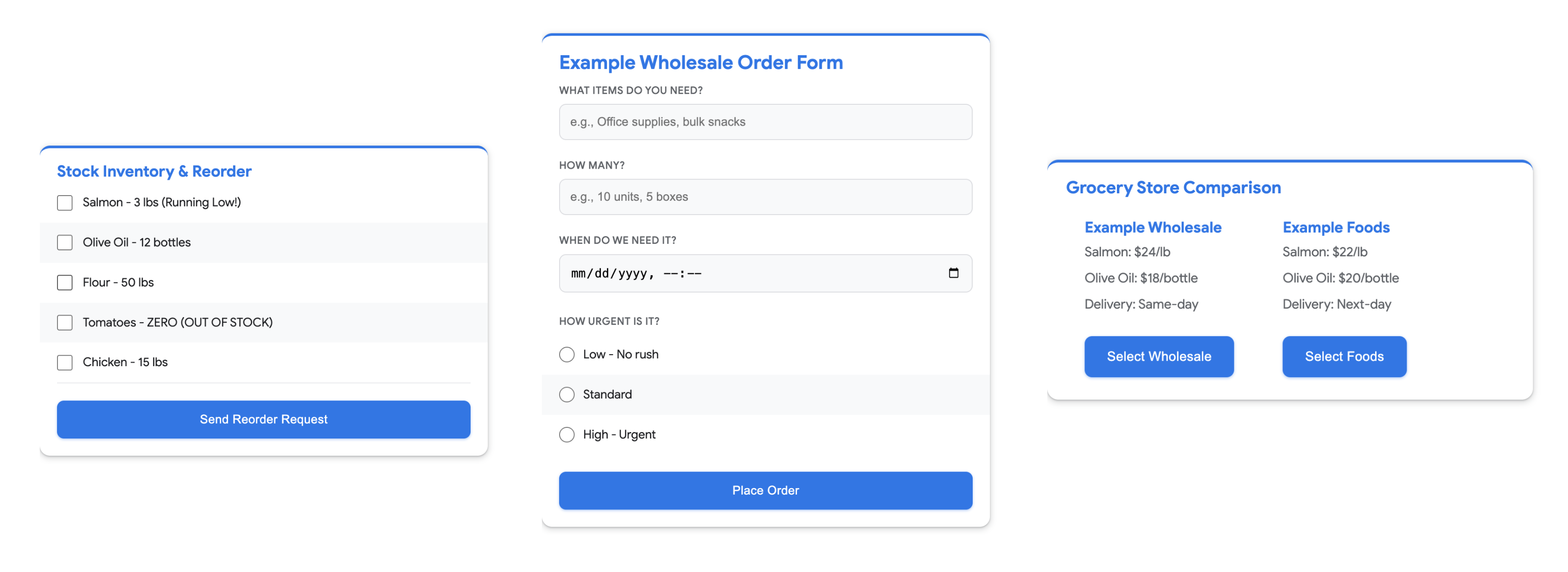
During development, ADK’s web interface (adk web) can render A2UI components natively, so you can test your agent’s UI output without building a custom renderer.
Explore the A2UI samples for more component patterns, or try the A2UI Widget Builder to compose layouts interactively.
6. Agent-User Interaction Protocol (AG-UI)
Traditional REST APIs return a response and they’re done. Agents are different. They stream text incrementally, call tools in the middle of a response, and sometimes pause to wait for human input. This makes connecting an agent to a frontend more complex than a standard API call.
You can handle this yourself. ADK provides a native /run_sse endpoint that streams events directly, and a few dozen lines of frontend code is enough to parse the stream and render tool calls. But that parsing code is boilerplate, and it breaks every time the event format changes.
The Agent-User Interaction Protocol (AG-UI) eliminates that boilerplate. It acts as a middleware that translates raw framework events into a standardized SSE stream. Your frontend listens for typed events like TEXT_MESSAGE_CONTENT or TOOL_CALL_START without caring which agent framework produced them.

To turn our kitchen manager agent into an AG-UI streaming endpoint, we wrap it with the ag_ui_adk package and mount it to a FastAPI app:
from ag_ui_adk import ADKAgent, add_adk_fastapi_endpoint
from fastapi import FastAPI

# Wrap the agent, create the app, mount the endpoint
ag_ui_agent = ADKAgent(adk_agent=kitchen_mgr, app_name="kitchen", user_id="chef")
app = FastAPI()
add_adk_fastapi_endpoint(app, ag_ui_agent, path="/")
# Run with: uvicorn module:app

# The SSE stream emits typed events:
#   RUN_STARTED
#   TOOL_CALL_START    toolCallName="check_inventory"
#   TOOL_CALL_RESULT   content="3 lbs in stock, REORDER NEEDED"
#   TOOL_CALL_END
#   TEXT_MESSAGE_CONTENT  delta="Based on "
#   TEXT_MESSAGE_CONTENT  delta="current inventory..."
#   RUN_FINISHED
Python
Explore the AG-UI examples to see more streaming patterns in action.
Putting It All Together: The Agent in Action
With all six protocols in place, our bare LLM at the start has become quite a capable agent that can check real inventory, discover suppliers, place orders, authorize payments, and stream interactive dashboards. Here’s what happens when a user sends a request that invokes all of the agent’s functionality:
“Check our salmon inventory, get today’s wholesale price and quality grade, and if we’re low order 10 lbs from Example Wholesale and authorize the payment.”
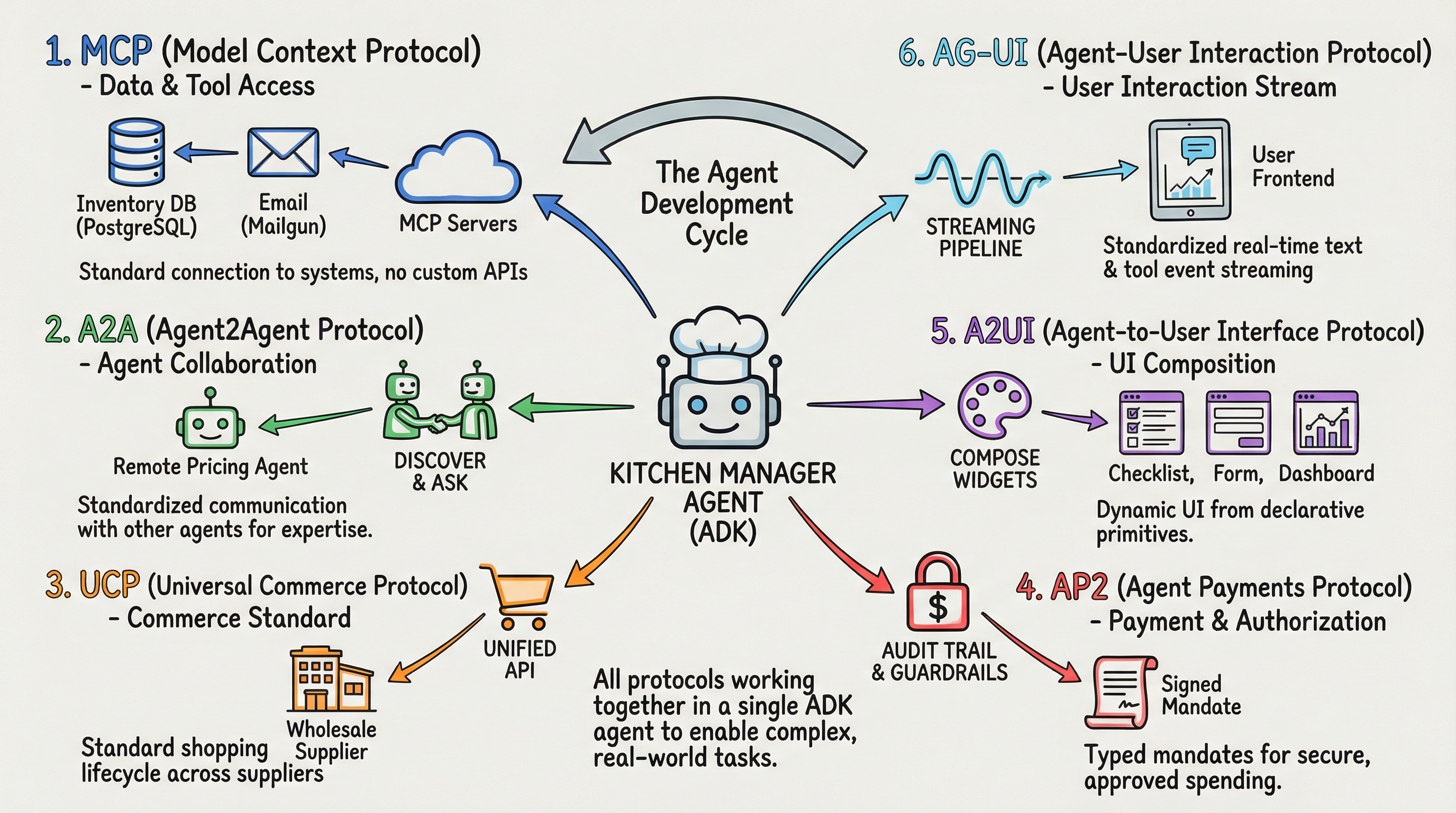
The agent handles each stage of the request using a different protocol:
Stage 1: Gather information
- First, check what’s in stock. MCP queries the inventory database for salmon (
check_inventory). - The stock is low. What’s the going rate? A2A queries the remote pricing and quality agents (
ask_agent).
Stage 2: Complete the transaction
- The price looks right, place the order. UCP sends a checkout request to Example Wholesale (
place_order). - But who approved this? AP2 secures the order with a payment mandate within configured guardrails (
authorize_payment).
Stage 3: Present the results
- Now show the user what happened. A2UI composes interactive widgets from the results.
- Stream it all to the frontend. AG-UI delivers the tool calls and text responses in real time.
Six protocols, each solving a different problem, all working through a single agent.
Tips for working with these protocols
Know what problem each protocol solves: MCP connects agents to tools and data. A2A connects agents to other agents. UCP standardizes commerce. AP2 handles payment authorization. A2UI defines what to render. AG-UI defines how to stream it. Understanding these boundaries keeps your architecture clean.
Add protocols as you need them: You don’t need all six in your agent on day one. Most agents start with MCP for data access. As your requirements grow (multi-agent communication, commerce, payments, rich UI, streaming), bring in the protocol that solves that specific problem.
Don’t start from scratch: Before building with a protocol, check for an ADK integration, an official SDK, and sample code. These protocols move fast, and the official tooling handles details you don’t want to reimplement yourself.
Adopt standards early: These protocols are still maturing, but the patterns they establish (discovery via well-known URLs, typed request/response schemas, standard event streams) make your agent compatible with the growing ecosystem of tools, services, and other agents.
Get Started Now
Every code sample in this post uses ADK. Set up your first agent, connect it to an MCP server, and start adding protocols from there. Browse the ADK Integrations to see what tools and services are already available. Links to each protocol’s documentation and samples are throughout this guide.
We can’t wait to see what you build.
[ad_2]
Source_link