• About Us
  • Disclaimer
  • Contact Us
  • Privacy Policy
Saturday, February 21, 2026
mGrowTech
No Result
View All Result
  • Technology And Software
    • Account Based Marketing
    • Channel Marketing
    • Marketing Automation
      • Al, Analytics and Automation
      • Ad Management
  • Digital Marketing
    • Social Media Management
    • Google Marketing
  • Direct Marketing
    • Brand Management
    • Marketing Attribution and Consulting
  • Mobile Marketing
  • Event Management
  • PR Solutions
  • Technology And Software
    • Account Based Marketing
    • Channel Marketing
    • Marketing Automation
      • Al, Analytics and Automation
      • Ad Management
  • Digital Marketing
    • Social Media Management
    • Google Marketing
  • Direct Marketing
    • Brand Management
    • Marketing Attribution and Consulting
  • Mobile Marketing
  • Event Management
  • PR Solutions
No Result
View All Result
mGrowTech
No Result
View All Result
Home Technology And Software

You Can Now Install—and Update—Microsoft Store Apps Using the Command Line

Josh by Josh
February 21, 2026
in Technology And Software
0
You Can Now Install—and Update—Microsoft Store Apps Using the Command Line


I can’t stand opening the Microsoft Store. It’s slow to load, confusing to browse, and full of ads for things I don’t care about. Luckily, thanks to a new feature, I don’t have to open the Microsoft Store ever again.

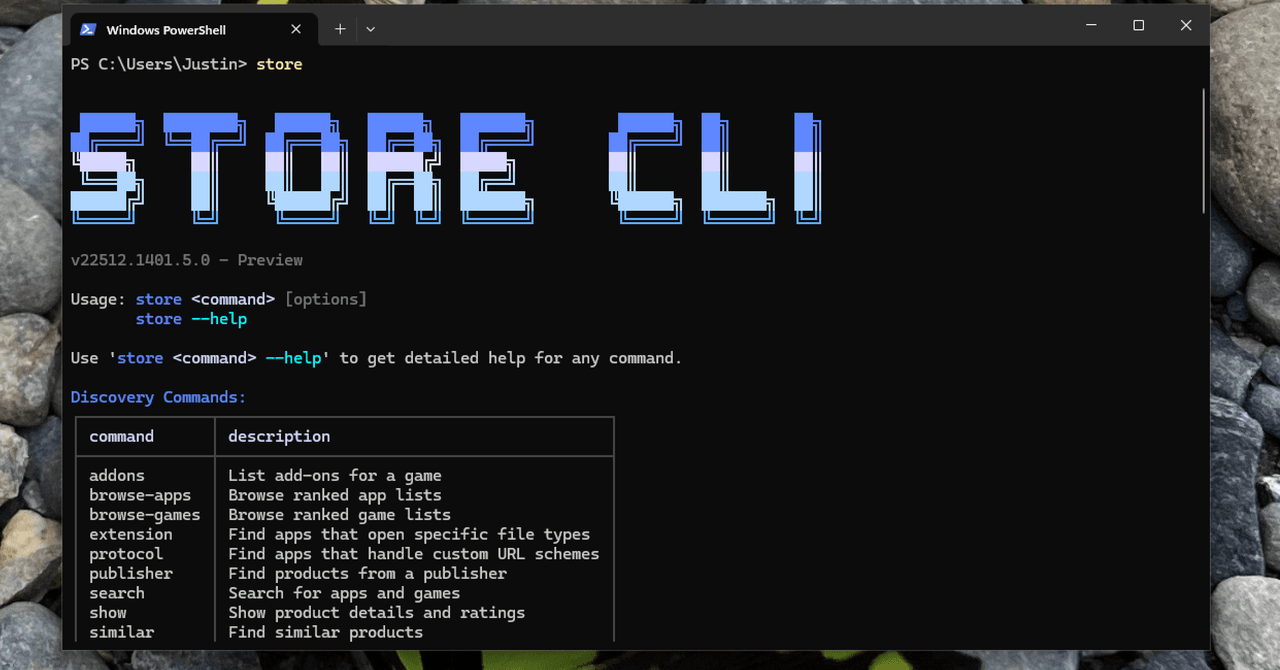
Last week Microsoft announced a brand new command line interface for the Microsoft Store, which you can access right now by opening PowerShell and typing “store.” If the command doesn’t work, make sure you’ve run all of the current Windows 11 updates.

If it does work, you will see a fancy bit of ASCII art along with a list of sub-commands. This tells you how you can search for, install, and even update software with just a few keystrokes.

Linux users are used to installing software from the command line, and Mac users know how to find third party tools for the job, like MAS for the Mac App Store. I can’t recall a mainstream commercial operating system including a way to browse and install software from a commercial app store using only commands.

Image may contain Text

Now Windows users can enjoy the privilege of installing software from the command line.

Courtesy of Justin Pot

Microsoft’s implementation is quite nice. For example, you don’t need to know the exact name of the app in order to install something. While testing this new interface, I typed “store install firefox,” not knowing if that would work. The tool searched the store, found the app most likely to match “firefox,” told me the company that made it (Mozilla, in this case), and asked if that was in fact what I wanted to install.

I can’t overstate how easy this makes installing software. Similar services I’ve tested don’t work this way—you need to know the exact name used by the package manager or else you’ll get an error. It’s really great to see this implemented so well.

There are downsides. The tool can only install applications that are offered in the Microsoft Store, which is inherently limiting. A few extremely popular apps, including Google Chrome and Paint.net, aren’t available this way. But plenty of applications are, and you might not know what is and isn’t there. You can type “store search” followed by a query in order to search the store. You can get more details by typing “store show” followed by the name of the application in order to read more about it.

You can also browse the Microsoft Store. The command “store browse-apps” will tell you about a few categories you can look into, including the bestseller lists. Taken together, these commands allow you to do just about everything you can do in the Microsoft Store, but faster.




Source_link

READ ALSO

India’s Sarvam launches Indus AI chat app as competition heats up

Runlayer is now offering secure OpenClaw agentic capabilities for large enterprises

Related Posts

India’s Sarvam launches Indus AI chat app as competition heats up
Technology And Software

India’s Sarvam launches Indus AI chat app as competition heats up

February 21, 2026
Runlayer is now offering secure OpenClaw agentic capabilities for large enterprises
Technology And Software

Runlayer is now offering secure OpenClaw agentic capabilities for large enterprises

February 20, 2026
People are using ‘admin nights’ to turn productivity into a party
Technology And Software

People are using ‘admin nights’ to turn productivity into a party

February 20, 2026
Instagram on trial and the RAMaggedon rages on
Technology And Software

Instagram on trial and the RAMaggedon rages on

February 20, 2026
The Search Engine for OnlyFans Models Who Look Like Your Crush
Technology And Software

The Search Engine for OnlyFans Models Who Look Like Your Crush

February 20, 2026
General Catalyst commits $5B to India over five years
Technology And Software

General Catalyst commits $5B to India over five years

February 20, 2026
Next Post
Build AI skills: Google AI Professional Certificate

Build AI skills: Google AI Professional Certificate

POPULAR NEWS

Trump ends trade talks with Canada over a digital services tax

Trump ends trade talks with Canada over a digital services tax

June 28, 2025
Communication Effectiveness Skills For Business Leaders

Communication Effectiveness Skills For Business Leaders

June 10, 2025
15 Trending Songs on TikTok in 2025 (+ How to Use Them)

15 Trending Songs on TikTok in 2025 (+ How to Use Them)

June 18, 2025
App Development Cost in Singapore: Pricing Breakdown & Insights

App Development Cost in Singapore: Pricing Breakdown & Insights

June 22, 2025
Google announced the next step in its nuclear energy plans 

Google announced the next step in its nuclear energy plans 

August 20, 2025

EDITOR'S PICK

What is Index Bloat? — Whiteboard Friday

What is Index Bloat? — Whiteboard Friday

October 17, 2025
8 Easy Ways to Send Texts From A Computer (No Phone Needed)

8 Easy Ways to Send Texts From A Computer (No Phone Needed)

July 8, 2025
Fine-Tuning, RLHF & Red Teaming

Fine-Tuning, RLHF & Red Teaming

October 23, 2025
Your Workplace Security Trap: Why the Biggest Dangers Are Hiding in Plain Sight

Your Workplace Security Trap: Why the Biggest Dangers Are Hiding in Plain Sight

October 9, 2025

About

We bring you the best Premium WordPress Themes that perfect for news, magazine, personal blog, etc. Check our landing page for details.

Follow us

Categories

  • Account Based Marketing
  • Ad Management
  • Al, Analytics and Automation
  • Brand Management
  • Channel Marketing
  • Digital Marketing
  • Direct Marketing
  • Event Management
  • Google Marketing
  • Marketing Attribution and Consulting
  • Marketing Automation
  • Mobile Marketing
  • PR Solutions
  • Social Media Management
  • Technology And Software
  • Uncategorized

Recent Posts

  • What are the best Google Ads strategies for B2B technology companies?
  • Build AI skills: Google AI Professional Certificate
  • You Can Now Install—and Update—Microsoft Store Apps Using the Command Line
  • A Coding Guide to High-Quality Image Generation, Control, and Editing Using HuggingFace Diffusers
  • About Us
  • Disclaimer
  • Contact Us
  • Privacy Policy
No Result
View All Result
  • Technology And Software
    • Account Based Marketing
    • Channel Marketing
    • Marketing Automation
      • Al, Analytics and Automation
      • Ad Management
  • Digital Marketing
    • Social Media Management
    • Google Marketing
  • Direct Marketing
    • Brand Management
    • Marketing Attribution and Consulting
  • Mobile Marketing
  • Event Management
  • PR Solutions