Threads might look a bit like Twitter and feel like Instagram, but the fledgling social media platform is a bit of both — and neither.
Threads has been positively flying since it first burst onto app stores in 2023. In just a few years, the Meta-owned app amassed 141.5 million daily active users, with many serious superfans in its ranks (several of the Buffer team among them!).
And those superfans will be quick to tell you that social media strategies for Instagram and Twitter/X aren’t plug-and-play for Threads.
The Threads algorithm is all its own, and — if you’re serious about building an audience on Threads — it’s well worth getting familiar with how it works.
Which is where this guide comes in.
The Threads team shared some details on the Threads Feed AI system on the Meta transparency site, and it includes some helpful insights about how to grow your following on Threads right now.
The team is adding new Threads features regularly, so the algorithm will likely evolve as the platform grows.
We’ll keep you updated as things change.
Key takeaways
- AI-driven discovery: Threads uses an AI ranking system for the For You feed, while the Following feed remains strictly chronological.
- Three-step ranking: The system gathers content inventory, analyzes engagement signals, and ranks posts based on predicted value to the user.
- Instagram link: Interactions on Instagram, such as viewing a profile, directly influence the content recommended on Threads.
- Interoperability: Threads has integrated with the fediverse, allowing users on other platforms like Mastodon to follow Threads accounts.
- Value over hacks: The algorithm prioritizes content that provides genuine value, such as education, problem-solving, or entertainment, over engagement-baiting.
Here’s a round-up of everything we know about how the Threads algorithm works, along with a few predictions for the future.
1. Threads’ feed is ranked by an AI system
Here’s something interesting: Threads’ latest update on their ranking system doesn’t mention the word ‘algorithm’ at all. Instead, they call it an artificial intelligence (AI) system.
“The content that you see on your Threads feed is selected, ranked, and delivered to you by an artificial intelligence (AI) system,” the company says. “Within one AI system, multiple machine learning models work together to deliver your experience.”
While this might feel new, it’s actually similar to how most social networks work. Most social networks use this kind of reactive machine learning AI to shape their feeds (although Threads is the first to scrap the word algorithm in favor of AI — likely thanks to the fact that most users will better understand the term after the AI boom in 2023).
2. Threads’ AI system only impacts the For You feed
After launching with a simple For You feed — a curated feed of the content that the algorithm predicts a user will enjoy — early adopters clamored for a Following feed, where they would only see content from accounts they already follow. Threads added this feature shortly after.
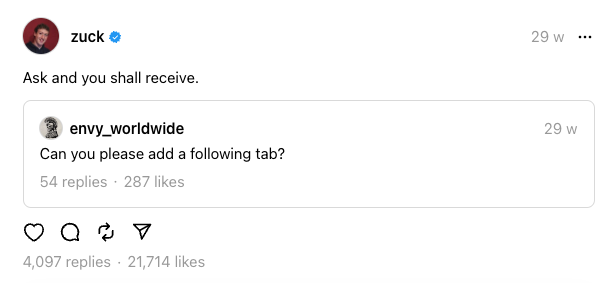
The setup is similar to TikTok’s For You Page (FYP) and Following feeds — you can switch between them with a tap at the top of the app.
On the Threads app, users can switch between the two feeds by tapping the Threads logo at the top of the app or the home button at the bottom of the app, then the For You or Following tabs that appear just beneath it. On the web version of Threads, there’s a For You/Following toggle button on the bottom right.
Interestingly, the Following feed isn’t dictated by the algorithm at all — it looks like the company has returned to a good old-fashioned chronological feed in this case.
“Your Following feed shows you posts from profiles you follow, displayed in reverse chronological order. For you shows you posts from profiles you follow, plus others we think you’ll enjoy based on your likes, replies, and reposts,” the company says.
So the information in this article focuses on the For You feed, which is where you’ll want your content to appear if you’re looking to grow your audience on Threads.
💡 Pro tip: You can set up a default feed (e.g., default to Following or a custom feed when opening the app) rather than always landing on For You.
3. Ranking happens in 3 steps
There are three actions that happen at lightning speed before any content appears in users’ feeds at all. Here’s how Threads breaks that process down:
- Gather inventory (content): The system gathers a portion of the public content available on Threads and all the content posted by accounts that you follow, which may include text posts, photos, and videos that follow our quality and integrity rules.
- Leverage signals (engagement): Next, the AI system considers a variety of input signals about the content. These signals might include how you’ve engaged with similar accounts, content, or your interests.
- Rank content: Finally, the system ranks content from the previous step. Content that the system predicts will provide more value for you is shown higher in your feed. This helps the system make content recommendations that more closely match your preferences.
This behind-the-scenes process might seem beyond your control as a brand or content creator on Threads. But there are some helpful clues in this system about giving your content the best possible chance of success.
First, it is crucial to ensure your posts are included in “the portion” of content the Threads algorithm gathers in step one. Second (and relatively standard practice for social media platforms) is the weight placed on engagement when it comes to ranking. The third — and perhaps most important — is the mention of value in the final step. I’ll unpack all of these below.
Flouting the rules is the surest way to remain stagnant on Threads — and might even mean being banned. As you’ll notice in the process above, only “text posts, photos, and videos that follow our quality and integrity rules” are analyzed according to the various ranking signals (below).
According to Threads’ Terms of Use, content on the platform must abide by the Instagram Community Guidelines, which they summarize as:
“We want Instagram to continue to be an authentic and safe place for inspiration and expression. Help us foster this community. Post only your own photos and videos, and always follow the law. Respect everyone on Instagram; don’t spam people or post nudity.”
It’s also worth ensuring your content aligns with another set of rules: Instagram’s Recommendation Guidelines. While content that goes against these guidelines is still technically allowed in the platform, it’s excluded from Instagram-recommended feeds like the Explore Page or the Instagram Reels Feed. It’s very likely this impacts Threads’ For You Feed, too.
That means avoiding anything that:
- depicts/discusses self-harm, suicide, eating disorders, or violence
- is sexually explicit or suggestive
- promotes the use of certain regulated products, like tobacco
5. The signals that shape users’ feeds
In their explainer, the social network breaks down several of the algorithm’s predictions, along with the signals that influence each one. I love their way of framing this because it highlights that even the tiniest of actions on your content can have an impact beyond just likes, comments, and reposts.
Whether or not a user will like a post
This prediction is influenced by:
- How many posts they’ve seen on their feeds
- How many posts they’ve clicked to like
- How many times they’ve clicked to like the author’s posts in their feed
- How many posts they’ve clicked to like from this author, of those that they’ve seen
How likely a user is to click to view replies on a post
This prediction is influenced by:
- How many times others have clicked to reply to the post
- How many replies they’ve seen
- How many times they’ve clicked to like the author’s posts in their feed
- How long it’s been since they were active on Threads
How likely they are to follow the author of a post
This prediction is influenced by:
- How many posts they’ve seen in their feed
- How long it’s been since they were active on Threads
- Which authors they’ve followed recently
- Whether or not the post was predicted to contain language that goes against the Instagram Community Guidelines
- How many times they’ve viewed the author’s profile on Instagram
How likely a user is to click on the profile of a post’s author
This prediction is influenced by:
- How many times the author’s profile has been clicked
- The profile click rate on the author of the post
- Whether or not the post was predicted to contain language that goes against our Community Guidelines
- How many times they’ve viewed the author’s profile on Instagram
- The number of times that people have clicked on the author’s profile
How likely a user is to scroll past a post rather than engage with it
This prediction is influenced by:
- The number of times that they’ve viewed a post
- How many times they’ve clicked to like the author’s posts
- How many times others have viewed the post
Threads hasn’t been explicit about what weight they give to each of these actions, but it’s likely that the more effort the action requires, the more it influences the predictions and, in turn, your content ranking.
6. Actions on Instagram affect Threads’ feeds
Threads is owned by Meta (which also owns Facebook, Instagram, and WhatsApp) but is often touted as a companion app to Instagram.
An Instagram profile is required to get set up on Threads, and it’s easy to share and switch between the two social networks. When you join the platform, your Instagram followers will also receive a nudge to follow you on Threads.
So, it’s not surprising to see just how much actions taken on Instagram can impact the Threads algorithm. As you’ll see above, viewing an author’s Instagram profile is a signal that affects not one but two predictions. It’s a relatively high-friction action that involves heading over to the author’s Threads profile and tapping on the Instagram logo on their page to switch apps.
With all that effort, checking out someone’s Instagram profile is a powerful indication of interest in the author’s content and will likely significantly impact ranking. This is a big hint that success on one platform will continue to be tied to the other as Threads grows — for now, at least.
7. Users can customize their experience
While Threads’ users’ feeds are all shaped by how they consume and engage with content on the platform, they do have a more explicit level of control over what they do and don’t see.
Some of these options include:
- Unfollow: This one is pretty self-explanatory (though Threads doesn’t say whether an unfollow on Threads might impact Instagram feeds and vice versa).
- Share: This includes sending a post to a chat and sharing it on another platform or site.
- Mute: Via the three dots to the right of every post, users can mute Threads creators so their content no longer appears in the users’ feeds without unfollowing.
- Hide: Also via the three-dot menu, users can hide a specific post so that they won’t see that post again. “This action also helps to limit similar content from appearing in your feed,” Threads says.
- Report: Users can report content they think goes against Threads’ (read: Instagram’s) Community Guidelines and posts they believe are spam or false information. The system will try to show the user less content like the post they reported, whether Threads rules that the content violates their guidelines or not.
- See content only from accounts you follow: You can click the Threads logo on your home screen and then click Following to see content only from accounts you follow, in reverse chronological order.
Again, Threads doesn’t say how much weight is given to each of these actions, but they likely have a more significant influence than easier or one-click actions, such as a ‘like.’
8. Fediverse features are evolving
Meta has begun rolling out deeper integrations with platforms built on the ActivityPub protocol, allowing Threads users who opt in to follow and view posts from fediverse accounts — even if those creators don’t have a Threads account themselves.
You can now search for fediverse users by handle, follow them directly from Threads, and see their posts in a dedicated fediverse feed, which is displayed in reverse chronological order.
It’s unclear how this may impact the Threads algorithm — and the algorithms of other platforms built on the ActivityPub protocol — right now, but it’s certainly one to keep in mind as you grow your following.
If you’re serious about Threads, it’s worth setting up and getting to grips with a fediverse platform before this big shift comes into play. Check out our guide to all Bluesky’s features and how to use them or our beginner’s guide to Mastodon.
9. Providing value is the key to Threads’ success
Understanding the inner workings of the Threads algorithm is definitely helpful, but there’s one small detail that stood out to me in their ranking explainer:
“Content that the system predicts will provide more value for you is shown higher in your feed.”
I love that framing because it showcases the ultimate goal Threads hopes to achieve with its powerful AI ranking system: posts that contain value for Threads users. So, rather than worrying about Threads engagement hacks or the best tags to use, focus on the quality of your content. What do you want your audience to walk away with after reading or watching your posts?
There are so many ways to do that. It might involve:
- Teaching them something new from your unique areas of expertise
- Helping solve a particular problem your target audience often faces
- Kickstarting a conversation in an area they have knowledge of or want to learn more about
- Just making them laugh
Of course, that is easier said than done. Luckily, we have plenty of resources that might prove helpful as you grow your following on Threads. For example, take a look at these Threads content ideas for your next post.
I’d suggest you start by following the steps to create your own social media strategy (this applies to creators, too). If you’re looking to build a personal brand, this guide provides a handy framework for doing exactly that. Finally, here’s a guide to tactics the Buffer Team and I have found success with on Threads.
10. Threads is leaning into timely, trending content posted directly on the platform
Threads has refined how content is surfaced to help you tap into the most lively, meaningful conversations, right as they’re happening. Rather than simply recycling the posts you once saw, the ranking system now leans into timeliness, engagement, and topical relevance, surfacing content from people who are actively driving conversations in the moment — and less from accounts you originally followed via Instagram but no longer interact with much.
Trending topics play a growing role in this shift. Recent posts and conversations that see sudden spikes in activity can get extra eyes, especially when they’re tied to what people are actively discussing across the platform.
For creators, posting directly to Threads and engaging with trending topics early can translate into better reach and follower growth.
These adjustments are designed to make it easier for you to find your people and keep building community.
Bonus: Make the most of Threads’ features
It’s also worth noting that Threads has a host of features that make your content easier to find, engage with, and derive value from. While none of these features are explicitly mentioned in Threads’ algorithm update, tapping into all the options a social network offers is always a solid strategy for ensuring you offer as much value as possible. That means:
- Using tags (Threads’ version of hashtags) to start or join conversations in your niche
- Leaning into polls, GIFs, memes, photos, and videos to stop the scroll
- Joining ongoing conversations in Threads rather than just trying to start your own
Happy Threading
What’s your experience been on Threads? I’d love to hear more about what you’ve learned. Tag @buffer in a post on Threads, or leave a comment below.
FAQ about the Threads algorithm
How does the Threads algorithm work?
The Threads algorithm uses an AI ranking system to decide which posts appear in your For You feed. It gathers available content, analyzes engagement signals like likes, replies, and profile visits, and ranks posts based on how valuable they’re predicted to be for each user.
Is the Threads feed chronological?
The Threads Following feed is chronological, showing posts from accounts you follow in reverse order. The For You feed is not chronological and is instead ranked by Threads’ AI system, which recommends content based on your activity, interests, and past engagement.
What signals does the Threads algorithm prioritize?
The Threads algorithm prioritizes signals that show genuine interest, such as replies, profile visits, time spent engaging with a post, and repeat interactions with an author.
Does Instagram activity affect Threads reach?
Yes, Instagram activity can affect Threads reach. Because Threads is closely connected to Instagram, actions like viewing an author’s Instagram profile or interacting with their content can influence what posts are recommended to you on Threads, especially in the For You feed.
Can users control what they see on Threads?
Users can influence their Threads feed by muting accounts, hiding posts, unfollowing creators, or reporting content. These actions help the system understand content preferences over time.
What type of content performs best on Threads?
Content that provides clear value performs best on Threads. This includes educational posts, problem-solving content, timely commentary, and engaging conversations. Posts that spark replies and meaningful interaction are more likely to be shown to new audiences.
Is Threads still worth using for growth?
Threads is still worth using for growth, particularly for creators and brands with an existing Instagram presence. The platform favors timely, engaging content and ongoing conversations, making it a strong channel for building community as the network continues to evolve.
More Threads resources