Apple Search Ads placements are expanding in March 2026, creating unprecedented opportunities for app marketers to reach high-intent users on the App Store. The App Store is a bustling marketplace, and standing out requires a smart approach to user acquisition. For years, Apple Search Ads has been a go-to solution for developers looking to boost their app’s visibility and drive downloads. Now, with significant changes on the horizon for March 2026, understanding how to leverage these new opportunities is critical for success.
This guide will walk you through everything you need to know about the latest updates to Apple Search Ads placements, providing actionable insights to help you stay ahead of the curve. We’ll cover the new ad inventory, best practices for campaign structure, and how to optimize your strategy for maximum return on investment (ROI).
Understanding Apple Search Ads Placements
Before diving into the new changes, let’s quickly recap the existing ad placements available through Apple Search Ads. These placements allow you to promote your app across different areas of the App Store, reaching users at various stages of their discovery journey.
- Today Tab: This is the front page of the App Store, seen by over half a billion visitors every week. An ad on the Today tab offers massive visibility and is ideal for large-scale brand awareness campaigns.
- Search Tab: Your ad appears in the list of suggested apps before users even begin to type in the search field. This is a great way to get your app in front of users who are actively looking for new apps to download.
- Product Pages: Your ad can appear at the top of the “You Might Also Like” list on other app product pages. This allows you to capture the attention of users who are exploring apps similar to yours.
- Search Results: This is the most common and well-known placement. Your ad appears at the top of the search results when a user searches for relevant keywords. According to Apple’s official documentation, nearly 65% of all app downloads occur directly after a search, making this a highly effective placement for driving installs.
March 2026 Update: Expanded Apple Search Ads Placements
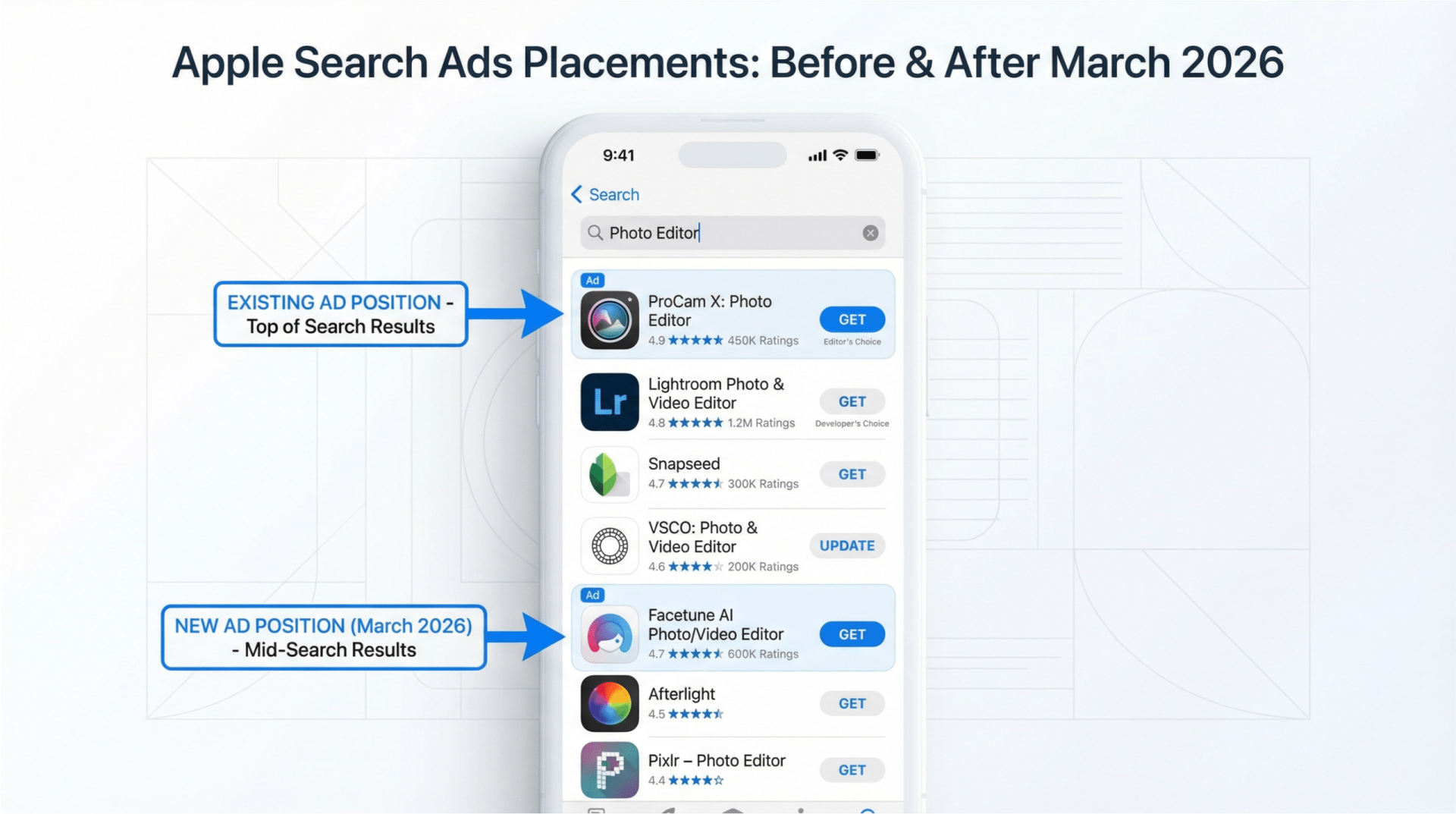
Starting in March 2026, Apple is introducing additional ad inventory within the search results page. This is a significant development for app marketers, as it creates more opportunities to reach potential users. Here’s what you need to know about this important update to Apple Search Ads placements:
- New Ad Positions: In addition to the existing ad slot at the very top of the search results, ads will now also appear further down the page. This means more chances for your app to be seen by users as they scroll through the search results.
- Automatic Eligibility: You don’t need to make any changes to your existing search results campaigns to be eligible for these new ad positions. Your ads will automatically be entered into the auction for all available slots.
- No Position Bidding: It’s important to note that you cannot specifically bid for or select a particular ad position. Apple’s ad-serving algorithm will determine where your ad is placed based on a combination of factors, including your bid and the ad’s relevance to the user’s search query.
- Consistent Ad Format: The ad format will remain the same regardless of the position. Your ad will still be created from your app’s product page, and you can continue to use custom product pages to create ad variations.
Optimizing Your Strategy for New Apple Search Ads Placements
While Apple has made it easy to take advantage of the new ad inventory, there are several steps you can take to optimize your campaigns and ensure you’re getting the most out of these new opportunities. A well-structured campaign is essential for success with profitable Apple Search Ads.
Refine Your Keyword Strategy
With more ad slots available, a robust keyword strategy is more important than ever. To maximize your reach and relevance, consider organizing your keywords into four distinct campaign types:
- Brand Campaigns: Target keywords related to your app’s name and your company’s brand. This helps protect your brand from competitors and ensures that users searching for you can easily find your app.
- Category Campaigns: Focus on general, non-branded keywords that describe your app’s category or function. For example, if you have a photo editing app, you might target keywords like “photo editor” or “picture effects.”
- Competitor Campaigns: Target the names of competing apps. This can be an effective way to capture the attention of users who are considering your competitors.
- Discovery Campaigns: Use broad match keywords and Search Match to discover new, relevant search terms that users are searching for. This can help you expand your keyword list and uncover new opportunities.
Leverage Custom Product Pages
Custom product pages are a powerful tool for increasing the relevance of your ads. By creating different versions of your App Store product page, you can tailor your ad creative to specific keyword themes and audience segments. According to Apple’s developer documentation, custom product pages allow you to showcase different features, screenshots, and app previews to different audiences. For example, you could create a custom product page that highlights specific features of your app that are relevant to a particular set of keywords. This can lead to higher conversion rates and a better user experience.
Embrace a Multi-Placement Strategy
While the new search results placements are exciting, don’t neglect the other ad placements available on the App Store. A multi-placement strategy can help you reach a wider audience and drive better overall results. For example, running a Today tab campaign can build brand awareness, which can in turn lead to more users searching for your app and converting through your search results ads. It’s all part of a holistic mobile app advertising strategy.
Measuring Success with Apple Search Ads Placements
With ads running across multiple placements, it’s important to have a clear understanding of how to measure performance. While last-touch attribution is a common metric, it doesn’t always tell the whole story. A user might see your ad on the Today tab, which piques their interest, and then later search for your app and download it. In this scenario, the Today tab ad played a crucial role in the conversion, even though the search results ad got the last click.
To get a more complete picture of your campaign performance, be sure to look at view-through metrics in addition to tap-through metrics. This will help you understand the full impact of your ads across all placements. You can also use a mobile measurement partner (MMP) to get more advanced attribution insights. Apple provides robust reporting tools through the Apple Ads dashboard to help you track key metrics like installs, spend, and tap-through rate across all placements.
Taking Advantage of Apple Search Ads Placements in 2026
The expansion of Apple Search Ads placements in March 2026 represents a significant opportunity for app marketers. By understanding the new ad inventory, refining your keyword strategy, and embracing a multi-placement approach, you can position your app for success in the ever-evolving App Store ecosystem. With nearly 65% of downloads happening directly after a search and an average conversion rate of over 60% for search results ads, these placements offer some of the highest-performing advertising opportunities in mobile marketing. Remember to also consider how you can use responsive search ads to further enhance your campaigns.
Ready to grow your business with expert advertising strategies? Contact us today for a free consultation!