• About Us
  • Disclaimer
  • Contact Us
  • Privacy Policy
Thursday, January 22, 2026
mGrowTech
No Result
View All Result
  • Technology And Software
    • Account Based Marketing
    • Channel Marketing
    • Marketing Automation
      • Al, Analytics and Automation
      • Ad Management
  • Digital Marketing
    • Social Media Management
    • Google Marketing
  • Direct Marketing
    • Brand Management
    • Marketing Attribution and Consulting
  • Mobile Marketing
  • Event Management
  • PR Solutions
  • Technology And Software
    • Account Based Marketing
    • Channel Marketing
    • Marketing Automation
      • Al, Analytics and Automation
      • Ad Management
  • Digital Marketing
    • Social Media Management
    • Google Marketing
  • Direct Marketing
    • Brand Management
    • Marketing Attribution and Consulting
  • Mobile Marketing
  • Event Management
  • PR Solutions
No Result
View All Result
mGrowTech
No Result
View All Result
Home Technology And Software

Nanit Home Display Review: A Transformative Tablet

Josh by Josh
December 14, 2025
in Technology And Software
0
Nanit Home Display Review: A Transformative Tablet
0
SHARES
0
VIEWS
Share on FacebookShare on Twitter


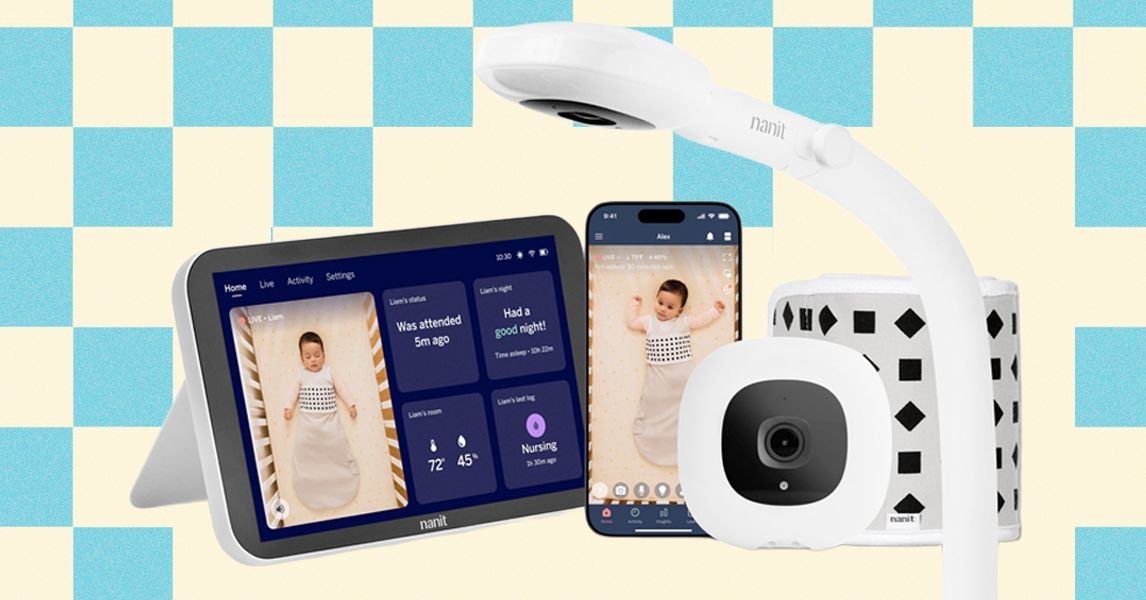
A narrow white pole with a camera on the end a small screen propped up on a wooden table

Photograph: Nicole Kinning

The Home monitor can run wirelessly and charges via a USB-C cable. It relies on your Wi-Fi network to connect to the camera, so while you can carry the monitor around your home, you can’t take it fully “off-grid” or use it outside your home network (not a dealbreaker for many families, but thought it was worth noting).

The flexibility does come with some limitations: The battery doesn’t last a full day, so if you’re using it off its charger, you’ll need to power it down when not in use to keep it alive. I found that most days, after I put my daughter down for her 10 am nap, the device, if left on and unplugged, would be nearly dead by bedtime around 7 pm.

Clarity Check

In most conditions, Nanit’s video quality is solid. My personal litmus test is whether I can see my daughter’s eyes in night mode, and from a standard view on the Home, the answer is yes. Zooming in brings out some pixelation, and the fixed floor-stand height means you can’t fine-tune the frame as much as you might like. But for a quick check-in glance parents make a dozen times a night, the clarity holds up.

READ ALSO

Why LinkedIn says prompting was a non-starter — and small models was the breakthrough

X is also launching Bluesky-like starter packs

The live feed is responsive with no noticeable delays or buffering, which I’ve found to be crucial in determining if certain sounds are cries or just sleep grunts. The display also shows room temperature and humidity levels, which is a nice touch as we dive headfirst into a Midwest winter.

The sound is clear as day. When set to do so, the Home monitor will ping when it detects crying or motion, and I have yet to miss any alerts while I sleep. The only hiccup came when I had the device lying flat on my desk; because the speaker sits on the back, the audio was noticeably muffled. Luckily, the built-in kickstand solves this, so it’s an easy problem to avoid.

Screen Time

Onto the reason why you’re all here—the touchscreen monitor. Its home screen is a mixture of widgets: the live feed, your baby’s status (when they were last attended to, how long they’ve been sleeping, etc.), a nightly summary, and environmental conditions (temperature and humidity). The interface of the live feed mimics the Nanit app pretty closely, with controls for the microphone, nightlight, audio monitoring, breathing detection, and camera power sitting along the bottom of the live view.

Something worth noting: the screen is very bright. Even with the brightness turned all the way down in the settings, it was still bright enough to disrupt my sleep. Pressing the power button once enters standby mode—your audio stays on, and you’ll get sound and motion pings, but the screen stays dark. (Sometimes you need a second to prepare your eyes for a blast of blue light first thing in the morning.) There’s one catch: if you’re on the live stream view, the screen won’t go to sleep automatically and stays illuminated. On any other tab, it dims after 30 seconds to a screensaver displaying the time, date, and notifications, similar to a phone lock screen.



Source_link

Related Posts

Why LinkedIn says prompting was a non-starter — and small models was the breakthrough
Technology And Software

Why LinkedIn says prompting was a non-starter — and small models was the breakthrough

January 22, 2026
X is also launching Bluesky-like starter packs
Technology And Software

X is also launching Bluesky-like starter packs

January 22, 2026
What Type of Mattress Is Right for You? (2026)
Technology And Software

What Type of Mattress Is Right for You? (2026)

January 22, 2026
Sources: project SGLang spins out as RadixArk with $400M valuation as inference market explodes
Technology And Software

Sources: project SGLang spins out as RadixArk with $400M valuation as inference market explodes

January 21, 2026
Fiverr Early Payout: Get Your Money Faster In 2026
Technology And Software

Fiverr Early Payout: Get Your Money Faster In 2026

January 21, 2026
TrueFoundry launches TrueFailover to automatically reroute enterprise AI traffic during model outages
Technology And Software

TrueFoundry launches TrueFailover to automatically reroute enterprise AI traffic during model outages

January 21, 2026
Next Post
The Impact of AI on Earned Media Value

The Impact of AI on Earned Media Value

POPULAR NEWS

Trump ends trade talks with Canada over a digital services tax

Trump ends trade talks with Canada over a digital services tax

June 28, 2025
Communication Effectiveness Skills For Business Leaders

Communication Effectiveness Skills For Business Leaders

June 10, 2025
15 Trending Songs on TikTok in 2025 (+ How to Use Them)

15 Trending Songs on TikTok in 2025 (+ How to Use Them)

June 18, 2025
App Development Cost in Singapore: Pricing Breakdown & Insights

App Development Cost in Singapore: Pricing Breakdown & Insights

June 22, 2025
Google announced the next step in its nuclear energy plans 

Google announced the next step in its nuclear energy plans 

August 20, 2025

EDITOR'S PICK

TAG Bulletin: Q2 2025

TAG Bulletin: Q2 2025

July 22, 2025
EA delays Battlefield 6 Season 2 to February 17

EA delays Battlefield 6 Season 2 to February 17

January 13, 2026

OpenX Fuels Continued Commercial Growth With Expanded Leadership Across Buyer Development and Marketing

August 29, 2025
We’re making a sustainable business our reality

We’re making a sustainable business our reality

May 31, 2025

About

We bring you the best Premium WordPress Themes that perfect for news, magazine, personal blog, etc. Check our landing page for details.

Follow us

Categories

  • Account Based Marketing
  • Ad Management
  • Al, Analytics and Automation
  • Brand Management
  • Channel Marketing
  • Digital Marketing
  • Direct Marketing
  • Event Management
  • Google Marketing
  • Marketing Attribution and Consulting
  • Marketing Automation
  • Mobile Marketing
  • PR Solutions
  • Social Media Management
  • Technology And Software
  • Uncategorized

Recent Posts

  • How Corporate Storytelling Strengthens Brand Identity in 2026
  • Spin a Baddie Script (No Key, Auto Roll, Auto Equip)
  • Why LinkedIn says prompting was a non-starter — and small models was the breakthrough
  • 5 B2B Marketing Trends for 2026
  • About Us
  • Disclaimer
  • Contact Us
  • Privacy Policy
No Result
View All Result
  • Technology And Software
    • Account Based Marketing
    • Channel Marketing
    • Marketing Automation
      • Al, Analytics and Automation
      • Ad Management
  • Digital Marketing
    • Social Media Management
    • Google Marketing
  • Direct Marketing
    • Brand Management
    • Marketing Attribution and Consulting
  • Mobile Marketing
  • Event Management
  • PR Solutions

Are you sure want to unlock this post?
Unlock left : 0
Are you sure want to cancel subscription?