Managing multiple social media accounts can quickly become a constant stream of tasks, from creating content and engaging with audiences to tracking performance and results.
Before investing in a paid marketing tool, I always suggest exploring what free social media management tools can offer. Many of these platforms deliver a solid set of features at no cost, including post scheduling, interaction management, and basic analytics to measure engagement.
From working with busy entrepreneurs, social media creators, and growing teams, I’ve learned how valuable it is to have everything in one place. When used effectively, social media management software can act as a powerful support system, combining scheduling, insights, and cost-efficient operation within a single platform.
That’s why I’ve curated this list of the best free social media management software available today. You’ll find detailed reviews, clear pros and cons, and a side-by-side comparison to help you choose the solution that aligns with your social media goals.
Best free social media management tools for 2026
- Agorapulse: Best for team collaboration and social inbox management
For managing comments, messages, approvals, and reporting across teams and clients. - Buffer: Best for simple, beginner-friendly social scheduling
For clean scheduling, basic analytics, and maintaining consistency across a few social accounts. - Hootsuite: Best for centralized social scheduling across multiple networks
For managing multiple accounts, scheduling at scale, and tracking performance from a single dashboard. - HubSpot Marketing Hub: Best for social media management tied to CRM and lead tracking
For scheduling posts, monitoring engagement, and connecting social activity directly to contacts, campaigns, and funnels. - Loomly: Best for content planning and approval workflows
For building content calendars, drafting posts collaboratively, and maintaining brand consistency. - Planable: Best for visual collaboration and content approvals
For previewing posts exactly as they’ll appear, collecting feedback, and streamlining approval workflows. - Simplified: Best for all-in-one content creation and social publishing
For creating designs, writing captions with AI, and scheduling posts from a single creative workspace. - Sprout Social: Best for advanced analytics and social listening
For deep audience insights, unified social inbox management, and performance reporting across channels. - Vista Social: Best for multi-platform scheduling with a modern UI
For managing posts, engagement, and analytics across major social networks with an intuitive interface. - Zoho Social: Best for small businesses using the Zoho ecosystem
For affordable scheduling, monitoring, and analytics with tight integration into Zoho CRM and apps.
*The software list is arranged alphabetically. These tools offer free trials, free forever options, or freemium models.
Comparison of the best free social media management tools
If you feel overwhelmed by the wealth of information about free social media management platforms, this comparison table will help you understand all the important aspects:
| Best free social media management tools | G2 Rating | Free plan | Paid plan |
| Agorapulse | 4.5/5 ⭐ | Free plan available | From $79/month |
| Buffer | 4.3/5 ⭐ | Free plan available | From $6/month for 1 channel |
| Hootsuite | 4.3/5 ⭐ | Free 30-day trial available | From $99/month |
| HubSpot Marketing Hub | 4.5/5 ⭐ | Free plan available | From $20/user/month |
| Loomly | 4.6/5 ⭐ | Free 15-day trial available | From $32/month |
| Planable | 4.6/5 ⭐ | Free plan available | From $33/month |
| Simplified | 4.6/5 ⭐ | Free plan available | From $29/month |
| Sprout Social | 4.4/5 ⭐ | Free 30-day trial available | From $199/seat/ month |
| Vista Social | 4.8/5 ⭐ | Free 14-day trial available | From $79/month |
| Zoho Social | 4.6/5 ⭐ | Free 15-day trial available | From $7.16/month |
*All pricing details mentioned in the article are based on publicly available data at the time of publication and are subject to change.
10 best free social media management tools I recommend
The demand for social media management tools continues to grow as brands work harder to stay consistent, responsive, and data-driven across multiple platforms. With audiences spread across networks like Instagram, LinkedIn, X, and Facebook, managing content and engagement manually is no longer practical for most teams.
Social media management platforms help streamline scheduling, monitor conversations, track performance, and maintain a consistent brand presence, all from a single dashboard. This momentum is reflected in market growth, with the social media management software market valued at $36.24 billion in 2025 and projected to expand to $168.64 billion by 2035, growing at a CAGR of 16.62%.
From my experience, you don’t need a paid plan to manage social media effectively right from the start. I’ve come across several free social media management tools that offer dependable features, from scheduling posts and managing multiple profiles to tracking basic engagement and performance.
That’s why I’ve curated this list of the free social media management tools I recommend. These platforms are well-suited for testing workflows, building consistency across channels, and identifying the right tool for your needs before deciding whether an upgrade is worth it.
How did I find and evaluate these free social media management tools?
To build this list, I started with G2 Data, shortlisting top-rated tools based on their G2 scores and consistent performance in the social media management software category.
From there, I reviewed product features and recent, verified user feedback to confirm that these tools deliver real value and to understand where each one stands out, whether that’s post scheduling, content calendars, analytics and reporting, social inbox capabilities, or platform integrations.
The aim was to understand how well these social media management tools perform in real-world use, what scenarios each tool is best suited for, and whether they can be tested through a free plan or trial without requiring significant commitment. Since this list focuses on free options, I examined closely what’s actually included at no cost.
The screenshots featured in this article may be a mix of those taken from the vendor’s G2 page or from publicly available materials.
To be included in this category, a solution must:
- Plan and publish social media content
- Manage multiple accounts
- Respond to inquiries
- Automate and schedule social media posts
- Store content and archive posts
This data was pulled from G2 in 2025. Some reviews may have been edited for clarity.
1. Agorapulse: Best for team collaboration and social inbox management
Agorapulse offers email credits, business messaging, and social media approvals to help you maximize the effectiveness of your social advertisements and campaigns. It’s a unique review generation and feedback management platform that lets you use analytical features to gauge your growth. The app monitors social posts across Facebook, Instagram, and other platforms. According to G2 Data, it ranks as the 6th easiest-to-use software.
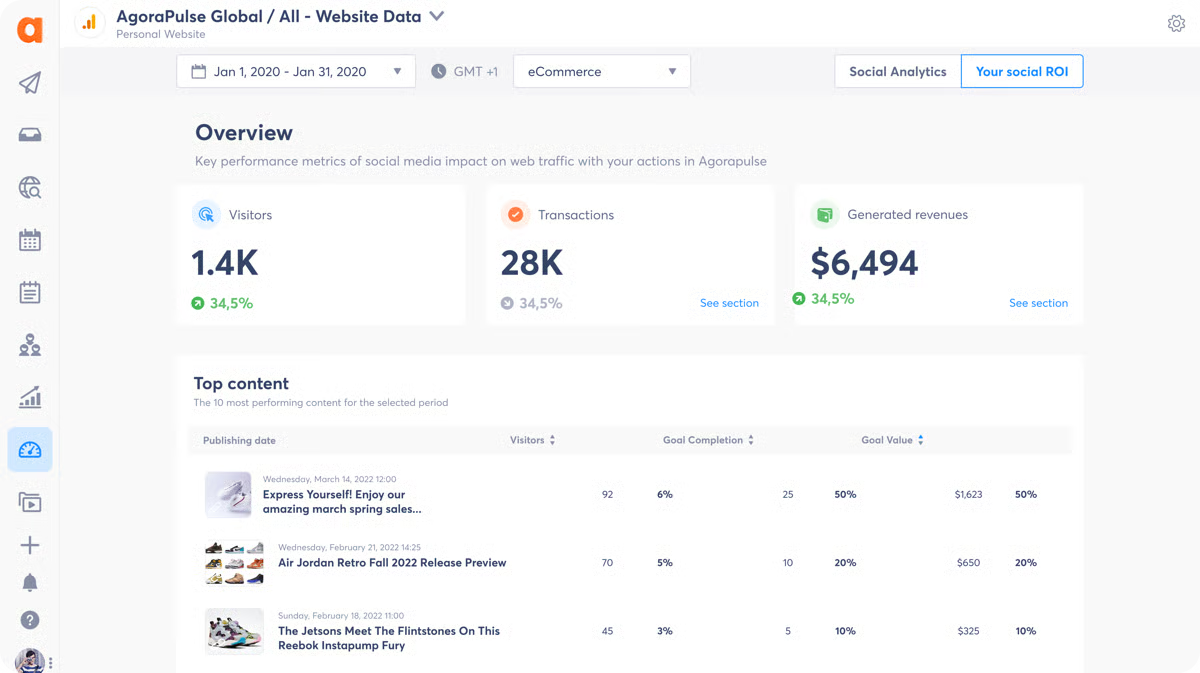
Pros and cons of Agorapulse: At a glance
| Pros of Agorapulse | Cons of Agorapulse |
| Team collaboration features | Limited Instagram functionality |
| Advanced reporting | Expensive to manage a large number of social media accounts |
| Active development and platform improvement | Complex platform for users without social media marketing backgrounds |
What G2 users like about Agorapulse:
“I like how I can invite multiple team members to a project or account so we can all work on it. I also like tracking and sharing analytics with my clients easily and efficiently to provide the best data on our shared progress. My team also enjoys being able to schedule content for several weeks or even months in advance. This helps for our travels and future campaigns without any hassle.”
– Agorapulse Review, Courtney G.
What G2 users dislike about Agorapulse:
“The mobile app could use a ton of work. It’s clunky, and I only get notified every hour. I have clients for whom I need to be notified whenever I get a DM or comment. I wish there were a way to set a rule that it will automatically review if it’s just someone tagging someone in the comments.”
– Agorapulse Review, Vanessa A.
2. Buffer: Best for simple, beginner-friendly social scheduling
Buffer is a central hub where you can create and plan content for various platforms, including Facebook, Instagram, Twitter, and Pinterest. It shines with its clean interface and generous free plan, allowing you to schedule posts in advance and keep your social media channels active. It’s a great starting point for beginners or anybody managing a few social media accounts.
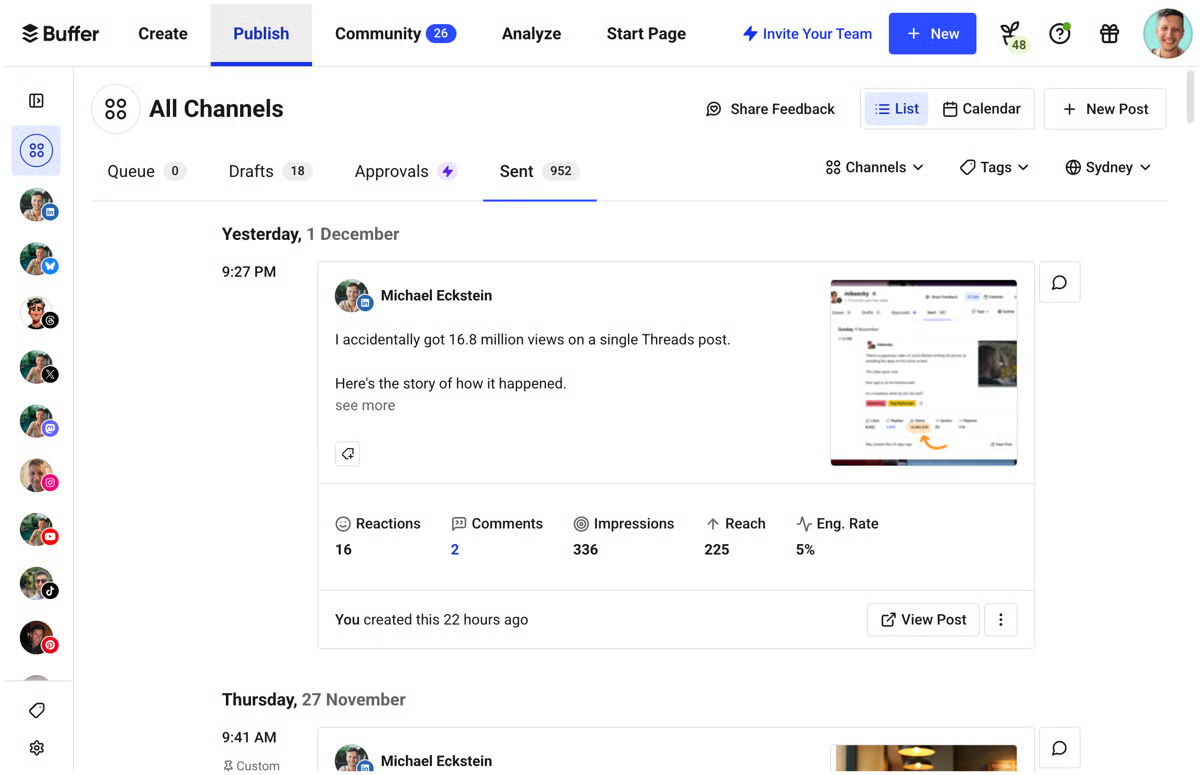
Pros and cons of Buffer: At a glance
| Pros of Buffer | Cons of Buffer |
| Good customer support | Limited social media platform support |
| Pablo, Buffer’s free image editing tool | Simple analytics |
| Clean and intuitive interface | Limited automation |
What G2 users like about Buffer:
“The best part of the software is that it is quite fluent and easy to navigate and understand. Additionally, they offer responsive customer support, providing a great user experience. I use this platform daily to manage all my social media accounts and schedule multiple posts at different times for better results. It is quite easy to integrate it with all our other social media accounts in seconds.”
– Buffer Review, Abhishek G.
What G2 users dislike about Buffer:
“The free version limits the number of simultaneous platforms you can schedule. You’ll need to do it separately if you want to schedule on more than three platforms at once.”
– Buffer Review, Aditi J.
3. Hootsuite: Best for centralized social scheduling across multiple networks
Hootsuite has proven itself as a stellar social media management solution in the digital marketing industry. It schedules posts, analyzes lead conversion and golden ratios, runs lead generation campaigns, and optimizes metrics. Assigning tasks, managing approvals, and collaborating with your team on social media projects are just a few more reasons why Hootsuite makes the Top 10 list. According to G2 Data, Hootsuite ranks as the 1st highest-rated solution in its category.
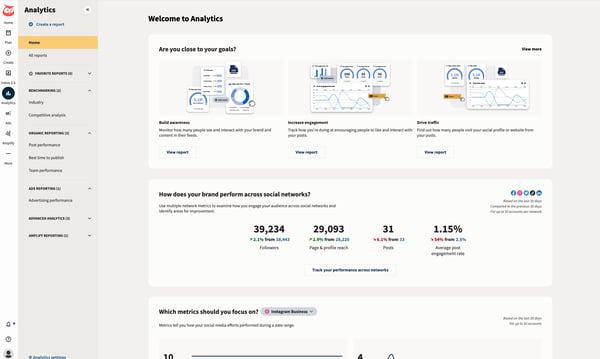
Pros and cons of Hootsuite: At a glance
| Pros of Hootsuite | Cons of Hootsuite |
| Automated publishing | Need occasional reconnection for social media accounts |
| Multiple account management | Learning curve for advanced features |
| Performance tracking and analytics | Limited customization options for the dashboard |
What G2 users like about Hootsuite:
“It still shocks me how quickly Hootsuite adopts new trends (such as AI) and how frequently they update their software to enhance the customer experience.”
– Hootsuite Review, Alessia B.
What G2 users dislike about Hootsuite:
“Not being able to tag Instagram accounts within Hootsuite is a major downside. 100% of the time, I need to edit the post once it’s been posted just to tag relevant users. Being able to tag a collaborator for IG posts would be a godsend as well! Customer success agents could use some improvement regarding timeliness with their responses.”
– Hootsuite Review, Laine C.
See how a social media calendar, and ready-to-use templates, can help you plan, schedule, and stay on track across platforms.
4. HubSpot Marketing Hub: Best for social media management tied to CRM and lead tracking
HubSpot Marketing Hub offers a full social media management suite. It unifies social media and martech operations in a single, comprehensive dashboard, giving you the power to schedule posts across platforms, monitor engagement, and analyze performance. Further, you can integrate social media with your customer relationship management (CRM) for targeted campaigns and lead nurturing. According to G2 Data, HubSpot Marketing Hub ranks as the 5th highest-rated solution in its category.
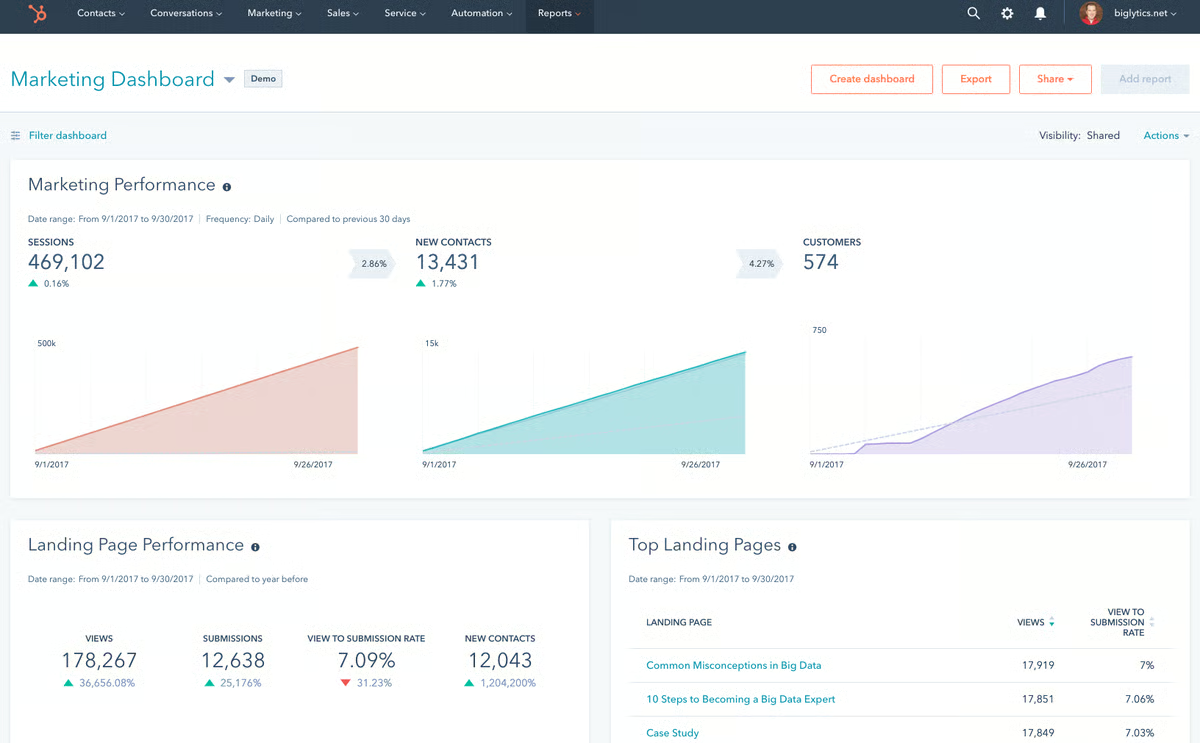
Pros and cons of HubSpot Marketing Hub: At a glance
| Pros of HubSpot Marketing Hub | Cons of HubSpot Marketing Hub |
| Powerful, all-in-one platform | Customer response times can vary, especially during peak hours |
| User-friendly interface | Challenging learning curve |
| Integrates with CRM for targeted campaigns | Not ideal for those who only need basic social media management |
What G2 users like about HubSpot Marketing Hub:
“It was quick to get up to speed using the HubSpot Marketing Hub. I can quickly build landing and website pages, view analytics, run A/B tests, and optimize my pages for the best results. The tool is very approachable – I have a lot of CMS experience, so this was a breeze. Still, even our team members who have less of that specific type of experience have been able to pick it up quickly and impact campaign efforts.”
– HubSpot Marketing Hub Review, Caleb B.
What G2 users dislike about HubSpot Marketing Hub:
“The learning curve is long, and we needed to consult with an expert to familiarize ourselves with the tool. Some integrations are unavailable, forcing us to use third-party tools. Building dashboards for custom reports is time-consuming, and the platform lacks features comparable to Power BI. I wish HubSpot’s reporting included AI capabilities to generate specific custom reports based on particular requirements.”
– HubSpot Marketing Hub Review, Rajat A.
5. Loomly: Best for content planning and approval workflows
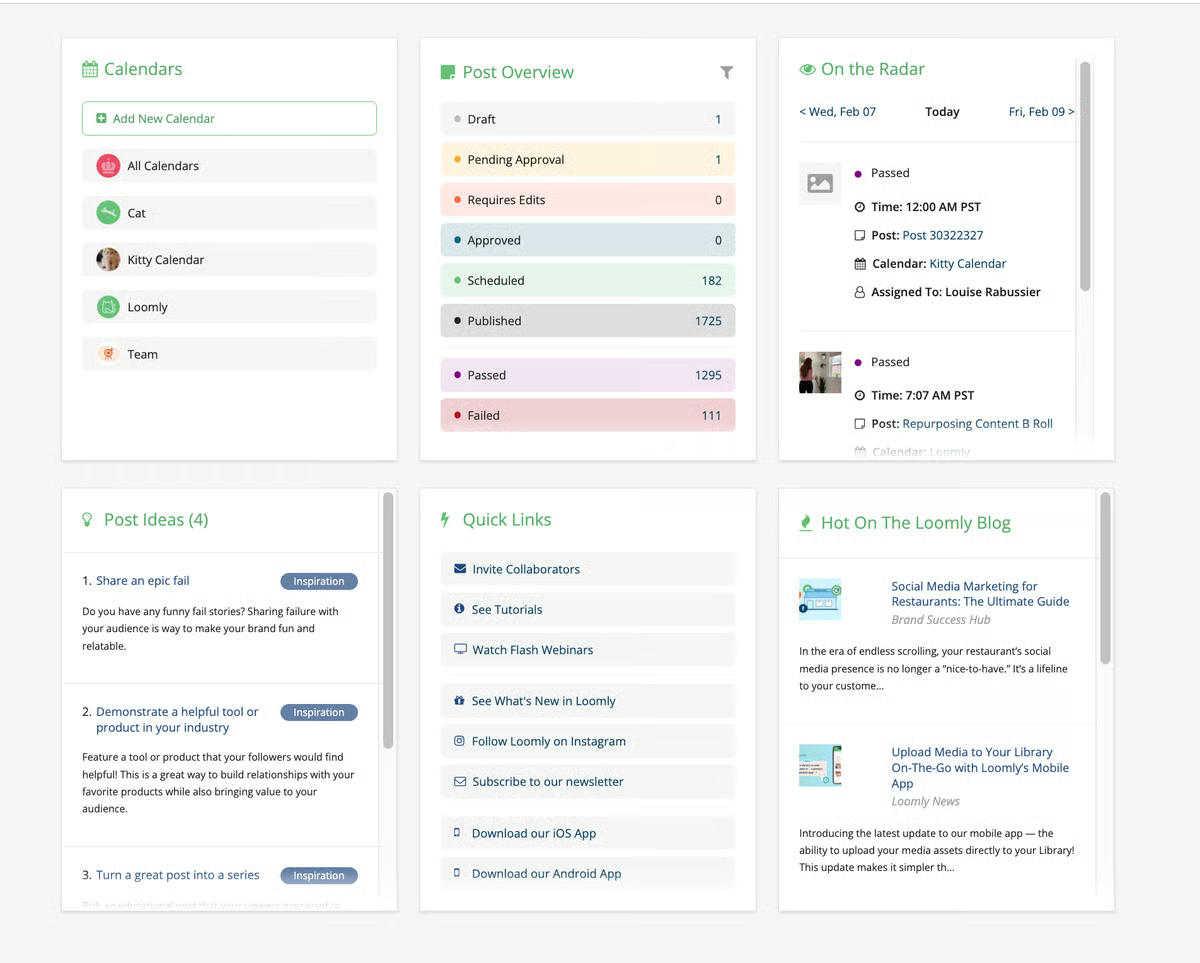
Loomly, a messaging and social media analytics tool, helps compose brand messages, schedule posts, suggest captions, polish content, and store web analytics. It double-checks and triple-checks your work before posting anything on social media. With Loomly’s integration features, you can get updates on projects in real time. It also guarantees your compliance with industry standards and guidelines while setting social media targeting.
Pros and cons of Loomly: At a glance
| Pros of Loomly | Cons of Loomly |
| Multiple social media platform management | Limited third-party integrations |
| The platform is easy to navigate, even for beginners. | Advanced customization can be challenging for users without technical skills |
| Clear and organized calendar formats | Inconsistent customer support |
What G2 users like about Loomly:
“Unlike other platforms, Loomly is all work and no play. The technology and development of this platform are focused on functionality rather than good visual design. Small businesses are paying for function, not beauty, in the backend. The interface is clean, and the wide range of platforms that it integrates with is outstanding. We appreciate how we can separate our hashtags as the first comment on IG, too! It’s nice how much we can dial in our Facebook posts, too.”
– Loomly Review, Lauren G.
What G2 users dislike about Loomly:
“Loomly is expanding its capabilities, but some useful features are missing compared to posting directly from social media apps. The format of the Calendar View should be optimized to match how Google Calendar displays the months’ view. I don’t like how the days are not fixed sizes and the boxes shift shape to fit as much as possible. Also, please add a platform-specific character limit so we know how much we can fit into the captions on TikTok.”
– Loomly Review, Tom T.
6. Planable: Best for visual collaboration and content approvals
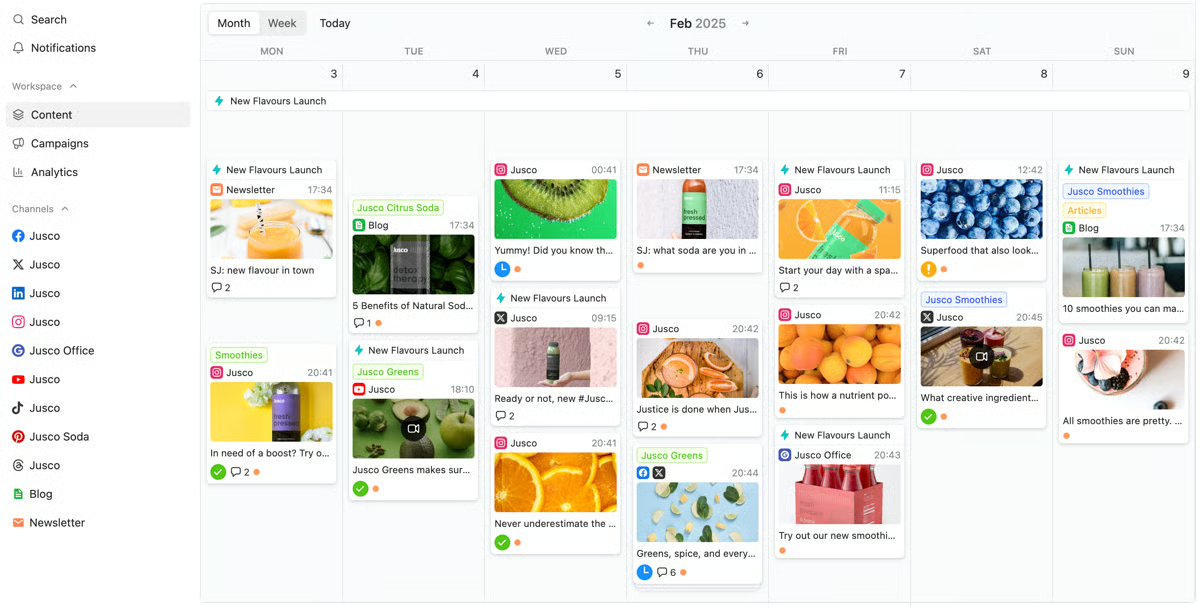
Planable is a social media collaboration tool built for agencies and brands managing multiple stakeholders. It lets teams plan content in dedicated workspaces, organize posts using a drag-and-drop calendar, and collaborate through in-context comments and suggestions. Custom approval workflows make it easy to review and sign off on content, from simple approvals to multi-level processes. According to G2 Data, it is used by 95% small businesses.
With direct publishing, basic engagement tools, and performance reporting, Planable helps teams create, approve, and publish social content more efficiently, eliminating the need for spreadsheets and email back-and-forth.
Pros and cons of Planable: At a glance
| Pros of Planable | Cons of Planable |
| Easy-to-use interface with smooth collaboration and quick edits | Upgrade options can be confusing and restrictive |
| Smooth team collaboration and quick edits | Scheduling issues may require manual posting at times |
| Visual calendar for content planning | Lacks built-in analytics and advanced content management features |
What G2 users like about Planable:
“Planable has become an essential part of my workflow as a freelance digital marketer. The Campaigns feature is a standout as it pulls every piece of a campaign into one clear, strategic view and makes reporting simple with built-in analytics. Scheduling content, collaborating with clients, and getting approvals is fast and intuitive, and the visual editor keeps everything organized. This is especially handy given that Planable enables me to share and get approval for content outside of social media, including blog content, emails and newsletters, press releases, and more. Overall, Planable works for my current use case”.
– Planable Reviews, Mike B.
What G2 users dislike about Planable:
“I dislike how it sends a ping to my phone to upload a story. I would rather do everything on the computer. If it sends a ping, then I might as well just make the story posts on my phone to begin with”.
– Planable Reviews, Zoe C.
7. Simplified: Best for all-in-one content creation and social publishing
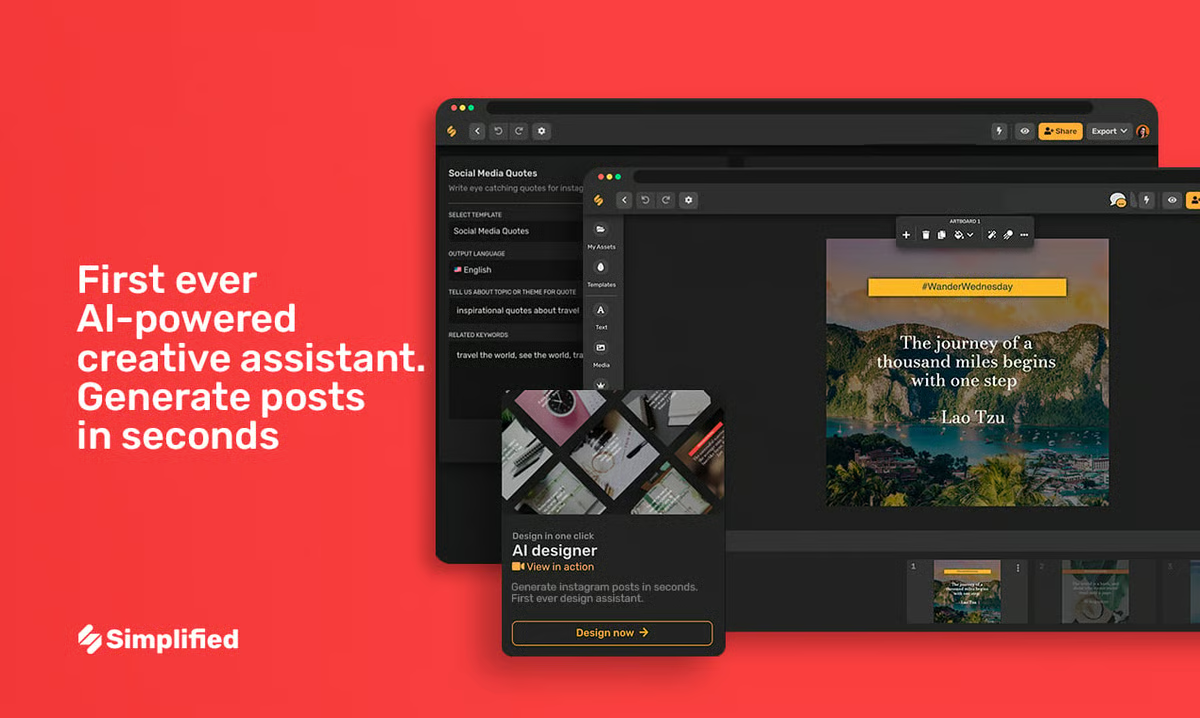
Simplified excels as an all-in-one design, content, and creative copy kit that will help boost your socials. It caters to marketing teams and individual creators by providing a suite of tools, including social media management, content creation, content templates, and collaboration. Connecting you to a design editor, AI writing generators, and a landing page builder helps save time and empowers you to work on ad hoc tasks. More than two million brand marketers and publishers are already using Simplified.
Pros and cons of Simplified: At a glance
| Pros of Simplified | Cons of Simplified |
| All-in-one solution | Prioritizes content creation over social media management |
| AI-powered content assistance | Limited third-party integrations |
| Content creation tool library | Lacks advanced analytics features for in-depth performance tracking |
What G2 users like about Simplified:
“Simplified makes it easy to manage a brand or brands. With its integration of AI image generation, writing tools, video creation, and editing, you only need one platform to handle it all. Within its ‘simplified’ interface, social media scheduling and management lets you go directly from idea to implementation with a few intuitive clicks.”
– Simplified Review, Dan D.
What G2 users dislike about Simplified:
“Can become costly if you have a lot of social media accounts or influence outlets.”
– Simplified Review, Jay G.
8. Sprout Social: Best for advanced analytics and social listening
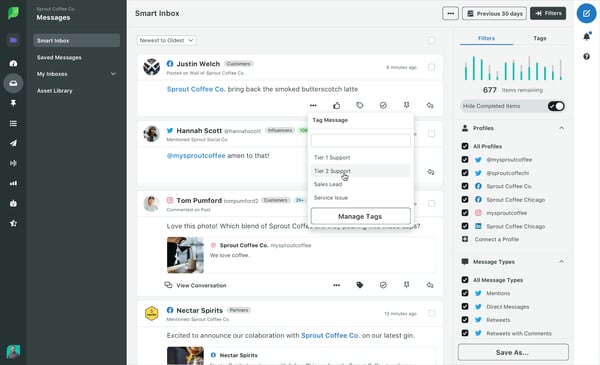
Sprout Social focuses on audience intelligence and impact while acting as a hub for managing planning, engagement, and analytics for all your social media accounts. It provides calendar access, date and time slot automation, and campaign management metrics. Track mentions, comments, and messages across different social channels. Respond to messages and interact with your audience directly using Sprout Social. According to G2 Data, it ranks as the 2nd highest-rated solution in its category.
Pros and cons of Sprout Social: At a glance
| Pros of Sprout Social | Cons of Sprout Social |
| AI-driven assistance | Limited collaboration features |
| All-in-one social inbox | Steep learning curve for new users |
| Comprehensive scheduling capabilities | Integrating with third-party tools can be challenging |
What G2 users like about Sprout Social:
“Sprout makes it easy for teams to collaborate and for me to have a central hub for all the accounts and brands I manage. The scheduling and calendar tools make my daily life much easier, and the reporting is very insightful. I’m also quick off the jump whenever there’s a question or request I need to respond to ASAP.”
– Sprout Social Review, Kristen H.
What G2 users dislike about Sprout Social:
“It can be hard to collaborate in Sprout, and the more people you add to your account, the messier workflows can become. I wish you could designate certain project teams or alter permissions from client to client to keep things more organized.”
– Sprout Social Review, Skylar B.
9. Vista Social: Best for multi-platform scheduling with a modern UI
Vista Social is a modern, all-in-one social media management platform built to support teams at every stage of their social strategy. It brings publishing, scheduling, and content planning into a single dashboard, along with reporting and analytics to track performance across platforms. Vista Social also includes a unified social inbox for managing messages, comments, and mentions, as well as social listening and review management tools to monitor brand conversations. G2 Data shows Vista Social as the top-ranked tool for ease of use in social media management.
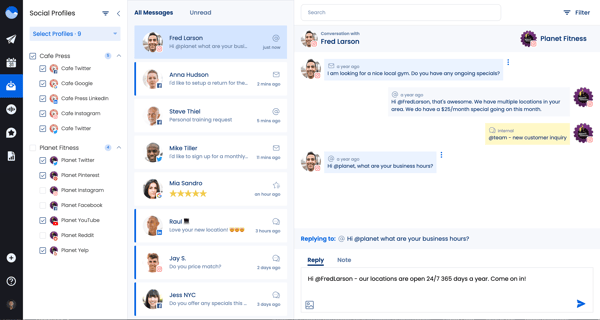
With features like link-in-bio pages and employee advocacy, Vista Social helps teams manage, engage, and grow their social presence efficiently from one place.
Pros and cons of Vista Social: At a glance
| Pros of Vista Social | Cons of Vista Social |
| Easy-to-use interface | Takes time to learn for new users |
| Centralized dashboard for managing multiple accounts | Mobile app needs improvement |
| AI Assistant helps with content creation | Occasional account-linking issues |
What G2 users like about Vista Social:
“It is one of the most complete social media tools I’ve seen to date. The DM interactions are in real time. DM automation is very useful and can be personalized depending on what you want, so you don’t need to use other platforms. The listening tool is very useful because social media managers need to have more data on a single platform to know what publications are working and what are not. It looks very complete with personalized options. You can configure the automations depending on the social network; it is very easy to do.
It is a powerful tool that could work for social media experts or non-experts alike”.
– Vista Social Review, Paulo G.
What G2 users dislike about Vista Social:
“The things I didn’t like were that although there are tutorials within the app, I didn’t understand the listening feature, for example, so I was tempted to look for a tutorial. That’s what I didn’t like, that there are no videos on how to connect to other accounts, for example”.
– Vista Social Review, Andreina C.
10. Zoho Social: Best for small businesses using the Zoho ecosystem
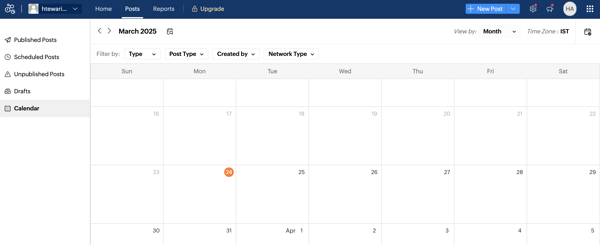
Zoho Social provides a customary dashboard, competitive benchmarking insights, and post-publication engagement metrics. It also helps build a community through feedback and thank-you surveys, as well as email invitations. It’s an easy-to-use, intuitive social media monitoring platform for online brand positioning and marketing strategy. According to G2 Data, it is used by 88% small businesses.
Pros and cons of Zoho Social: At a glance
| Pros of Zoho Social | Cons of Zoho Social |
| Flawless integration with other applications | Steep learning curve |
| User-friendly interface | Occasional performance lags and delays |
| Custom branding features | Limited customization options for the dashboard |
What G2 users like about Zoho Social:
“Zoho products match all of our small business needs, such as email, social media, campaigns, and chatbots for our webpage, phone, and messaging system, just to name a few. Most importantly, it’s very affordable. They even offer free trials for everything, along with great customer service. After a month of using it, we love it.”
– Zoho Social Review, Paul N.
What G2 users dislike about Zoho Social:
“There are two things I find frustrating. First, I can’t customize the tabs on the page to prioritize the ones I use most. Second, the built-in AI composer isn’t my favorite tool for creating posts.”
– Zoho Social Review, Argyro C.
Frequently asked questions on free social media management tools
Q1. What limitations should I be aware of with free plans?
Free plans often limit the number of connected accounts, scheduled posts, or advanced analytics features. Identify your specific needs to see if an upgrade might be necessary later.
Q2. Can a free social media management tool schedule posts for different platforms?
Most free social media management tools enable scheduling across multiple platforms, including Facebook, Instagram, and Twitter. This helps you maintain a consistent presence and plan your content calendar efficiently.
Q3. Do free tools offer any insights into social media performance?
Basic reporting is often included. Look for features that track post-performance metrics, audience demographics, and engagement data. This will help you understand which strategies resonate with your followers.
Q4. Are free tools secure for my social media accounts?
Take your digital safety into your own hands. Choose social media management tools with strong security practices. Read reviews and check the company’s privacy policy before connecting your accounts.
Q5. Which free social media management tools are best for small businesses?
For small businesses, the best free social media management tools are those that offer basic scheduling, support multiple platforms, and are easy to use without heavy setup.
- Zoho Social offers a solid free plan for single-brand management with basic scheduling.
- Buffer is a popular choice for simple post scheduling across multiple platforms.
- Vista Social stands out for small businesses that want scheduling plus light analytics without upgrading immediately.
Tools like Hootsuite, Agorapulse, and Sprout Social are powerful but mainly offer free trials, making them better for short-term evaluation rather than long-term free use.
Q6. What should I look for when comparing free social media management tools?
When comparing free tools, focus on what’s actually included without paying. Key factors to evaluate include:
- Number of social accounts supported
- Post and scheduling limits
- Access to analytics and reporting
- Content calendar availability
- Team collaboration features
For example, Buffer keeps things simple with limited scheduling, while Vista Social and Zoho Social provide a broader feature set in their free tiers. Tools like HubSpot Marketing Hub offer social features as part of a larger marketing platform, which may or may not fit your needs.
Q7. Can I manage multiple social media accounts with free tools?
Yes, but with limits.
Some free tools allow multiple social accounts, while others restrict you to one brand or a small number of profiles. Buffer supports multiple social channels with posting caps, and Vista Social allows managing several profiles even on its free plan. Zoho Social supports limited multi-channel management under one brand.
Enterprise tools like Sprout Social and Agorapulse usually require a paid plan for managing multiple accounts at scale.
Q8. Do free social media tools support content calendars?
Many free social media tools do include basic content calendars, but functionality varies.
- Loomly, Planable, and Vista Social offer visual calendars that help plan posts ahead of time.
- Buffer includes a simple queue-based calendar view.
- Simplified combines a content calendar with design and copy tools, which is useful for lightweight planning.
Advanced approval workflows and collaboration within calendars are typically locked behind paid plans.
Q9. Which free tools work best for content creators?
Content creators benefit from tools that simplify planning, previewing, and posting content.
- Simplified is well-suited for creators who want design, captions, and scheduling in one place.
- Planable is great for visual previews and content collaboration.
- Buffer remains a favorite for solo creators who want a clean, distraction-free posting experience.
These tools help creators stay consistent without needing enterprise-level features.
Free tools, big impact
I don’t believe you need to be a social media maestro to stay in control. The right tools can simplify your workflow, cut through the noise, and give you the insights you need to move forward with confidence. I recommend picking one that fits your needs and experimenting with it to start managing your social media presence more effectively.
I hope this list of the best social media management tools helps you find the solution that works best for you.
Learn how to create personalized marketing experiences and get insight into integrated marketing communications.
Edited by Aisha West
This article was originally published in 2024. It has been updated with new information.